

Kling O1 Guide: Master the Unified Multimodal AI Video Model
Kling O1 represents a revolutionary breakthrough in AI video generation technology. At its core, Kling O1 operates on Multimodal Visual Language (MVL) architecture, which is a sophisticated framework that processes text, images, videos, and reference materials within a unified semantic understanding space. This architectural innovation means the system doesn't treat different input types as separate entities, but rather as interconnected components of your creative vision. This comprehensive guide covers everything you need to know about Kling O1, from basic video generation to advanced editing techniques.
Core Architecture of Kling O1
Kling O1's Multimodal Visual Language (MVL) architecture represents a paradigm shift in how AI processes visual content. Instead of treating text, images, and video as separate inputs requiring different models, the system creates a unified semantic space where all modalities contribute to understanding creative intent.
Five Core Capabilities of Kling O1
1. Universal Engine: One Model for All Video Tasks
Traditional AI video workflows force creators to navigate between different specialized models - one for generation, another for editing, yet another for style transfer. Kling O1 video generator eliminates this fragmentation by consolidating multiple video tasks into a single unified model.
This universal engine handles:
- Reference-based video generation: Create videos from image references
- Text-to-video synthesis: Generate scenes from written descriptions
- Start-end frame video creation: Create smooth transitions between keyframes
- Content addition and removal: Modify video elements seamlessly
- Style transformation: Apply artistic styles to existing footage
- Shot extension: Expand video sequences naturally
2. Multimodal Commands: Create and Edit Through Instructions
One of Kling O1's most innovative features is its ability to interpret various input types as creative instructions. In this system, uploaded images, videos, reference elements, and text descriptions all function as commands that guide the AI's understanding of your creative vision.
The model breaks down traditional modal barriers, allowing you to combine inputs in ways that weren't previously possible:
- Image References: Upload character photos, outfit designs, or scene compositions that the AI uses to understand visual style and maintain consistency.
- Video References: Provide motion examples that inform camera movements, pacing, and action sequences in generated content.
- Reference Elements : Create reusable character libraries, props, and environments that maintain identity across multiple generations.
- Text Instructions: Describe desired changes, camera movements, or style transformations using natural language.
This multimodal approach transforms complex post-production tasks into simple conversational interactions. Rather than manually creating masks, setting keyframes, or tracking objects, you can simply instruct: "remove background pedestrians," "transform daylight to golden hour," or "replace the protagonist's outfit with the design from reference image three."
3. Reference System: Solving Video Consistency Challenges
Maintaining visual consistency across video sequences has long been one of the most challenging aspects of AI-generated content. Characters might change appearance between frames, objects could shift unexpectedly, and environments might lack continuity. Kling O1 addresses these issues through an advanced reference system that functions like a human director's memory.
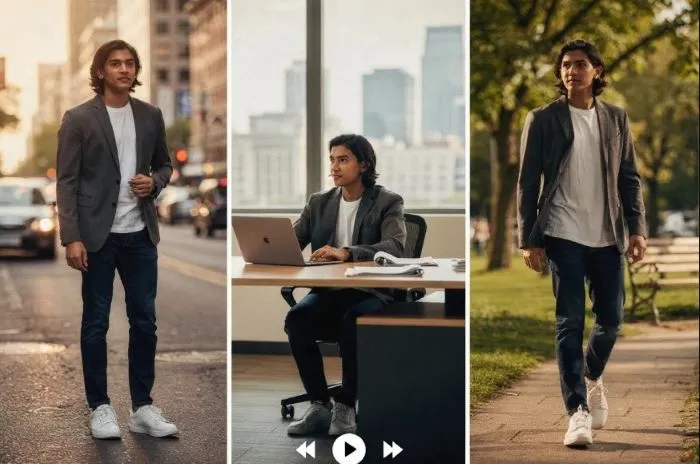
The system's enhanced understanding of input images and videos, combined with multi-view image support for creating reference elements, enables it to "remember" key visual elements throughout a sequence. Whether you're working with characters, props, or environments, Kling O1 maintains stable features regardless of camera movement, ensuring every frame remains coherent and consistent.
4. Single-Pass Editing: From Concept to Completion
Traditional video editing workflows require multiple passes through different software tools. You might use one application for rotoscoping, another for color grading, and yet another for compositing. Kling O1's single-pass editing capability eliminates this multi-step process of complex modifications. Those editings previously required separate tools or frame-by-frame masking can now be performed automatically within a single generation pass. The AI understands the semantic relationships between elements in your video, allowing it to make pixel-level modifications that respect the overall visual logic of the scene.
5. Creative Flexibility: Multiple Input Combinations
Kling O1's flexibility extends beyond its unified architecture to support diverse input combinations that adapt to different creative workflows:
- Text + Image: Generate videos from descriptions enhanced with visual references
- Text + Video: Modify existing footage through natural language instructions
- Video + Image: Edit videos using reference images for style or content matching
- Video + Text + Multiple Images: Complex multi-element compositions combining various input types
- Start/End Frames + Prompt: Create smooth transitions between defined keyframes
Kling O1 Video Generation mode: Creating from Scratch
In this part, let's tap into Kling O1's video generation mode, which transforms static images into dynamic sequences, combines multiple visual references into cohesive scenes, and generates cinematic shots from scratch. Its key capabilities include:
- Image-to-Video: Convert single images into 5 or 10-second clips with natural motion
- Multi-Reference Composition: Combine up to 7 reference images for complex scenes
- Start-End Frame Control: Define keyframes and generate smooth transitions
- Duration Selection: Choose 5-second clips for quick content or 10-second sequences for storytelling
Here is a simple tutorial for AI video generation with Kling O1:
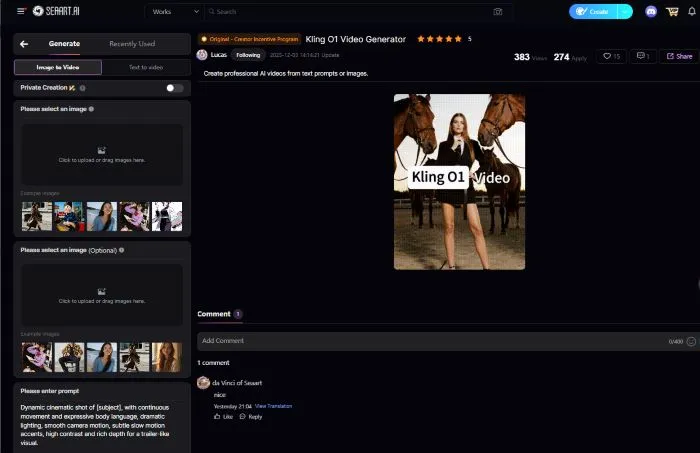
Step 1: Access Interface: Navigate to video creation and select Kling O1. You can try Kling O1 for free at SeaArt AI.
Step 2: Prepare Materials: Upload source images (single or multiple up to 7) or start/end frames based on your approach.
Step 3: Write Prompt : Describe desired motion, camera movement, mood, and transitions. Reference images using @ symbol (e.g., @image1).
Step 4: Configure Settings: Select duration (3-10 seconds) and review inputs before generating.
Step 5: Generate & Iterate: Process and review output. Refine prompts or inputs based on results.
Video Editing: Modifying Existing Footage
Kling O1's edit mode enables comprehensive video modifications through intuitive instructions. Instead of manual frame-by-frame work, you describe desired changes and Kling O1 handles processing automatically.
Kling O1's editing capabilities include:
- Motion Transfer: Extract camera movement patterns from reference videos and apply them to your scenes.
- Background Replacement: Replace backgrounds while preserving foreground elements and motion.
- Style Conversion: Transform footage into different artistic styles or adjust color grading.
- Element Manipulation: Add, remove, or modify objects while maintaining visual coherence.
Edit Workflow:
- Select Edit Mode and upload source video (3-10 seconds optimal)
- Optionally add up to 4 reference images for guidance
- Include motion reference if transferring camera movement
- Write clear instructions describing modifications
- Generate and review modified output
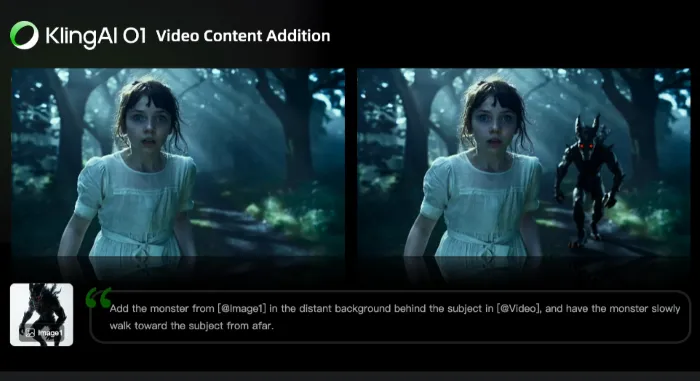
Reference System: Maintaining Consistency
Use up to 7 reference images in Video Mode or 4 in Edit Mode. Each image receives a tag (Image 1, Image 2, etc.) referenced in prompts using @ symbol. Best practices include using high-quality images, maintaining style consistency, and including multiple angles for characters.
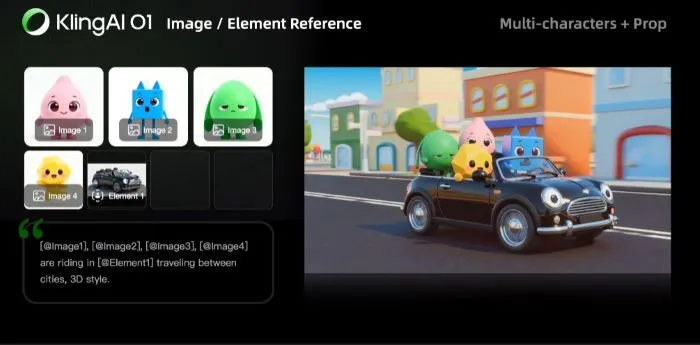
Reference Elements
Reference elements are permanently saved assets reusable across projects. Create character elements by uploading 4 images: front-facing view first, then different angles (half-body, close-up, profile). Name elements descriptively and test before extensive use.
Beyond characters, create elements for props, environments, supporting characters, and clothing. Benefits include maintaining visual consistency, avoiding re-uploads, creating different scenes with same assets, and building reusable libraries.
Camera Control and Professional Techniques
Kling O1 understands professional cinematography terminology: dolly movement, handheld style, panning, jib movement, push-in/pull-out, and tracking shots. Modify camera angles while preserving composition to create multiple perspectives from one source video.
Creating Multiple Angles
To deliver better visuals for camera movements, you can try two methodst: using image generation models (Nano Banana Pro, Seedream 4, Flux 2) to generate different perspectives, or using the built-in Camera Angle Control feature with a 3D interface to position desired angles and generate single or all possible views.
Tips for Using Kling O1 Video Model
Here are some tips to help you achieve better results in AI video generation and editing:
For Generation
- Start with high-quality, well-composed images
- Write detailed prompts including camera movement, actions, mood, and lighting
- Leverage multiple references for rich scenes
- Test both 5-second and 10-second durations
For Editing
- Use well-composed source footage
- Be specific about changes using @ symbols
- Build reference element libraries for consistency
- Start with simple modifications before complex edits
Use Cases of Kling O1 Video Model
Kling O1 serves diverse applications: UGC ads, social media content (TikTok, Instagram Reels, YouTube Shorts), product demonstrations, character-driven narratives, film previsualization, storyboarding, camera planning, style exploration, marketing videos, fashion content, brand consistency, A/B testing, post-production edits, background replacement, and element manipulation.
Conclusion
Kling O1 video model transforms video creation by unifying generation and editing in one multimodal system, breaking down barriers and making professional production accessible to everyone. Experience a unified workflow where text, images, and video work together seamlessly, maintain consistent characters and scenes, deliver cinematic camera movements, and support flexible input combinations. Kling O1 understands text like a director, interprets images like a cinematographer, and processes video like an editor, all within one streamlined framework that makes your video creation more accessible than ever.