

Nano Banana 2 (Pro) vs. Nano Banana 1: The New Upgrades
In the whirlwind of AI advancements, the buzz around Nano Banana 2 vs. Nano Banana 1 is reaching fever pitch. Whether you’re already generating with the newer model or still rocking the original, this in-depth breakdown will show you exactly what’s changed, where each version shines, and which one deserves your daily workflow. If you’re a designer, marketer, or AI enthusiast debating whether to hold off on upgrades, this guide dissects the hype.
Nano Banana 2 (Pro) vs. Nano Banana 1 - Quick Comparison
Here's a side-by-side comparison based on leaks, early tests, and official documentation:
| Feature | Nano Banana 1 | Nano Banana 2 (Pro) |
| Base Model | Gemini 2.5 Flash (lightweight diffusion mechanism) | Gemini 3.0 Pro (multi-step generation: planning, generating, reviewing, iterating) |
| Core Strengths | Speed and stability for quick aesthetic drafts; good for stylized compositions | Deeper reasoning for logic-consistent scenes; superior prompt adherence and world understanding (e.g., accurate chessboards or dynamic object relationships) |
| Image Quality | Up to 1K resolution; basic fusion and blending | Native 2K rendering, 4K super-resolution; sharper details, better textures, and realistic lighting/reflections |
| Text Handling | Prone to errors in rendering or editing text (e.g., blurry or inconsistent) | Near-perfect text preservation and correction; handles complex text like whiteboards or infographics accurately |
| Perspective & Control | Limited; struggles with extreme angles or spatial logic | Advanced 3D spatial understanding; precise angle/view control and object manipulation |
| Consistency | Good for single sessions; basic character/scene preservation | 3x improvement in cross-session consistency; maintains styles/themes even in "shredded" reconstructions |
| Aspect Ratios | Standard ratios (e.g., 1:1, 16:9) | Expanded support (e.g., 1:1 to 21:9, including 9:16 for vertical videos) |
| Speed & Workflow | Extremely fast for casual use; forgiving on messy prompts | Slightly slower due to reasoning steps but faster overall for complex tasks; ideal for multi-step editing |
| Limitations | Lacks depth in reasoning; inconsistent on detailed or logical prompts | Early reports of occasional performance inconsistencies or slower speeds in previews (improved in final release) |
| Use Cases | Quick posts, concepting, simple edits | Professional design, e-commerce visuals, film pre-vis, UI generation via "vibe-coding" |
Architecture: From Fast Generator to Thinking Machine
Nano Banana 1: The Speed Demon
The original Nano Banana worked like most diffusion models: you type a prompt, it generates pixels, and you hope for the best. Its strength was simplicity and speed—perfect for rapid iterations.
The downside? It couldn't really "think" about what you asked for.
If you wanted "a coffee cup reflected in a mirror on a rainy window," Nano Banana 1 might give you coffee, a mirror, and rain—but the logical relationships between them? Hit or miss.
Nano Banana 2 Pro: The Reasoning Engine
Here's where things get interesting. Nano Banana 2 reportedly uses a two-stage system:
- Gemini 3 Pro "brain" that actually understands your prompt like a human would
- GemPix 2 diffusion "hand" that executes the vision with technical precision
This "plan-evaluate-improve" loop means the AI can catch its own mistakes before showing you the result.
It's the difference between a translator who knows two languages versus one who understands both cultures.
Image Quality: Finally, True 4K
Let's talk pixels. Nano Banana 1 maxed out around 1080p, which was fine for social media but fell apart when you needed print-ready assets or detailed product shots.
Nano Banana 2 brings native 4K generation to the table—roughly 2-4× the clarity. More importantly, it maintains that quality across the entire image.
Textures look like textures, not algorithmic approximations. Fabrics have weave patterns. Metal actually reflects light correctly.
For creators doing commercial work, this isn't just a nice-to-have. It's the difference between "good enough for Instagram" and "ready for a client presentation."
The Text Problem is Solved
Here's a pain point every Nano Banana 1 user knows: text rendering was terrible.
Want a logo on a t-shirt? Garbled letters. A book cover with a title? Good luck reading it. Product mockups with packaging text? Forget about it.
Why This Matters
The Nano Banana 2 vs. Nano Banana 1 difference in text accuracy is night and day.
The new model can generate:
● Readable screen interfaces with perfect UI text
● Store signs with correct spelling
● Product labels that actually make sense
● Mathematical formulas and diagrams
● Even stylized fonts with perspective distortion
This single improvement eliminates hours of Photoshop cleanup work. For UX designers creating mockups or marketers building product concepts, this is genuinely game-changing.
Real-World Text Rendering Tests
Here are some tests that prove Nano Banana Pro's text mastery.
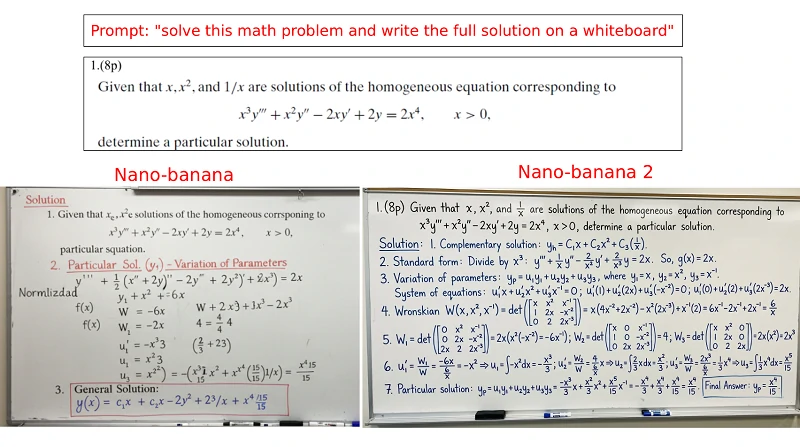
Test 1: Handwritten Whiteboard
Nano Banana 2's capabilities have surpassed our expectations, you can even see it solving problems on a blackboard, and the generated text has a handwritten feel.
The comparison between Nano Banana version 1 and Nano Banana Pro (Nano Banana 2) is as follows:
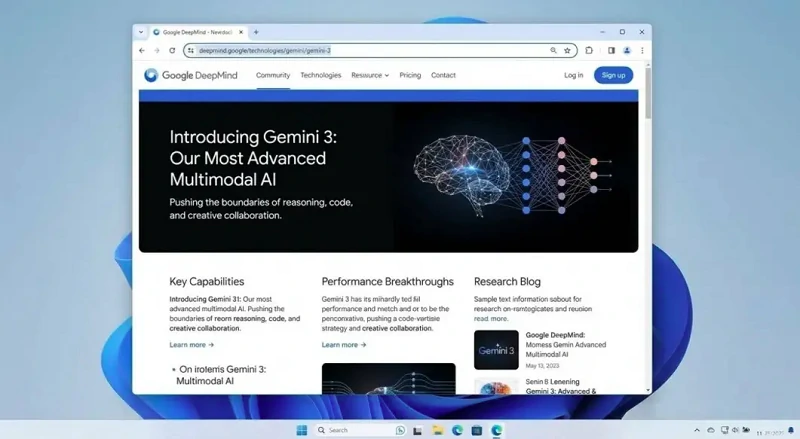
Test 2: Nested UI (Windows + Chrome + YouTube)
First, let's look at an AI-generated computer screenshot.
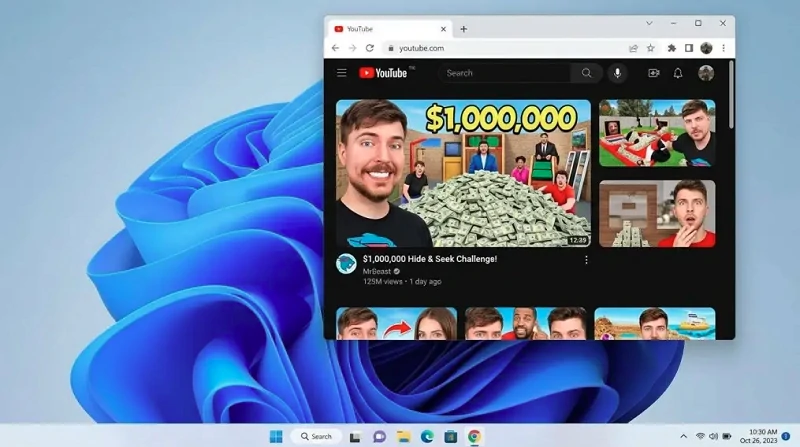
The Nano Banana PrPro can directly generate a screenshot of a Windows computer, showing a browser browsing YouTube, and specifying that the video's thumbnail is Mr. Beast.
(Prompt:Generate a screenshot of a windows 11 desktop, with google chrome open, showing a YouTube thumbnail of Mr. Beast on http://YouTube.com)
It can even directly generate a screenshot of a Google DeepMind webpage, the dense text doesn't appear as gibberish, which is truly impressive.
Speed: Faster AND Better
Usually, quality and speed are at odds. Not here. Despite the more complex architecture, Nano Banana 2 is 2-3× faster than its predecessor:
- Nano Banana 1: 20-30 seconds per 1080p image
- Nano Banana 2: ~10 seconds per 4K image
How? Better optimization and Google's infrastructure improvements. But the real win isn't just speed—it's consistency. You're less likely to get four wildly different interpretations when you run the same prompt multiple times.
Character Consistency: Tell Better Visual Stories
If you've tried creating a character series with Nano Banana 1, you know the frustration. Generate a character in scene 1, use the same prompt for scene 2, and suddenly they have different hair color, facial features, or clothing.
Nano Banana Pro's reasoning engine maintains visual coherence across generations. The model actually "remembers" what a character should look like, making it viable for:
- Storyboard creation
- Comic book development
- Marketing campaign assets with branded characters
- Educational content with recurring figures
Editing Experience: From Text-Only to Intuitive Control
The original model was pretty basic: type words, get image. No real control beyond rephrasing your prompt.
Nano Banana Pro introduces region-based editing (think Photoshop's selection tools but AI-powered). You can:
- Select specific areas to modify without regenerating the whole image
- Adjust lighting angles and intensity
- Control camera perspective and depth
- Use multilingual prompts (not just English)
These features transform the workflow from "generate and pray" to "generate and refine."
Prompt Understanding: The Real Game-Changer
Here's where the Nano Banana 2 vs. Nano Banana 1 comparison gets technical—but bear with me, because this is important.
Nano Banana 1's Limitations:
- Struggled with complex spatial relationships
- Missed subtle nuances in multi-part prompts
- Required very explicit, detailed instructions
- Often ignored parts of longer prompts
Nano Banana Pro's Leap Forward
Thanks to Gemini 3 Pro's reasoning capabilities, the new model can:
- Handle abstract concepts: "melancholic atmosphere" or "corporate but approachable"
- Follow multi-step logic: "a woman looking at her phone, which displays a photo of the same room she's sitting in"
- Interpret creative briefs: you can be conversational instead of robotic
This means less time fighting with prompt engineering and more time being creative.
Here's an interesting test:
Enter the prompt phrase "11:15 on the clock and a wine glass filled to the top" to test whether your AI-generated image is smart enough.
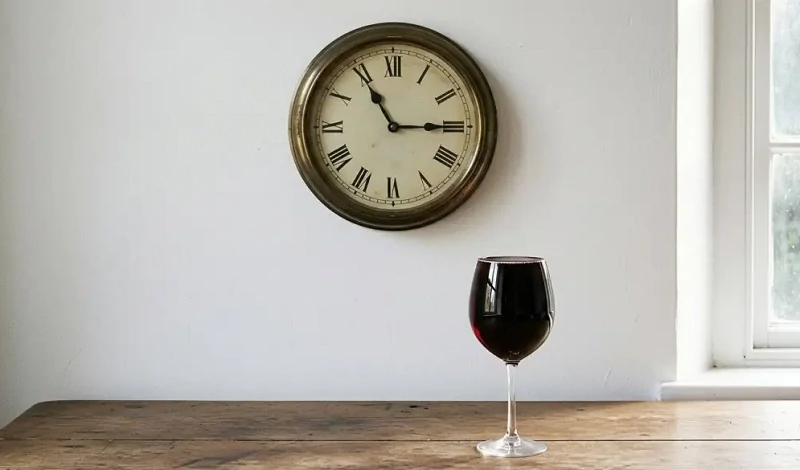
In the field of AI-generated images, there's a highly challenging test that no AI has yet been able to consistently perform—the clock and full glass of red wine test.
However, the Nano Banana Pro has succeeded.
This isn't just about rendering text or objects—it's about understanding spatial precision, physical accuracy, and multiple constraints simultaneously.
It's the difference between "draw a clock" and "draw a clock that actually tells the time I specified."
Commercial Viability: Built for Business
Nano Banana 1 was great for hobbyists but murky for commercial work. Nano Banana Pro brings clarity:
- SynthID watermarking: transparent but verifiable AI provenance
- Pro licensing options: clear terms for commercial use
- Enterprise integration: likely bundled with Google One AI Premium
If you're a business, this removes legal uncertainty around AI-generated content.
What Creators Actually Get
Let's cut through the hype. Here's what matters in practice:
✅ Designers: 4K assets ready for client delivery, no upscaling artifacts
✅ Marketers: Accurate product mockups with readable text
✅ Content creators: Consistent characters for series work
✅ UX professionals: Interface mockups that look like real apps
✅ Educators: Diagrams and illustrations with correct text/formulas
Is Nano Banana 2 (Pro) Worth It?
The Nano Banana 2 vs. Nano Banana 1 comparison isn't about incremental improvements—it's a generational leap.
The first version was a solid experiment. The second is a professional tool.
Upgrade if:
- You need 4K output quality
- Text accuracy is critical for your work
- You're creating multi-image projects requiring consistency
- You want commercial licensing clarity
Stick with Nano Banana 1 if:
- You only need quick, low-resolution drafts
- Your work is purely experimental/personal
- You're satisfied with current capabilities
Expected Release and Access
Based on industry signals, Nano Banana Pro is likely launching late November 2025, possibly tied to Google One AI Premium subscriptions. Keep an eye on Google AI Studio for early access.
Final Thoughts
AI image generation is moving from "impressive magic trick" to "reliable design tool." Nano Banana 2 represents that transition—less about novelty, more about utility. The original Nano Banana proved Google could compete in this space. The sequel proves they're serious about winning it.
Ready to try Nano Banana Pro? Visit Google AI Studio when it launches, or test the current Nano Banana model at SeaArt AI to see what's possible today.