

Complete Sora 2 Prompt Guide: Tips for Stunning Video Creation
Want to create stunning AI videos with Sora 2? Mastering the right prompt techniques is key! This guide reveals the core secrets of Sora 2 video generation, from basic syntax to advanced strategies, teaching you how to craft professional-quality videos with simple text descriptions.

Why You Need a Sora 2 Prompt Guide?
The difference between mediocre and cinematic Sora 2 output isn't about hidden settings - it's about mastering precise description techniques. Sora 2's capabilities emphasize physical realism and improved consistency, especially with the support of Sora 2 Cameo, but these features only shine with targeted prompts.
Detailed Sora 2 Prompting Guide for Different Vibes
Effective prompt guide requires domain-specific approaches. Historical figures need respectful, period-accurate descriptions, while animated styles require specific visual descriptors like "hand-drawn cel animation" or "glitchy gradients." You can choose between short prompts for creative freedom or detailed director-level prompts for precise control. Or you can also use the Sora 2 prompt generator directly to help improve your creative efficiency.
Historical Content & Public Figures
1. Political Leaders & Historical Figures
- Safe Usage Range: Deceased historical figures widely considered public domain, including political leaders like Abraham Lincoln, Winston Churchill, Nelson Mandela, and Gandhi. Prompt strategies should focus on historical accuracy, period-appropriate settings, and respectful portrayal.
- Prompt Structure: "Historical documentary style, [figure name] in period-appropriate setting, authentic costume and environment, respectful portrayal, archival film grain texture
2. Historical Musicians & Entertainers
- Coverage Range: Classical musicians (Mozart, Beethoven, Bach), modern music legends (Elvis Presley, David Bowie, Freddie Mercury), and other deceased musicians. Suitable for music-themed video content.
- Prompt Strategy: "Concert hall setting, vintage lighting, period-appropriate instruments, authentic performance style, warm film stock colors"
3.Past Comedians & Entertainment
- Creative Direction: Utilize deceased comedians like Robin Williams, George Carlin, Richard Pryor for stand-up comedy style videos. Maintain consistency in comedic style.
- Prompt Structure: "Stand-up comedy stage, intimate lighting, audience reactions, authentic comedic timing, warm stage lighting"
Animated Style Replication Strategies
Different Sora 2 anime styles require specific visual descriptors for authentic results.
1. Classic Cartoon Styles
- Tom & Jerry Style: "hand-drawn cel animation, rich grayscale shadows, 1940s color film tones, exaggerated proportions, fluid frame transitions" - emphasizes hand-drawn animation texture and exaggerated proportions.
- Looney Tunes Style: "thick outlines, high-contrast colors, vintage Technicolor feel, expressive squash-and-stretch designs, 1930s-50s theatrical style" - highlights thick outlines and classic animation techniques.
- The Simpsons Style: "flat yellow skin tones, thick black outlines, minimal gradient use, 1990s color scheme" - maintains iconic flat design style.
2. Modern Animation Styles
- Rick and Morty Style: "glitchy gradients, electric greens, chaotic linework, sharp edges, glowing sci-fi interiors" - emphasizes tech aesthetic and chaotic visual elements.
- Adventure Time Style: "noodle-limb silhouettes, soft pastels, abstract terrain, matte finishes, low-detail sky gradients" - highlights abstract and soft color combinations.
- BoJack Horseman Style: "flat vector layers, textured brush fill, pastel haze, anthropomorphic shapes, modern indie tone" - modern indie animation texture.
3. Japanese Animation Styles
- Dragon Ball Z Style: "spiky hair shapes, energy halos, speed-line overlays, bold color blocking, dramatic sky gradients" - emphasizes energy effects and dramatic skies.
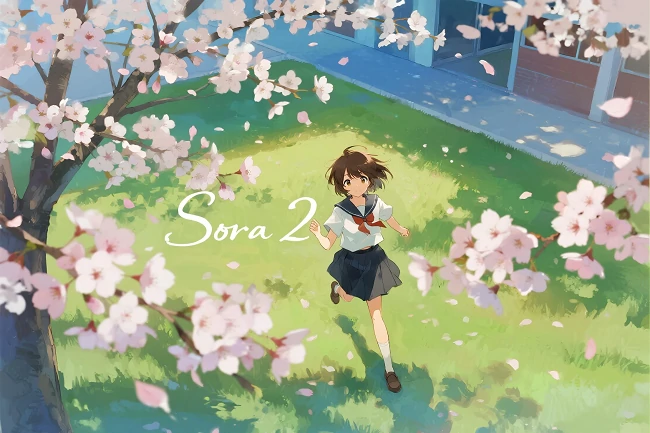
- Studio Ghibli Style: "watercolor backgrounds, soft outlines, nature-focused scenery, pastel color use, rounded shapes" - watercolor texture and nature themes.
- Akira Style: "hyper-detailed framework, saturated reds and oranges, high-motion blur, industrial backdrops, film-grain finish" - hyper-detailed framework and industrial backgrounds.
Sci-Fi Content Creation
1. Space Sci-Fi Scenes
- Strategy Focus: Use large-scale scenes rather than micro-movements. Prompts should include "wide shot of lunar base at night, lights glowing soft blue, reflecting off gray dust, slow tilt up to show Earth hanging in sky"
- Technical Points: Avoid complex finger movements, focus on atmospheric elements, lighting, and grand scale.
2. Future Technology Scenes
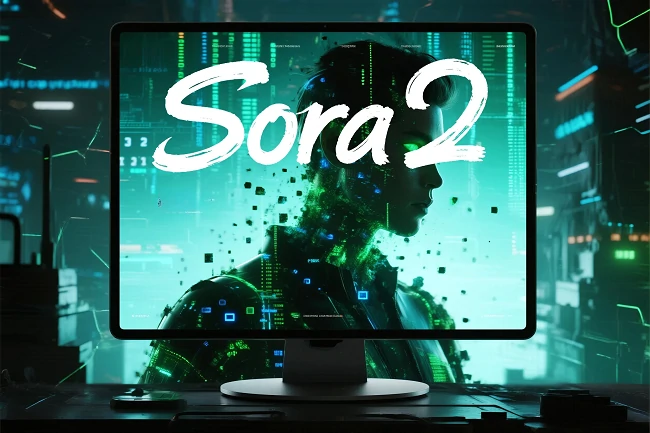
- Hologram Scenes: "Close-up of scientist leaning over hologram, hand glides through blue light of planet, lab totally dark, only hologram glowing and monitors beeping"
- Key Elements: Emphasize light effects, tech texture, and environmental atmosphere.
Nature Documentary Style
1. Wildlife Photography
- Giraffe Scene: "Low-angle shot of giraffe bending to drink from waterhole, acacia trees in background, golden savanna grass, slow pan right to follow zebra herd"
- Technical Points: Low-angle shots enhance impact, include environmental details and natural sound effects.
2. Marine Ecology
- Coral Reef Scene: "Drone shot going down over coral reef, bright blue and yellow fish swimming through coral, sunlight beams through water, 60fps smooth fish movement"
- Key Elements: Emphasize color contrast, light effects, and smooth motion.
Human Emotional Content
1. Daily Life Scenes
- Park Scene: "Medium shot of teen on park bench flipping through book, pausing to sip soda, autumn leaves floating onto pages, golden late afternoon light"
- Emotional Elements: Focus on detailed actions, environmental atmosphere, and emotional expression.
2. Market Scenes
- Farmers Market: "Tracking shot of couple at farmers' market holding hands, stopping to smell strawberries, bright sunshine on fruit stands, soft chatter about produce"
- Technical Points: Tracking shots, natural lighting, and authentic environmental audio.
Professional Production Techniques
1. Director-Level Prompt Structure
- Scene Setup: Location, time, weather, era background
- Subject Action: Character, action, emotion, rhythm
- Camera Grammar: Angle, framing, lens, movement, focus
- Lighting Color: Light source, direction, mood, palette
- Physics Materials: Surfaces, forces, interactions
- Audio Cues: Ambient sound, key effects, brief dialogue
- Exclusions: Unwanted visual elements
2. Short Prompt Strategies
- Descriptive Prompts: "90s documentary-style interview, old Swedish man in study says 'I still remember when I was young'" - let AI creatively interpret details.
- Directive Prompts: "Make me a podcast with two animals talking about their owners" - directly command AI to execute specific actions.
3. Long Prompt Strategies
- Production Brief Method: Suitable for single rich emotional scenes, includes format tone, main subjects, wardrobe props, location framing, lighting palette, action camera beats, etc.
- Time-Coded Shot List: Suitable for fast-paced commercials, precise rhythm and transition control.
Technical Parameter Control
1. API Parameter Settings
- Resolution Options: sora-2 supports 1280x720, 720x1280; sora-2-pro additionally supports 1024x1792, 1792x1024
- Duration Control: 4 seconds, 8 seconds, 12 seconds, default 4 seconds
- Model Selection: sora-2 or sora-2-pro
2. Quality Optimization Recommendations
- Short Clip Advantages: 4-second clips more reliable than 8-second clips, can be stitched in post
- Resolution Impact: Higher resolution provides more accurate details, textures, and light transitions
- Prompt Length: Short prompts offer more creative freedom, long prompts provide precise control
Content Safety & Compliance
1. Portrait Rights Considerations
- Avoid Real Faces: Use stylized characters (anime, cartoon, painterly style)
- Avoid Similarity Prompts: Don't target specific people or celebrities, even indirectly
- Minor Protection: Avoid using minors in risky setups or suggestive contexts
2. Content Compliance Requirements
- Originality Requirements: All generated content should be original and non-infringing
- IP Protection: Don't imitate protected IP characters, logos, or packaging designs
- Fact Verification: Avoid unsubstantiated claims
How to Access Sora 2 on SeaArt AI
Now that Sora 2 has officially launched on SeaArt AI, all users can leverage the related video generator and prompt guide to achieve impressive video creation results.
Step 1. Visit seaart.ai to access the Sora 2 AI video generator;
Step 2. Choose Image to Video or Text to Video and enter the corresponding sora 2 prompt based on the effect you want to achieve;
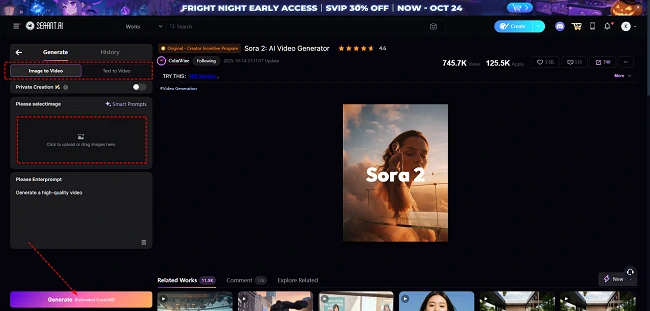
Step 3. Click "Generate" to start video generation. Wait a moment, and you will get stunning cinematic-level videos. You can directly download them for subsequent sharing or editing, or update the prompts to get better results.
Conclusion
Mastering Sora 2 prompt techniques transforms simple text descriptions into professional-quality videos across any genre - from historical documentaries to sci-fi adventures, animated sequences to nature documentaries. Whether you're crafting viral UGC content, professional commercials, or artistic projects, the strategies outlined in this guide provide the foundation for consistent, cinematic results.
Ready to put these techniques into practice? Visit SeaArt AI now and experience the power of Sora 2's AI video generation. Transform your ideas into reality with the most advanced AI video generation technology available.