banner_image ×
SeaArt AI الإصدارة المؤسسية

# Script: AI-Generated Art - Gothic Dark Souls-Inspired Woman with Dragon Eyes a
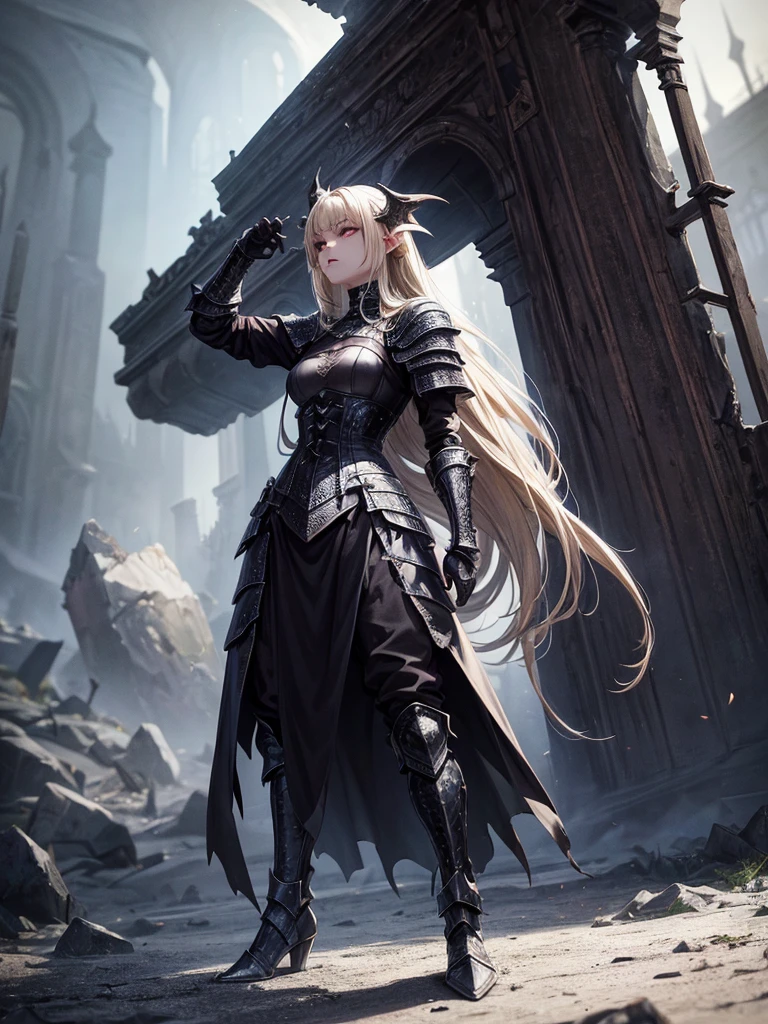

# Script: AI-Generated Art - Gothic Dark Souls-Inspired Woman with Dragon Eyes and Wings

**Objective:**
Create an AI-generated image of a woman with specific features and attire, inspired by the Gothic style of the Dark Souls series.

**Character Description:**
- **Gender:** Female
- **Hair:** Long blonde hair, tied back
- **Eyes:** Red, dragon-like
- **Dragon Features:** Small wings
- **Attire:** Full-body medieval armor
- **Style:** Gothic, similar to Dark Souls aesthetics

**Steps:**

1. **Gather Reference Images:**
   - Collect images of full-body medieval armor from the Dark Souls series.
   - Find examples of blonde hair tied back.
   - Look for images of red, dragon-like eyes and small dragon wings.
   - Compile Gothic art references to understand the desired aesthetic.

2. **Character Design:**
   - **Hair:** Design the long blonde hair tied back, ensuring it looks natural and flows realistically.
   - **Eyes:** Create piercing red eyes with elongated pupils to give a dragon-like appearance.
   - **Dragon Features:** Add small, subtle dragon wings that look natural on her back.
   - **Armor:** Design full-body medieval armor with intricate Gothic patterns and dark tones, appearing worn and battle-scarred. Ensure the armor covers the entire body, including helmet, chest plate, gauntlets, greaves, and boots.
   - **Overall Style:** Use dark, muted colors with high contrasts to emphasize the Gothic style. Incorporate dark shadows and dim lighting.

3. **Pose and Composition:**
   - Position the character in a dramatic pose, possibly standing or in mid-battle stance.
   - Choose a dark, eerie background that complements the Gothic theme, like a ruined castle or a foggy forest.
   - Use lighting to create a moody, atmospheric effect, casting shadows that highlight the character’s features and armor.

4. **AI Tools and Techniques:**
   - Use AI art generation tools like DALL-E, MidJourney, or Stable Diffusion.
   - Input the character description and upload refer
image
avatar
L
Luis Felipe Gomes Pereira
معلومات الإبداع
ريمكس
السجل
كلمة التلميح
# Script: AI-Generated Art - Gothic Dark Souls-Inspired Woman with Dragon Eyes and Wings **Objective:** Create an AI-generated image of a woman with specific features and attire , inspired by the Gothic style of the Dark Souls series . **Character Description:** - **Gender:** Female - **Hair:** Long blonde hair , tied back - **Eyes:** Red , dragon-like - **Dragon Features:** Small wings - **Attire:** Full-body medieval armor - **Style:** Gothic , similar to Dark Souls aesthetics **Steps:** 1 . **Gather Reference Images:** - Collect images of full-body medieval armor from the Dark Souls series . - Find examples of blonde hair tied back . - Look for images of red , dragon-like eyes and small dragon wings . - Compile Gothic art references to understand the desired aesthetic . 2 . **Character Design:** - **Hair:** Design the long blonde hair tied back , ensuring it looks natural and flows realistically . - **Eyes:** Create piercing red eyes with elongated pupils to give a dragon-like appearance . - **Dragon Features:** Add small , subtle dragon wings that look natural on her back . - **Armor:** Design full-body medieval armor with intricate Gothic patterns and dark tones , appearing worn and battle-scarred . Ensure the armor covers the entire body , including helmet , chest plate , gauntlets , greaves , and boots . - **Overall Style:** Use dark , muted colors with high contrasts to emphasize the Gothic style . Incorporate dark shadows and dim lighting . 3 . **Pose and Composition:** - Position the character in a dramatic pose , possibly standing or in mid-battle stance . - Choose a dark , eerie background that complements the Gothic theme , like a ruined castle or a foggy forest . - Use lighting to create a moody , atmospheric effect , casting shadows that highlight the character’s features and armor . 4 . **AI Tools and Techniques:** - Use AI art generation tools like DALL-E , MidJourney , or Stable Diffusion . - Input the character description and upload refer
مقاس
768X1024
تاريخ
Jun 30, 2024
الوضع
الافتراضي
النوع
upscale
Checkpoint & LoRA
MeinaUnreal
Checkpoint
MeinaUnreal
0 تعليق
0
0
0
0/400
منطقة العروض الخاصة

في.10  📌 Wall art 🚩
icon
في.10 📌 Wall art 🚩
avatar
S
SoilSighStudio
خادمات وايفوس
icon
خادمات وايفوس
avatar
E
Eloi Fury
واحد
icon
واحد
avatar
A
Alejo
أرواح سوداء بأسلوب الرسوم المتحركة المظلمة
icon
أرواح سوداء بأسلوب الرسوم المتحركة المظلمة
avatar
A
avatar_frame
AI-KSK
جميل الرياح,مرحبا بالقطة الصغيرة ملصقات الفتيات الصور الفوتوغرافية
icon
جميل الرياح,مرحبا بالقطة الصغيرة ملصقات الفتيات الصور الفوتوغرافية
avatar
9
avatar_frame
93GSD5
أشكال الحلوى
icon
أشكال الحلوى
avatar
K
avatar_frame
Kaia
إنكيو - عشبية الساحرة الطيبة
icon
إنكيو - عشبية الساحرة الطيبة
avatar
A
avatar_frame
Arnav Parashar
 أداة الذكاء الاصطناعي 1.0  📌 Convert videos text and image 🚩
icon
أداة الذكاء الاصطناعي 1.0 📌 Convert videos text and image 🚩
avatar
S
SoilSighStudio
اختبار فليكسي
icon
اختبار فليكسي
avatar
S
SES
ماعز
icon
ماعز
avatar
D
Dang Ho#2Q2p84
تم تحويل الصورة إلى أسلوب فني مختلط من القلم, قلم رصاص, وعلامة.
icon
تم تحويل الصورة إلى أسلوب فني مختلط من القلم, قلم رصاص, وعلامة.
avatar
A
avatar_frame
AI-KSK
أنت على راحة اليد
icon
أنت على راحة اليد
avatar
A
avatar_frame
AI-KSK
أيقونة نسيج ماتي بنقرة واحدة
icon
أيقونة نسيج ماتي بنقرة واحدة
avatar
Y
avatar_frame
YUXINN6362
تحدي IP V10s بواسطة iLegal Tech
icon
تحدي IP V10s بواسطة iLegal Tech
avatar
I
avatar_frame
iLegal Tech
أعطيك إبهام الإشارة
icon
أعطيك إبهام الإشارة
avatar
9
avatar_frame
93GSD5
تحول إلى ملكة شريرة,أكل التفاحة
icon
تحول إلى ملكة شريرة,أكل التفاحة
avatar
9
avatar_frame
93GSD5
رشّ الطلاء
icon
رشّ الطلاء
avatar
A
avatar_frame
Arcane
تحويل الصورة إلى فيديو
icon
تحويل الصورة إلى فيديو
avatar
A
Ahmed Mohamed#2kjN92
أخذ النجوم وأعطيها لك
icon
أخذ النجوم وأعطيها لك
avatar
贝
贝贝
إضافة تأثيرات دخان ملون احتفالي للخلفية
icon
إضافة تأثيرات دخان ملون احتفالي للخلفية
avatar
9
avatar_frame
93GSD5
فارس العصور الوسطى
icon
فارس العصور الوسطى
avatar
浓
avatar_frame
浓郁
【أعلى 1】انفجار بنقرة واحدة
icon
【أعلى 1】انفجار بنقرة واحدة
avatar
青
avatar_frame
青苹果
كوتشان
icon
كوتشان
avatar
M
avatar_frame
musi kame
رؤية المزيد 

اقتراحات ذو صلة

شبكة التحكم
logo
العربية
تطبيقة
توليد الصورة شخصيات AI سويفت AI تدريب النموذج اللوحة المتقدمة الأداة السريعة تيار العمل
ذات الصلة
الاستوديو التصنيفات كلما عالت جودة الصور المولدة، زادت العملات الرمزية المستهلكة، والآن مجاني لفترة محدودة مدونة AI أخبار AI
دعم
الدليل خدمة العملاء
احصل على التطبيق
icon
Download on the
APP Store
icon
GET IT ON
Google Play
تابعنا
iconiconiconiconiconiconiconicon
© 2025 SeaArt, Inc.
Copyright Policy
شروط
سياسة الخصوصية 特定商取引法 資金決済法に基づく表示
المزيد