
النوع
LORA
وقت النشر
2024-01-06
النموذج الأساسي
SD 1.5

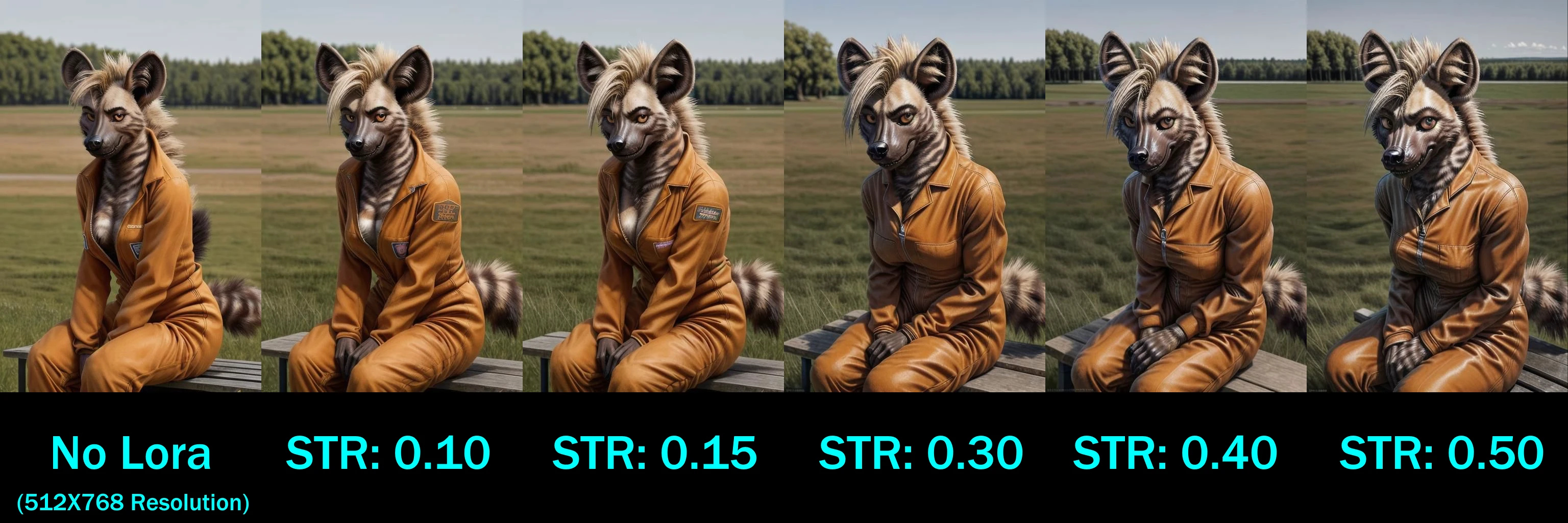
This is a test Lora.
Uploaded as a test, since I've never done a style before.
This Lora is designed to alter and enhance the detail composition of an image.
Select between the ‘Light’ or ‘Heavy’ options, adjust strength and see results.
Combine with embeddings and other resources, or go standalone, the choice is yours.
Option differences are below.
So, you’re here, and you’re probably wondering:
“Okay, but the hell does light and heavy even mean?”
Very good question, with a very simple answer.
Heavy means the details prompt with less strength and very quickly ramps up at even small strength changes. Generally 0.4 is a good location for it, <0.6 is where influence becomes very, VERY strong.
Light means the details are a little more subtle and aren’t as night-and-day. Will the images still change? Yes, but the changes should be less drastic and offer more room to experiment. However higher strengths (exceeding 0.8) can still heavily influence generation outputs. This is the scalpel to the other version’s sledgehammer approach.
Made with Civitai’s Lora trainer.
Cover image for Light is a placeholder image from dataset while I get a comparison image ready (once Civitai’s image gen is back up -_-).

1- النموذج المعاد النشر هو فقط لأغراض التعلم والتبادل والمشاركة، حقوق النشر والتفسير النهائي تعود للمبدع الأصلي.
2- إذا رغب المبدع الأصلي للنموذج في استلام نموذجه، يرجى التواصل مع موظفي SeaArt AI عبر القنوات الرسمية للتوثيق والاعتماد. نحن نلتزم بحماية حقوق كل مبدع. انقر للاستلام
