

Unlocking the Potential of Seedream 4.5: The Comprehensive Guide to ByteDance’s AI Powerhouse
The landscape of generative AI is in a state of perpetual acceleration. Just when creators feel they have mastered the intricacies of a specific model, a new contender emerges, promising higher fidelity, better coherence, and features that were previously thought impossible. Enter Seedream 4.5, the latest image generation and editing model developed by the technology giant ByteDance.
While names like Midjourney and Stable Diffusion have dominated the headlines, Seedream 4.5 has effectively carved out a niche for itself as a "pro-grade" tool. It is not just another random image generator; it is a sophisticated engine built with specific industrial applications in mind—namely, accurate text rendering, character consistency, and hyper-realistic lighting. For graphic designers, marketers, and digital artists, Seedream 4.5 represents a significant leap forward, moving the needle from "cool AI art" to "production-ready assets."
In this extensive guide, we will explore the inner workings of Seedream 4.5, dissect what makes it unique, provide you with a masterclass on prompting, and highlight the critical pitfalls you must avoid to get the best results. Whether you are looking to create cinematic storytelling shots or high-end product photography, this guide is your roadmap.
The Seedream 4.5 Difference: Why It Matters
To understand how to use Seedream 4.5, you first need to understand what makes it tick. Unlike some models that prioritize artistic hallucination—creating dreamlike but often nonsensical structures—Seedream 4.5 is engineered for control and precision.
1. The Holy Grail of Text Rendering
For years, the Achilles' heel of AI image generation has been text. Hands emerging from nowhere and gibberish lettering were the hallmarks of AI art. Seedream 4.5 tackles this head-on. It has been trained with a specific focus on glyph recognition and rendering. This means you can finally generate a coffee shop sign that actually says "Coffee" rather than "Cxffee." While it is not perfect—no model is yet—it is significantly more reliable for integrating logos, slogans, and typographic elements directly into the generation process, often saving hours of Photoshop work.
2. Cinematic Lighting and Volumetrics
ByteDance developers have clearly fed Seedream 4.5 a balanced diet of high-end photography and cinematography. The model excels at understanding complex lighting scenarios. We are talking about the difference between a flat, lit scene and one that utilizes Rembrandt lighting, volumetric fog, and authentic depth of field. The way the model handles light wrap around objects and -surface scattering on skin is particularly noteworthy, making it a top contender for photorealistic portraiture.
3. Consistency Across Generations
One of the most frustrating aspects of generative AI is the "slot machine" effect—pulling the lever and getting a completely different character every time. Seedream 4.5 includes advanced attention mechanisms that allow for better stability. If you define a character with specific traits (e.g., "a woman with a scar on her left cheek wearing a teal scarf"), the model is surprisingly sticky with those details across varied poses and environments. This feature alone makes it a formidable tool for storyboarding and graphic novel creation.
of a Perfect Seedream 4.5 Prompt
Prompting for Seedream 4.5 is an art form that sits somewhere between coding and poetry. Unlike early models that required "word salad" (a jumble of random tags like "8k, best quality, masterpiece"), Seedream 4.5 prefers a structured, natural language approach. It is built to understand syntax and adjectives in a way that relates to physical photography.
To master this model, you should think in terms of a Hierarchy of Understanding. The model parses your prompt by prioritizing concepts that appear earlier in the text.
The Four Pillars of Prompt Structure
- Subject ( The "Who" or "What")
- This is non-negotiable. Start your prompt by clearly defining your subject. Be specific about age, gender, ethnicity, clothing, and expression.
- Bad: "A girl."
- Good: "A close-up portrait of a 25-year-old Japanese woman with shoulder-length indigo hair, wearing a vintage leather aviator jacket."
- Environment (The "Where")
- Context is key. Place your subject in a world. Seedream 4.5 needs to know the background to calculate lighting interactions.
- Bad: "Outside."
- Good: "Standing on a neon-lit cyber-punk street in Tokyo during heavy rain, reflections on the wet asphalt."
- Cinematography & Style (The "How")
- This is where you act as the director. Define the lens, camera type, and artistic medium.
- Keywords to use: "Shot on 35mm," "85mm lens," "f/1.8 aperture," "bokeh," "cinematic color grading," "oil painting," "vector art."
- Lighting & Mood (The "Vibe")
- Lighting dictates emotion. Be descriptive about the source and quality of light.
- Keywords to use: "Golden hour," "softbox lighting," "harsh rim light," "moody," "ethereal," "volumetric fog."
The "Goldilocks Zone" for Length
Through extensive testing, the community has found that Seedream 4.5 performs optimally with prompts between 30 and 100 words (roughly 150-200 tokens).
- Too Short: The model hallucinates random details to fill the gaps.
- Too Long: The model suffers from "attention drift," forgetting the start of the prompt or blending concepts together.
Curated Prompt Examples: From Theory to Practice
Let’s look at concrete examples. I have categorized these to show the versatility of the model.
1. The Cinematic Narrative Shot
This category is about storytelling. We want to freeze a moment in a movie.

The Prompt:
"A weathered astronaut sitting alone on a rusted bench in an abandoned Martian greenhouse. He is holding a small, vibrant green sprout in his dirty gloved hands, looking at it with hope. The background shows shattered glass domes and a red dusty landscape outside. Cinematic lighting, sunbeams filtering through the dust, 35mm film grain, hyper-realistic, emotional atmosphere, detailed textures."
Why this works:
It sets a clear subject (astronaut), an action (holding a sprout), a setting (Martian greenhouse), and a mood (hope/isolation). The technical keywords "35mm film grain" and "sunbeams" guide the renderer to produce a specific aesthetic rather than a generic digital art look.
2. High-End Commercial Product Photography
Product shots require absolute clarity and perfection in texture.

The Prompt:
"A bottle of luxury perfume made of crystal clear glass with gold accents, resting on a slab of black marble. Water droplets on the glass, fresh condensation. Soft, diffuse studio lighting, rim light highlighting the gold cap. Dark moody background with a subtle golden gradient. Macro photography, sharp focus on the brand logo 'ELEGANCE', ultra-realistic, 8k resolution."
Why this works:
Notice the inclusion of specific material properties ("crystal clear glass," "black marble"). Seedream 4.5 excels at rendering these physical textures. The request for text "ELEGANCE" leverages the model's text capabilities. "Macro photography" ensures the camera focuses correctly.
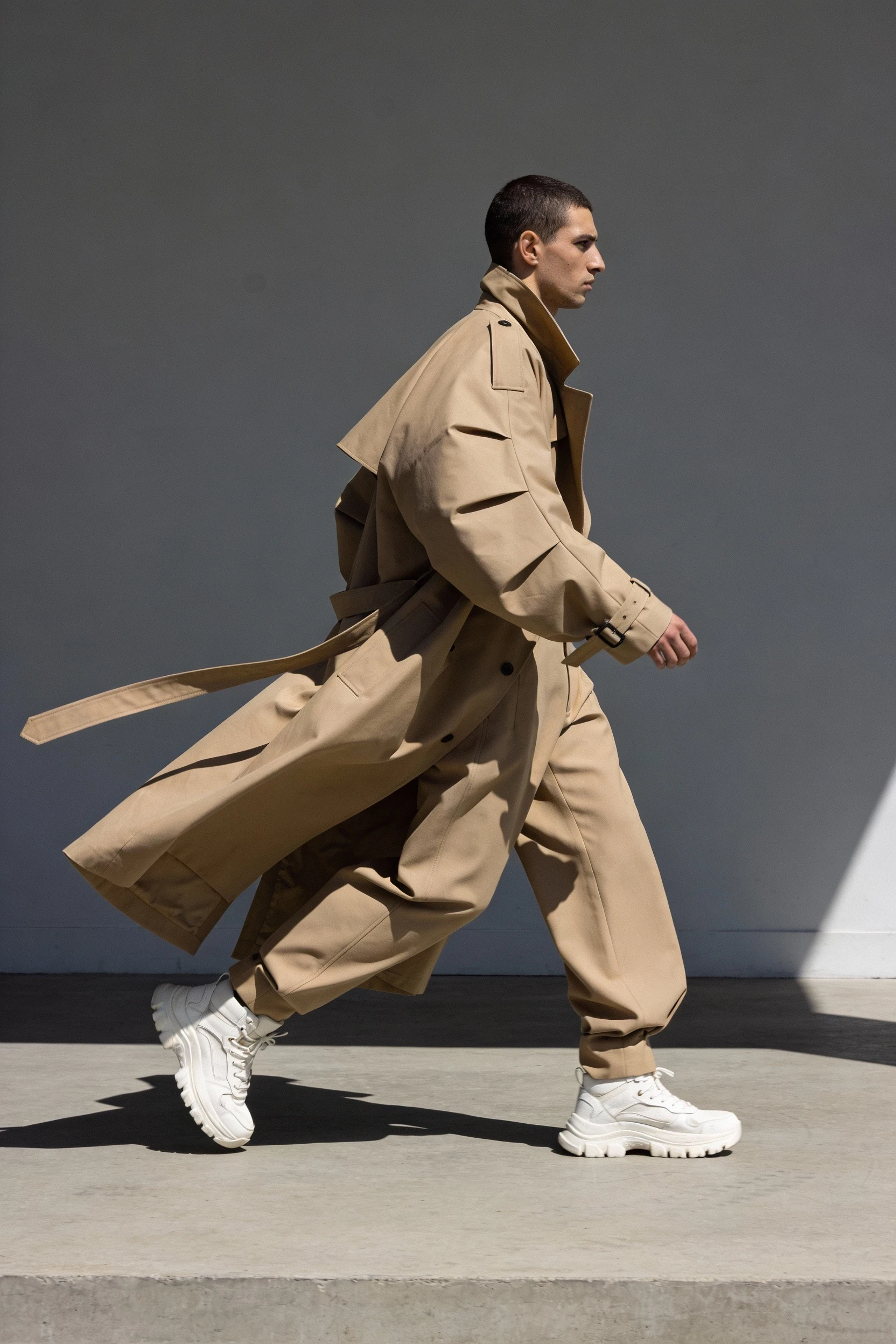
3. The Fashion Lookbook
Fashion requires accurate and fabric physics.
The Prompt:
"Full-body fashion shot of a male model wearing an avant-garde oversized beige trench coat and chunky white sneakers. He is walking mid-stride on a minimal concrete runway. Harsh architectural shadows, high contrast, editorial photography style. The fabric of the coat flows dynamically in the wind. Neutral grey background, sharp details."
Why this works:
"Mid-stride" implies motion, which Seedream 4.5 handles well without distorting limbs. "Avant-garde" and "editorial photography" trigger specific training data related to high-fashion magazines, ensuring the pose and lighting are stylish rather than casual.
4. Abstract & Surreal Concepts
Sometimes you want to break reality.

The Prompt:
"A giant mechanical whale floating through a sky made of liquid clouds. The whale is constructed from intricate brass clockwork gears and stained glass. Dreamlike atmosphere, pastel color palette, soft glowing light. Surrealism, Salvador Dali inspired, highly detailed, magical realism."
Why this works:
Combining organic concepts (whale) with mechanical ones (clockwork) tests the model's ability to fuse concepts. "Pastel color palette" overrides the model's tendency toward high-contrast realism, forcing a softer, artistic interpretation.
What to Avoid: Common Pitfalls in Seedream 4.5
Even the most powerful engine can stall if you put the wrong fuel in it. Here are the most common mistakes users make with Seedream 4.5 and how to avoid them.
1. The "Novel Writer" Trap
Do not write pages of text.
Seedream 4.5 has a context window, but it is not infinite. If you write a 500-word backstory about your character's childhood trauma, the model will ignore 90% of it. It doesn't "know" the character; it only visualizes the visual descriptors.
- Avoid: "James, who was born in 1990 and hates cats because he is allergic, is standing..."
- Do: "James, a 30-year-old man with a stern expression, standing..."
2. Ambiguity and "It"
Never use pronouns like "it," "he," or "she" if there are multiple subjects, or if the reference is vague. The model often loses track of who is doing what.
- Avoid: "A cat and a dog are playing. It is jumping over him."
- Do: "A cat and a dog are playing. The dog is jumping over the cat."
3. Over-Cranking the Guidance Scale
The guidance scale (often labeled as cfg_scale or similar in interfaces) controls how strictly the model follows your prompt.
- The Trap: Cranking this up to 15 or 20 thinking it will make the image "more accurate."
- The Result: Deep-fried, oversaturated images with harsh lines and bizarre artifacts.
- The Fix: Keep your guidance scale between 7 and 9. This is the sweet spot for Seedream 4.5. If you want a more artistic, loose interpretation, you can drop it to 5. Only go above 10 if you are strictly trying to render a logo or text and don't care about photorealism.
4. Contradictory Instructions
Asking for "photorealistic" and "vector illustration" in the same prompt confuses the model. It causes a "style bleed" where you get a weird hybrid that looks like neither. Pick a lane. If you want a hybrid style, use words like "mixed media" or "2.5D" intentionally.
5. Neglecting Negative Prompts?
While Seedream 4.5 is smart, it still benefits from negative prompts (telling the model what not to generate). However, do not just copy-paste massive "negative embeddings" from older Stable Diffusion 1.5 workflows. Those often degrade quality in newer models.
- Avoid: "Blurry, ugly, bad , extra fingers, text, watermark, signature..." (a generic list of 50 words).
- Do: Keep it targeted. If you are generating a landscape, use "people, cars, buildings" if you want it empty. If generating a photo, use "cartoon, illustration, drawing."
Advanced Techniques: Getting the Professional Edge
To truly master Seedream 4.5, you need to move beyond single-shot prompting and embrace an iterative workflow.
The Iterative Refinement Loop
Rarely will the first image be perfect. The professional workflow involves generating a "base" image, finding what works, and refining the prompt.
- Generation 1: "A cyberpunk city." (Result: Too generic).
- Generation 2: "A cyberpunk city with neon blue lights and flying cars." (Result: Better, but composition is flat).
- Generation 3: "Low angle view of a cyberpunk city, neon blue lights reflect on wet pavement, flying cars streak overhead, cinematic perspective." (Result: Dynamic and usable).
Multi-Prompting and Weighing
If your interface supports it, use prompt weighting. If Seedream 4.5 is ignoring a specific detail (like "red shoes"), you can emphasize it. Syntax varies by platform, but concepts like (red shoes:1.2) or {{red shoes}} often tell the model "pay 20% more attention to this." Do not overuse this, or you will distort the image.
Visual Referencing (Image-to-Image)
Seedream 4.5 shines when you provide it with an initial visual guide. Instead of describing a pose for 30 minutes, sketch a stick figure or use a stock photo as a base (ControlNet or Img2Img). This constrains the model's "imagination" to the structure you want, allowing the text prompt to focus purely on style and texture. This is crucial for consistency in professional work.
Conclusion
Seedream 4.5 is a testament to how fast the AI imaging field is maturing. It moves us away from the era of improved randomization and into the era of reliable direction. By understanding its linguistic preferences—its need for specific, hierarchical, and concise instructions—you can unlock a level of visual fidelity that was previously the domain of high-budget CGI studios.
The key takeaway is respect for the tool: it is not a mind reader. It is a highly advanced pattern matcher. If you feed it clarity, it returns brilliance. If you feed it ambiguity, it returns chaos. Start with clear subjects, define your light, choose your lens, and let Seedream 4.5 handle the rendering. The future of digital creation is here, and it is waiting for your prompt.