

Flux 1 vs Flux 2: The Detailed Upgrade Guide for Creators
Flux 2 has officially launched, marking a revolutionary leap forward in AI image generation technology. Released by Black Forest Labs in November, Flux 2 represents a complete architectural overhaul that delivers unprecedented quality, control, and efficiency. Wondering if Flux 2 is worth the hype? This comprehensive guide explores every key difference between Flux 1 vs Flux 2, helping you understand why the Flux 2 model is transforming professional creative workflows worldwide.
Complete Feature Comparison: Flux 1 vs Flux 2
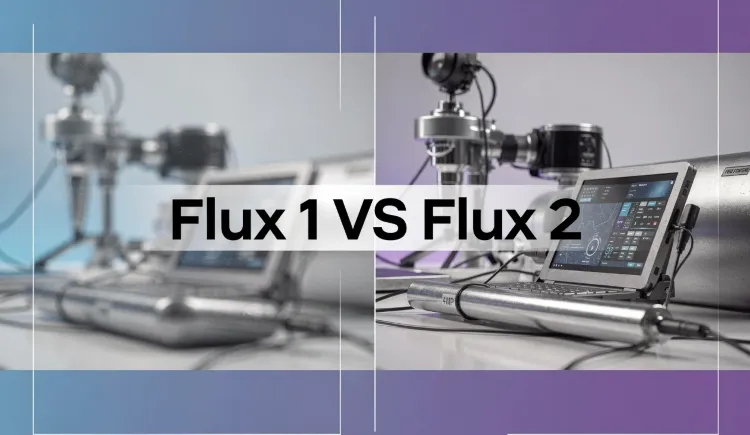
Here's a side-by-side look at the core upgrades in the Flux 2 AI image generation model compared to Flux 1:
| What you care about | FLUX.1 | FLUX.2 | Why it matters to you |
| Picture quality | Limited in detail and lighting, images may look “AI-ish” | Way more realistic – skin, lighting, materials, physics all look real | Make your AI generated images more photorealistic |
| Text in images | Limited text rendering capabilities | Reliably generates complex typography, infographics, and UI mockups | Great for making posters, memes, product mockups |
| Character consistency | Single image reference, weaker consistency control | 1–10 image references, significantly improved cross-image consistency | Perfect for making comics, storyboards, or IP characters |
| Editing Capabilities | Text-to-image + basic I2I | Advanced multi-ref editing, color/pose control, object extraction | Less hassle, fewer failed attempts |
| Speed & GPU needed | Needed a beefy graphics card | Same or faster, and works well even on 12–24 GB cards | More people can run it locally |
| How big the model is | 12 billion parameters | 32 billion parameters (the “dev” version) | understands complex prompts better |
| Versions you can use | • Pro (paid API) • Dev (free download) • Schnell (fast but lower quality) | • Pro – best quality, only through API (paid) • Flex – great balance, customizable • Dev – full 32B model you can download and fine-tune • Klein – lightweight & fast | More choices depending on your budget and needs |
| Old add-ons (LoRAs, ControlNets) | Worked great with FLUX.1 | Do NOT work with FLUX.2 (everything was rebuilt) | You’ll need new LoRAs made for FLUX.2 |
Key Improvements in Flux 2
In this part, let's dive into the key improvements that set Flux 2 apart from its predecessor.
1. Revolutionary Multi-Reference Support
The Flux 2 AI image generation model introduces native multi-reference support, allowing you to reference up to 10 images simultaneously. This feature ensures consistent style, character, and product identity across multiple images without fine-tuning. Unlike Flux 1, which required separate tools for multi-image consistency, Flux 2 handles this seamlessly within a single model.
Practical Benefits:
- Create consistent character appearances across an entire series
- Maintain brand identity across product catalogs
- Preserve artistic style across multiple compositions
- Generate cohesive visual narratives without manual intervention
2. Unprecedented Image Quality and Photorealism
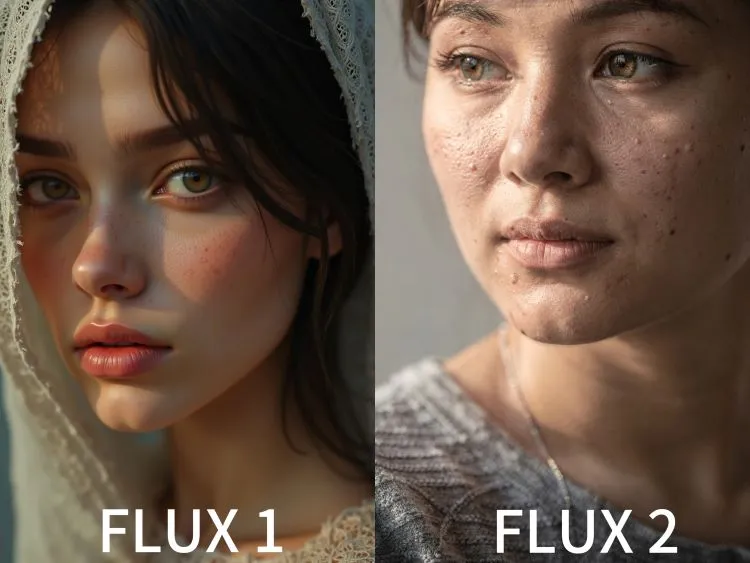
The Flux 2 model delivers state-of-the-art photorealism with native 4-megapixel output. From skin pores and fabric weave to accurate reflections and lighting. The model understands real-world physics, materials, and spatial relationships, producing images that are virtually indistinguishable from real photography.
Quality Enhancements:
- Sharper textures and micro-details previously impossible
- More stable and accurate lighting across all scenarios
- Better material representation (metal, glass, fabric, skin)
- Improved spatial coherence and realistic proportions
3. Advanced Text Rendering Capabilities
One of the most significant improvements in Flux 2 is its ability to generate complex typography with legible fine text. Here is a real-world text tests:
Prompt: "Infographic of Eiffel Tower with facts: Height 324m, Built 1889, Location Paris. Modern typography."
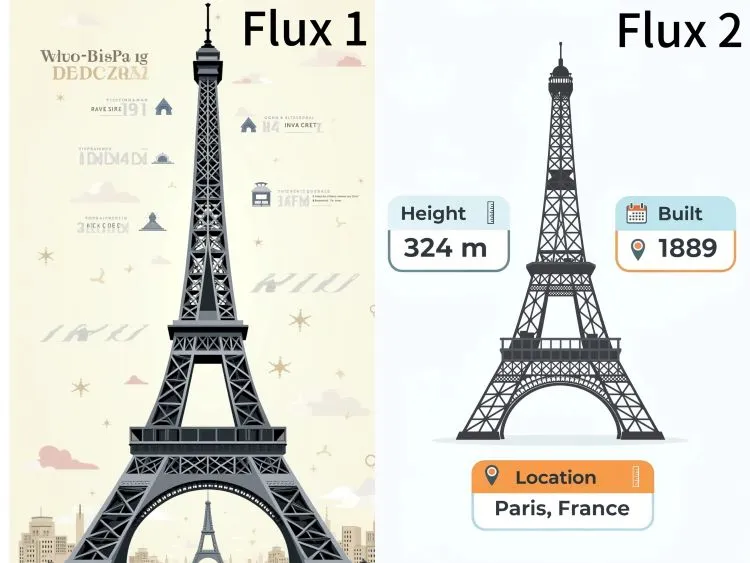
Flux 1 Result: Readable but uneven spacing.
Flux 2 Result: Polished, scalable design ready for print.
While Flux 1 struggled with text accuracy, Flux 2 reliably produces professional-grade text rendering, making it suitable for:
- User interface designs and mockups
- Educational infographics
- Brand identity materials with logos and text
4. Smarter, More Intuitive Prompt Understanding and Control
The Flux 2 AI image generation model demonstrates superior adherence to complex, structured instructions. It understands multi-part prompts, compositional constraints, and nuanced requirements that Flux 1 couldn't reliably interpret. The new structured (JSON-style) prompt control allows for precise scene composition, giving creators unprecedented control over every element.
5. Superior World Knowledge and Coherence
With 32 billion parameters (compared to Flux 1's 12 billion), the Flux 2 model possesses significantly more world knowledge. It understands real-world lighting, spatial logic, and expected behaviors, resulting in more coherent scenes that make logical sense. This improvement is particularly noticeable in complex scenes with multiple elements interacting naturally.
6. Faster Generation with Better Efficiency
Despite being more powerful, Flux 2 is actually 30–50% faster than Flux 1 on the same hardware. Through guidance distillation and optimized kernels, the model delivers better performance while consuming less computational resources. Quantized versions run comfortably on consumer GPUs with 12–16 GB VRAM, making professional AI image generation accessible to more creators.
Architecture Difference: Flux 1 vs Flux 2
Flux 1 relied on a multimodal diffusion transformer (MM-DiT) setup, blending CLIP and T5 encoders for reliable outputs. It was innovative, but Flux 2 reimagines the core with a latent flow matching system paired to a 24B Mistral-3 vision-language model (VLM). This duo excels at grasping real-world physics, materials, and spatial logic—think accurate reflections on glass or fabric folds that behave naturally.
The star here is the all-new FLUX.2 VAE, retrained from scratch for superior compression without quality loss. In Flux 1 vs Flux 2, this means Flux 2 handles complex scenes with less "AI artifacting," making it ideal for professional pipelines. Developers love the modular design, allowing fine-tuning without starting over.
Migration Guide: Moving from Flux 1 to Flux 2
If you were already a Flux 1 user who takes consistency and realism as goals, the Flux 2 model is definitely worth the switch, Since Flux 2 uses an entirely new architecture, migrating from Flux 1 requires some planning:
1. LoRAs and Custom Models
All Flux 1 LoRAs are incompatible. You'll need to retrain or recreate custom models using Flux 2 architecture.
2. ControlNets
Flux 2 has built-in advanced editing capabilities, reducing the need for external ControlNet tools. However, existing ControlNet workflows will need to be rebuilt.
3. Workflow Optimization
Simplify your workflows with Flux 2's native multi-reference support and structured prompts. If you want to skip the workflow setup, try the Flux 2 AI image generator for free on SeaArt now.
Available Variants: Choosing the Right Flux 2 Model
Before starting AI image generation with Flux 2, you need to find the most suitable version. The Flux 2 family offers multiple variants to satisfy different creative needs:
FLUX.2 [Pro]
Best for: Production workflows requiring top-tier quality
Features: State-of-the-art image quality, fastest generation, lowest cost per image
Availability: API-only, available through BFL Playground and BFL API
FLUX.2 [Flex]
Best for: Developers needing control over quality-speed tradeoffs
Features: Adjustable steps and guidance scale parameters, excels at text rendering
Availability: BFL Playground, BFL API, and launch partners
FLUX.2 [Dev]
Best for: Open-source developers and researchers
Features: 32B open-weight model, most powerful open-weight image generation available
Availability: Hugging Face, GitHub (reference inference code), multiple API providers
Hardware: Optimized fp8 implementation for GeForce RTX GPUs
FLUX.2 [Klein]
Best for: Lightweight applications and resource-constrained environments
Features: Size-distilled from Flux 2 base, Apache 2.0 license
Availability: Coming soon (beta signup available)
Final Thoughts on Flux 1 vs Flux 2
When we talk about Flux 1 vs Flux 2, we're really discussing the evolution of AI as a creative partner. Flux 1 was a solid first act, but Flux 2 is where the magic happens. Flux 2 now offers unmatched realism, precision editing, and the ability to scale effortlessly. Beyond generating unrelated images, you can craft consistent visuals and stories or precisely modify any images using prompts.
Want to elevate your image generation with Flux 2? Just explore the BFL Playground when it launches, or instantly try Flux 2 AI image generator free online at SeaArt AI.