


How to Create a Comic with AI Comic Generator in Easy Steps
Maybe you have a brilliant idea for a superhero adventure, a heartwarming slice-of-life tale, or a hilarious gag strip, but you're not a skilled artist. Don't worry! The AI comic generator is here to help - SeaArt AI. In this article, we'll guide you through the process step-by-step, showing you how to create a comic with an AI tool, even if you've never drawn a stick figure before.
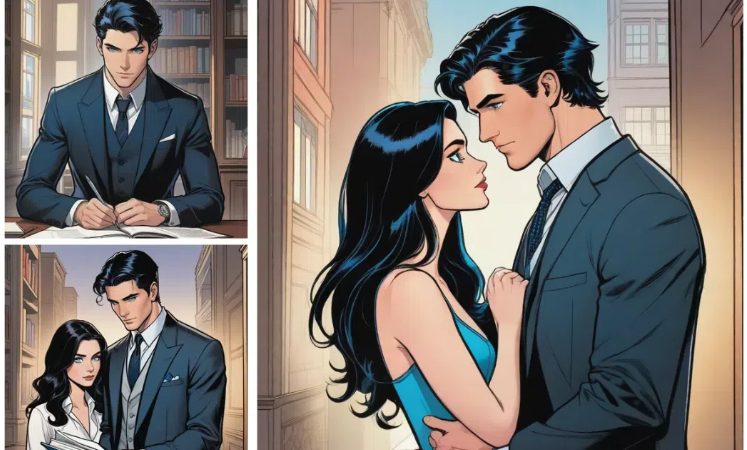
What is a Comic Strip?
A comic strip, or comic strip, is a form of comic that tells a story through a series of continuous images. These images are usually arranged in a certain order to form a complete storyline. With the development of science and technology, more and more creative tools and software have been developed for the creation and editing of Comic Strip. If you're a comic fan but don't have the skills or time to draw, you can use the AI comic generator to create the pictures you like.
What is a Good AI Comic Generator for Novice?
Are you ready to unleash your inner storyteller and create amazing comics without any drawing skills? SeaArt is the AI comic generator that makes it easy!
Its powerful text-to-image and image-to-image AI transforms your ideas into visuals with just a few words or a few clicks.
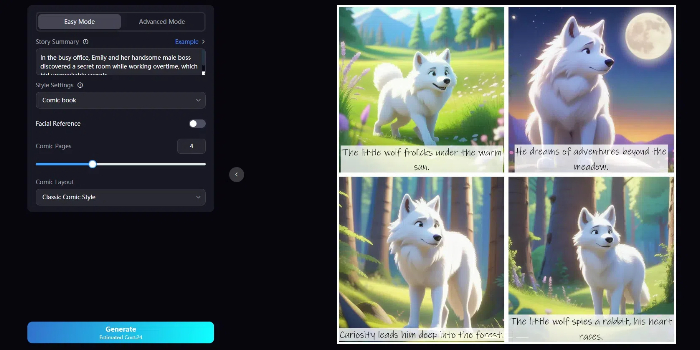
Key Features:
- Free AI image generator from text or image
- A variety of AI models
- Rich AI filters
- Huge user community
- User-friendly interface
How to Create a Comic with SeaArt AI Online (Step-by-Step)
With SeaArt’s AI tools, you can plan your story outline in advance and choose your preferred art style, then use simple prompts to automatically generate a complete comic. You can also use existing images to quickly create ready-to-use four-panel comics.
Method 1. Text to Comic: SeaArt AI Comic Tool
Next, we will provide two modes, Easy Mode and Advanced Mode, to help you create comics from text.
🌟 Easy Mode
Step 1: Enter a summary of the story you want to make
Go to SeaArt AI's AI comic generator and use your imagination to write a detailed summary of your comic's plot. The more information you provide, the better SeaArt AI can understand your vision. If you're short on inspiration, click on "Example" to explore preset summaries.
Step 2: Choose a style
SeaArt offers a variety of comic styles to choose from. Select the one that best matches your artistic preferences.
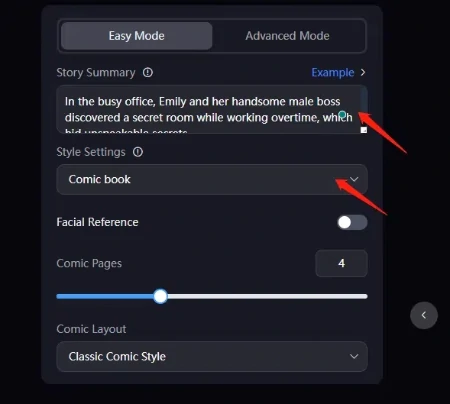
Step 3: Fine-tune your settings
For even more control, explore SeaArt's advanced settings. You can adjust the number of pages, customize the canvas size, and add additional details to enhance your comic.
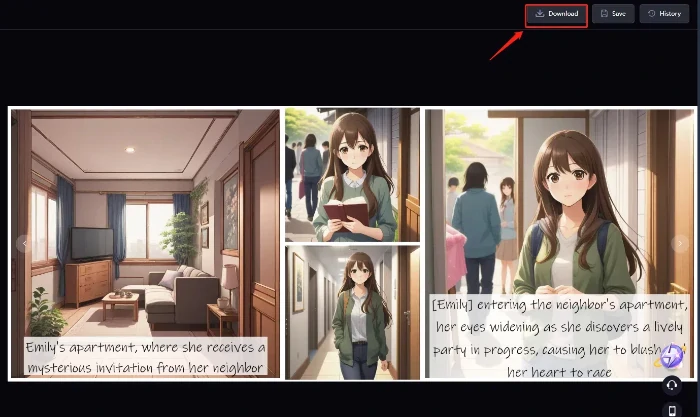
Step 4: Generate your comic
Once you're happy with your settings, click "Generate." SeaArt AI will automatically create your comic panels, bringing your story to life.
Step 5: Download and share
Download your finished comic in high resolution, ready to share with the world. SeaArt's comics are watermark-free, so you can use them for personal or professional projects.
🌟 Advanced Mode
You can also choose to operate in advanced mode. You can tell the story in detail, set up storyboards, resize the canvas, etc. The advanced mode can produce more elaborate comic books. The operation is also simple and obvious.
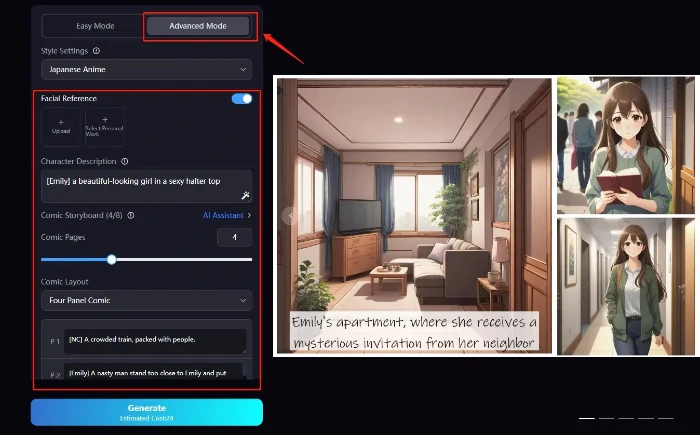
Step 1: Enter a summary of the story you want to make
Provide a more comprehensive description of your story to give the AI a clearer direction.
Step 2: Select style, customize, and confirm layout
As in Simple Mode, choose your preferred comic style, make individual adjustments, and confirm the layout.
Step 3: More setting
Use the additional settings to further refine your comic. You can adjust the canvas size, create detailed storyboards, and enhance the overall quality of your comic.
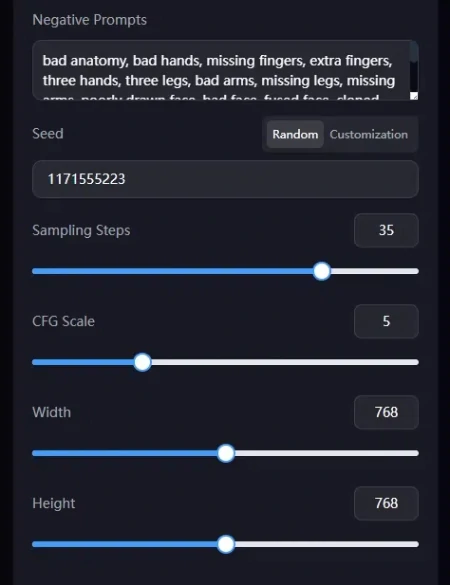
Step 4: Generate in one click
Once your settings are perfected, click "Generate" to create your comic.
Step 5: Download and Save Without Watermark
Download your newly created high-quality comic and share it with your readers.
Method 2. Photo to Comic: Nano Banana Four-Panel Comic Generator
If you want to generate a ready-to-use four-panel comic from a single image, the steps below will help you complete the process quickly.
Step 1: Enter the page
Go to SeaArt AI and select the appropriate available comic generator, such as Nano Banana Pro comic generator.
Step 2: Upload your photo
Click the selection box on the left to upload the image you want to turn into a comic. Choose Mode 1 or 2 below, then click Generate to start creating.
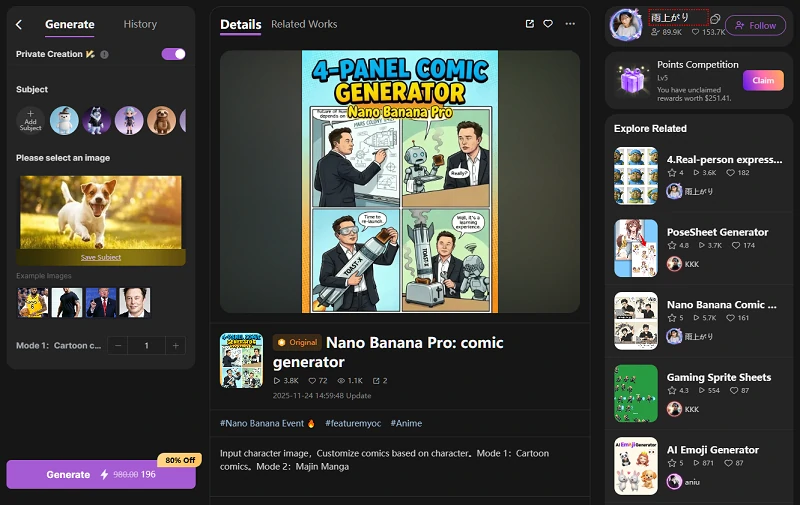
Step 3: Generate your comic
After the results are generated, you can download the image to share or edit it, or use the buttons below the image to explore more options, such as creating a comic-style video based on the image.
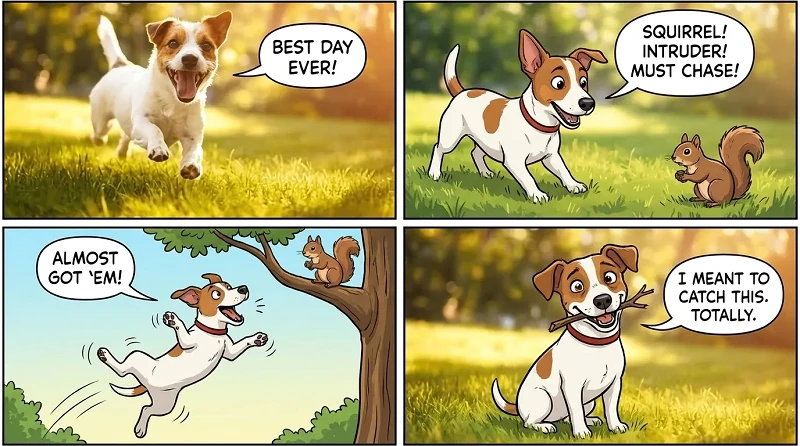
Created with SeaArt AI's Nano Banana Pro: Comic Generator
What Elements Should a Good Comic Contain?
A good cartoon should contain an attractive story, vivid characters, superb drawing skills, profound theme and meaning, tight rhythm and sense of rhythm, unique style and creativity, coherence and consistency and other aspects of the elements. These elements interact and support each other, and together constitute an excellent comic book work.
At the same time, a good comic should be created independently, so there should be no plagiarism. Only their own independent creation of good works, which is the proof of their ability.
FAQs About Comic Making App Free
1. What is the free comic book creator website?
SeaArt is a free comic maker website. Its various functions can bring you convenience. Its rich library of resources can provide you with inspiration.
2. How to convert a story into a comic?
Turning a story into a comic is a process that involves creativity, technology, and artistic expression. First, you need to define the content and structure of your story. Then, leverage an AI comic generator like SeaArt to effortlessly craft detailed comic strips. SeaArt empowers you to bring your stories to life without any drawing skills, so start creating your own comics today!
3. Can AI replace comic artists?
The application of AI in comic creation does bring new changes and possibilities to this traditional art form, but it cannot completely replace the creative process of human cartoonists. Creating comic strips requires human emotion, intelligence, innovation, and a unique personality, which AI cannot replace at present.
Conclusion
With this comprehensive guide on how to create a comic. No matter your artistic experience, SeaArt empowers you to bring your stories to life with stunning visuals and effortless ease. So, what are you waiting for? Start creating your own comics today with SeaArt's powerful and user-friendly AI comic generator and share your unique stories with others!
Related Articles
What Cartoon Character Do I Look Like? Quiz Test & Face Analyzer App & AI Filter
6 Best Anime PFP Makers for Stunning Anime PFPs

AI Manga Filter Online Free: Create Your Unique Manga Art with AI
Lovart vs Sovart: Which AI Design Agent Should You Choose?