SonoVision is now live on SeaArt! It supports both text-to-video and image-to-video. Beyond high video quality, it natively generates audio—so you can produce voice-over videos from a given audio file, or control dialogue, background music, and sound effects directly via prompts.
Click to try Sonovision now:
Keynode Intro
| SeaArtSonoVision_T2V | SeaArtSonoVision_i2V | |
|---|---|---|
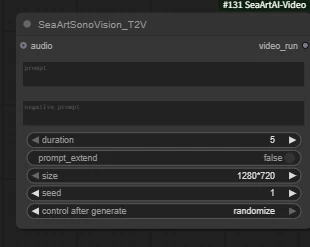 | 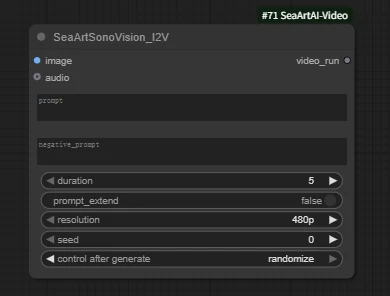 | |
| Inputs | audio: connect to a specific audio file optional | image:connect to your upload image required audio:connect to a specific audio file optional |
| Core Parameters | prompt / negative_prompt duration:support 5s or 10s prompt_extend:true / false (prompt enhancement/rewriting) size:resolution(width × height) support 1280 × 720 / 960 × 960 / 720 × 1280 / 1088 × 832 / 832 × 1088 seed:radom seeds control after generate:seeds control | prompt / negative_prompt duration:support 5s or 10s prompt_extend:true / false (prompt enhancement/rewriting) resolution: support 480p / 720p / 1080p seed:radom seeds control after generate:seeds control |
Below we'll explain the workflow in detail, following the sequence of text-to-video and image-to-video generation.
Let's begin!
SeaArtSonoVision-T2V-Workflow
Click to try Sonovision-T2V-Workflow
node preview
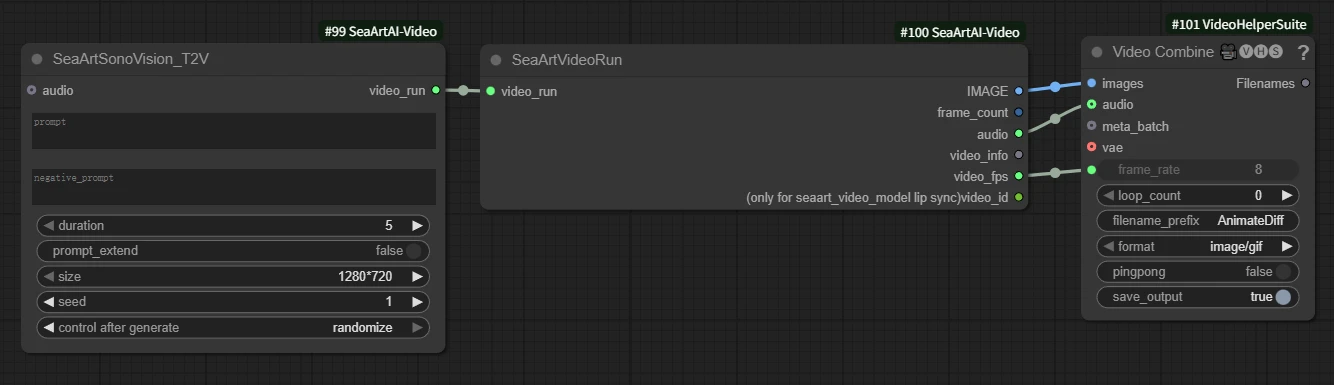
Price (credits)
| 5s | 10s |
| 260 | 520 |
Sample

Camera Shot: A high-angle, third-person perspective shot following a seagull in one continuous take; the camera position is slightly above the seagull, steadily tracking it. Time slows down (100% to 40% to 100%) as the shark emerges from the water.
Scene/Time: Open sea on a clear day, strong winds and large waves, obvious splashes and spray, bright reflections on the sea surface.
Subject/Action: The camera follows a seagull as it skims over a wave crest; a giant shark, approximately 7 meters long, suddenly bursts through the water behind it, its mouth opening wide. Time slows down, showing the tense moment of "passing by"; the seagull quickly rises its wings to escape, and the shark plunges back into the sea, creating a huge splash.
Style: Cinematic realism, IMAX scale, HDR, natural motion blur, volumetric water mist and spray.
Lighting/Tone: High-altitude sunlight, cool blue sea color, warm-toned rim lighting on the seagull's feathers; obvious highlights on the water surface and refraction from the spray.
SeaArtSonoVision-I2V-Workflow
Click to try Sonovision-T2V-Workflow
node preview
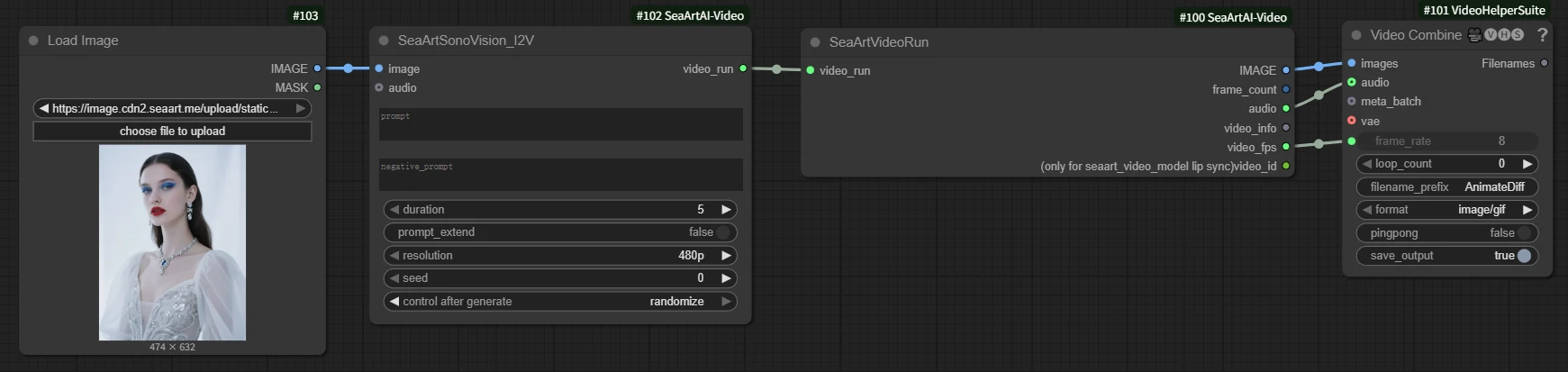
Price (credits)
| 480p | 720p | 1080p | |
| 5s | 140 | 260 | 450 |
| 10s | 280 | 520 | 900 |
Sample

A ladybug flew past a lizard, and the lizard instantly flicked its tongue, trapping the ladybug and then retracting it just as quickly.
Tips:Prompt Framework
Compose prompts with:
- Subject: who/appearance/quantity
- Action: what they are doing
- Scene/Time: location/time/weather
- Camera: one motion + camera position
- Visual Style: style/materials/lens language
- Lighting & Tone: key/fill, color temp, primary color
- Mood: atmosphere keywords
- Audio: dialogue (language/gender/tone/lines), music (style/instruments), SFX (source)
Example structure:
- Subject + Action + Scene/Time + Camera + Visual Style + Lighting/Tone + Mood + Audio
Extension—Native Audio Support
You can describe audio directly in the prompt (background music, ambient SFX, or spoken lines), or specify an external audio file
Tips:When producing videos with audio, please emphasise the following elements in your prompt: (Subject + Facial Expression + Tone of Voice + Character Dialogue)
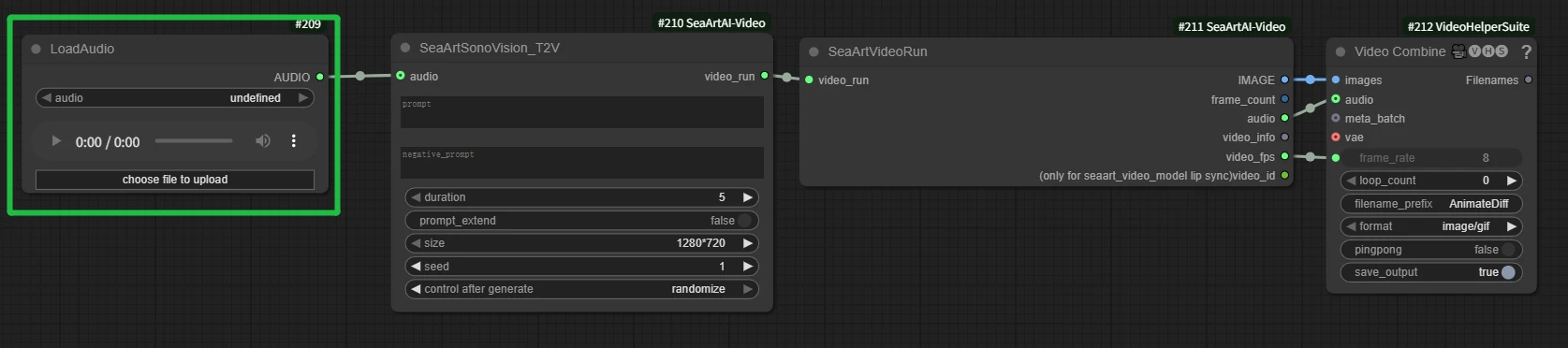
T2V with Designated Audio
- Add a LoadAudio node and connect it to SeaArtSonoVision_T2V.
- Supports human voice, pure music, and environmental sounds.
📃Tips:
- Even with a voice file, describe who is speaking and their expression/tone.
- Keep audio length aligned with video duration.
🔍Q&A:
- Q: If audio length ≠ video duration, will the task fail?
- A: No. The duration (5s/10s) defines how much audio is read. For a 5s video, only the first 5s of longer audio is used; shorter audio behaves similarly. Best practice: match lengths.
I2V with Designated Audio


Same usage as T2V. With a voice clip, you can make the character in the image speak.
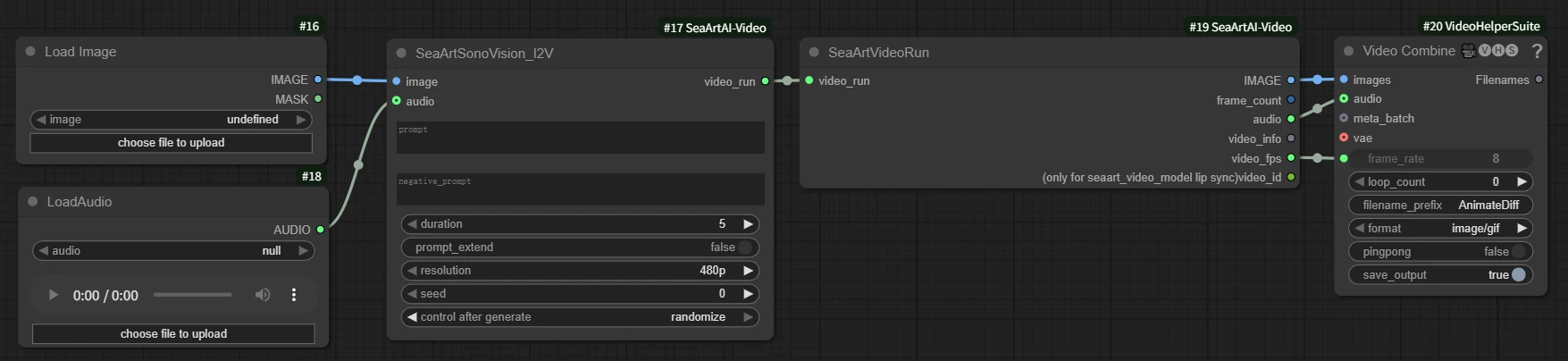
📃Tips: Explicitly state the character is speaking and describe their expression, otherwise lip‑sync may not trigger.
Sample
🔍FAQ
- Lip‑sync off:
- Use shorter, clearer lines; natural speaking pace.
- Reduce environmental noise in descriptions; ensure the audio contains human voice.
- Face drift (I2V):
- Use a clearer, frontal reference image.
- Soften camera‑motion instructions in the prompt.
- Optionally turn off prompt_extend for better identity consistency.
-------------------------
That’s the basic guide to the SonoVision node. Hope it helps—give it a try!🔥