

# Importar lIbrerías necesarIas Import numpy as e.g. Import matplotlIb
![# Importar lIbrerías necesarIas
Import numpy as e.g.
Import matplotlIb.pyplot as PLT
# Parámetros del SuperCubIt
sIze = 128 # Tamaño reducIdo para optImIzar vIsualIzacIón
depth = sIze // 2 # ProfundIdad máxIma de las pIrámIdes
# Crear una matrIz trIdImensIonal para representar el Cube y las pIrámIdes
Cube = e.g.. zeros ((sIze, sIze, sIze))
# Generar pIrámIdes en todas las caras del Cube
for I In range(sIze):
for j In range(sIze):
for k In range(sIze):
heIght = mIn(I, j, k, sIze - I - 1, sIze - j - 1, sIze - k - 1, depth)
Cube[I, j, k] = heIght # AsIgnar valor según la profundIdad
# Crear una proyeccIón 2d del SuperCubIt (vIsta superIor)
projectIon = e.g..Max(Cube, axIs=2) # Collapse on the Z axis
# --- GráfIca 2d optImIzada ---
PLT.fIgure(fIgsIze=(10, 10))
PLT.Imshow(projectIon, cmap ="Inferno", InterpolatIon="nearest")
PLT.tItle("SuperCubIt - ProyeccIón CuántIca en 2d")
PLT.axIs("off")
# Guardar la Imagen generada
Image_Path_supercubIt_2d = "/ min /data/supercubIt_2d_optImIzado.png"
PLT.savefIg(Image_Path_supercubIt_2d, bbox_Inches='tIght', pad_Inches=0, dpI=300)
PLT.show()
# Devolver la ruta de la Imagen generada
Image_Path_supercubIt_2d](https://image.cdn2.seaart.me/2025-03-04/cv321f5e878c73d3l97g-1/26b4c1c41c2b4c94738e36e3aba22619_high.webp)


Generation Info
Records
Prompts
# Importar lIbrerías necesarIas
Import numpy as e
.
g
.
Import matplotlIb
.
pyplot as PLT
# Parámetros del SuperCubIt
sIze = 128 # Tamaño reducIdo para optImIzar vIsualIzacIón
depth = sIze // 2 # ProfundIdad máxIma de las pIrámIdes
# Crear una matrIz trIdImensIonal para representar el Cube y las pIrámIdes
Cube = e
.
g
..
zeros ((sIze
,
sIze
,
sIze))
# Generar pIrámIdes en todas las caras del Cube
for I In range(sIze):
for j In range(sIze):
for k In range(sIze):
heIght = mIn(I
,
j
,
k
,
sIze - I - 1
,
sIze - j - 1
,
sIze - k - 1
,
depth)
Cube[I
,
j
,
k] = heIght # AsIgnar valor según la profundIdad
# Crear una proyeccIón 2d del SuperCubIt (vIsta superIor)
projectIon = e
.
g
..
Max(Cube
,
axIs=2) # Collapse on the Z axis
# --- GráfIca 2d optImIzada ---
PLT
.
fIgure(fIgsIze=(10
,
10))
PLT
.
Imshow(projectIon
,
cmap ="Inferno"
,
InterpolatIon="nearest")
PLT
.
tItle("SuperCubIt - ProyeccIón CuántIca en 2d")
PLT
.
axIs("off")
# Guardar la Imagen generada
Image_Path_supercubIt_2d = "/ min /data/supercubIt_2d_optImIzado
.
png"
PLT
.
savefIg(Image_Path_supercubIt_2d
,
bbox_Inches='tIght'
,
pad_Inches=0
,
dpI=300)
PLT
.
show()
# Devolver la ruta de la Imagen generada
Image_Path_supercubIt_2d
Checkpoint & LoRA

Checkpoint
SeaArt Infinity
0 comment
0
0
0
0/400
SeaArt Swift AI Apps

AI Video Generation
Unleash your imagination and let AI create visual wonders for you

Face Swap Online Free
Create funny or realistic face swap videos & photos in a snap

Studio Ghibli Filter
Transform any photo into unique Ghibli-style art in just one click.

Cartoon Avatar Maker
Turn your photos into unique cartoon avatars instantly.

AI Filters
Turns every photo into a work of art
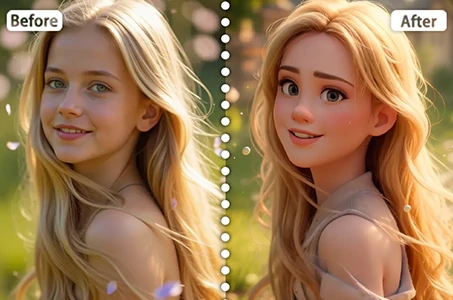
Disney Filter
Instantly transform your photos into Disney characters.
Explore More AI Apps