
SeaArt AI Consistent Character Video Generator
Create reusable AI avatars from photos and use them across unlimited AI consistent character videos with perfect appearance consistency. Build your character library at SeaArt AI once and generate multiple videos where your characters maintain identical features, style, and appearance.
Tap into SeaArt AI Consistent Character Video Generator


Reusable Character Creation
Upload photos once to create AI characters for people and pets. Save your characters and reuse them across multiple video.

HD Video Quality
Generate high-definition videos with smooth character animations and natural movements.



Perfect Character Consistency
Advanced AI maintains character appearance, facial features, and style across every scene. Your character looks identical in all videos,

Vast Character Library
Create AI characters at SeaArt AI, save them to your library, and reuse them across unlimited videos.
Generate Reusable AI Characters from Photos
Upload photos of people or animals to create AI characters that you can save and reuse indefinitely. Once created, your characters are stored in your library, ready to use in any AI generated videos. This eliminates the need to upload photos repeatedly or recreate characters for each new video. You can build a character for yourself, family members, pets, or fictional personas and use it across multiple videos with consistency.
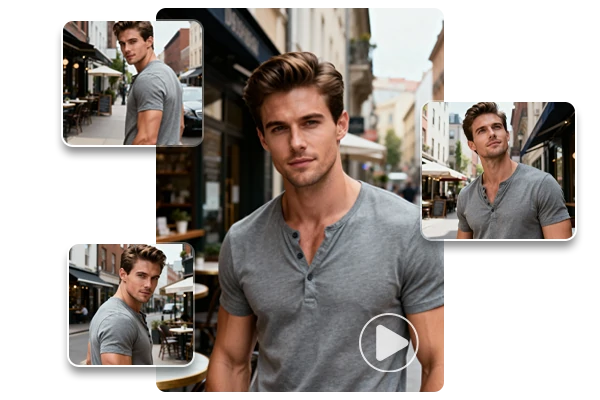
Maintain Perfect Character Consistency Across Videos
Generate multiple videos using the same character, and watch as your character maintains identical appearance and facial features across every scene. The consistent character video generator preserves character likeness while allowing different actions, movements, and scenarios. Your character looks exactly the same whether appearing in a morning routine video, an adventure scene, or a casual conversation clip.
Multi-Character Interactions in Customizable Scenes
Beyond single characters, this consistent character video generator enables you to create a small cast and then place your AI avatars in one scene. With multi-character interactions, you can stage dialogue, reactions, or group actions while each character keeps a consistent look. Shape the setting, props, and mood with scene reference or prompts, so every clip fits your visions without rebuilding characters.
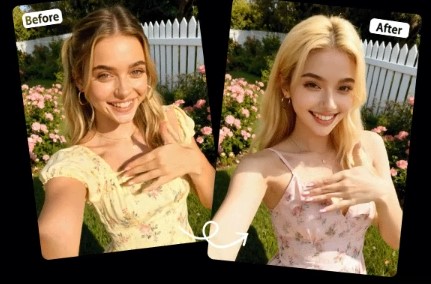
Replace Characters in Existing Videos
Upload an existing video and replace characters with your saved AI characters while maintaining the original movements and actions. This character swap AI lets you swap faces or entire character appearances in videos without losing motion, expressions, or scene dynamics. Ideal for updating old videos with new characters, localizing content with different actors, or experimenting with character variations in the same scene.
How to Create Consistent Character Video?
Step 1: Upload your image
Upload clear photos of the subjects. The AI creates reusable AI character, which is automatically saved to your character library.
Step 2: Enter the prompts
Select characters from your library, add prompts or scene descriptions, you can also click "Help Me Write" to get specific prompts.
Step 3: Generate and Save
Click Generate, download your character videos for sharing or further editing.
Consistent Character Video Generator - FAQs

How does this tool keep the same character look across multiple videos?

Does this work for both people and animals?
A: Yes—people and pets both work. Use a clear photo, create the character, and save it to your library so you can reuse it across different clips and scenes.
Can I replace a character in an existing video?
Yes, SeaArt supports character replacement, you can upload a source video and swap the on-screen character to a saved one while keeping the original motion. This is useful for refreshing old edits, testing variants, or reusing the same cut with different characters.



