
Type
Other
Temps de Publication
2023-10-04
Modèle Basique
Other

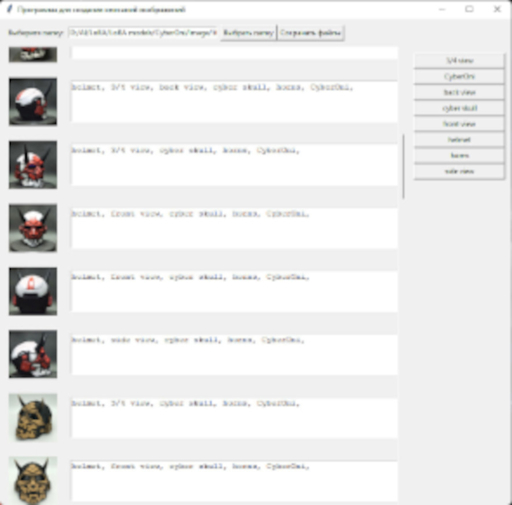
Image Description Program for LoRA
Description:
Image Description Program for LoRA is an intuitive graphical application that helps you manage and describe your photos. Organize your image collection quickly and easily!
Features:
Select a folder with photos.
The program will load image thumbnails.
Add descriptions to the images.
Buttons with quick text insertion are created automatically.
Use the context menu for copying, pasting, and cutting text.
Load existing text files with descriptions.
Save descriptions to text files.
Usage:
Select a folder with images.
Add descriptions to the images.
Get buttons for quickly adding text.
Copy, paste, and cut text using the context menu.
Save descriptions in files.
Running the Program:
To run the "Image Description Program for LoRA," you will need a Python interpreter and several libraries installed. Here are the steps to run it:
Step 1: Install Python
If Python is not installed on your computer, you can download it from the official Python website (https://www.python.org/downloads/) and install it following the instructions for your operating system.
Step 2: Install Required Libraries
To run this program, you will need the tkinter and PIL (Pillow) libraries. You can install them using the pip package manager by running the following commands in the command prompt (terminal):
pip install tk
pip install pillow
Step 3: Download and Run the Program
Download the program's source code from the provided file and save it on your computer.
Run the program by executing the ImageDescriptionApp.py file using the Python interpreter. You can do this by opening the command prompt (terminal) and navigating to the directory where the ImageDescriptionApp.py file is located. Then run the following command:
python ImageDescriptionApp.py
After completing these steps, the program should start, and you can begin using it to describe your images.
Please note that the program is intended for use on Windows computers. If you have a different operating system, you may need to make some adjustments for it to work correctly.
Note: This program was created by GPT-3.5.
1. Modèle partagé uniquement à l'apprentissage et au partage. Droits d'auteur et interprétation finale réservés à l'auteur original.
2. Auteur souhaitant revendiquer le modèle : Contactez officiellement SeaArt AI pour l'authentification. Nous protégeons les droits de chaque auteur. Cliquer pour revendiquer
