Type
Other
Temps de Publication
2024-05-02
Modèle Basique
Other
Introduction de version
Version 4 of this script

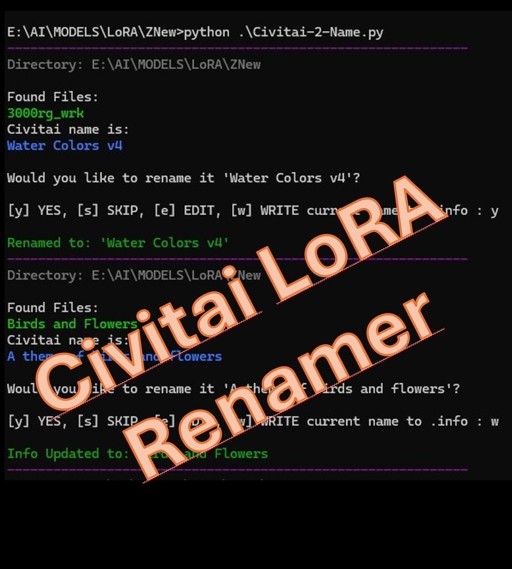
This script will help you fix your folders of jumbled / ugly LoRA Names.
It will prompt you to rename your LoRAs and adjacent files with the suggested name from the civitai.info files. It will also let you choose your own name, and even update the info files with your new name if you want.
It will parse the folder you run it from and check each of the model.civitai.info files that are created by the Civitai Helper extension. ( https://github.com/butaixianran/Stable-Diffusion-Webui-Civitai-Helper )
Within those files is a name that the models creator titled it, and it is often much cleaner and easier to understand than the filename of the downloaded file.
Instructions:
Place the Python file in a folder with the models you want to parse.
It will run recursively through any folder you run it from as well as subfolders.
Run the script by either double-clicking on the Python file or the included .Bat file.
It will check for the following files:
LORANAME.safetensors
LORANAME.preview.png
LORANAME.civitai.info
LORANAME.json
As well as other adjacent files with the same prefix.
It will parse the info file and check the name stored in there and compare it to the current name. If they match it will skip the files and move on to the next set. If the files don't match the name it will present you with some options.
If you choose "y" it will rename all of the files with that prefix to the suggested Civitai name.
In the above case, it would rename
3rq-0003.safetensors
3rq-0003.preview.png
3rq-0003.civitai.info
3rq-0003.json
to
A theme of birds and flowers.safetensors
A theme of birds and flowers.preview.png
A theme of birds and flowers.civitai.info
A theme of birds and flowers.json
If you choose "s" it will skip those files and move on to the next set
If you choose "w" it will write the current file name back into the .civitai.info file.
This is useful if you are happy with your file names and don't want the script to prompt you about them anymore.
For example, if you are prompted with:
If you choose "w" it will write the name Birds and Flowers to the .civitai.file and not prompt you with future runs of the script.
If you choose "e" it will prompt you to choose a new name you want to use for the set of files.
If you choose "y" it will rename the files to:
Birds and Flowers.safetensors
Birds and Flowers.preview.png
Birds and Flowers.civitai.info
Birds and Flowers.json


Version 4 of this script
1. Modèle partagé uniquement à l'apprentissage et au partage. Droits d'auteur et interprétation finale réservés à l'auteur original.
2. Auteur souhaitant revendiquer le modèle : Contactez officiellement SeaArt AI pour l'authentification. Nous protégeons les droits de chaque auteur. Cliquer pour revendiquer
