Type
Other
Temps de Publication
2023-05-12
Modèle Basique
Other

YOUTUBE TUTORIAL
(2) Stable Diffusion WebUI / Photopea Integration demo - YouTube
HERE!
PLUGIN
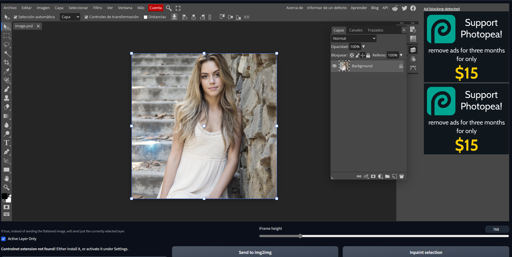
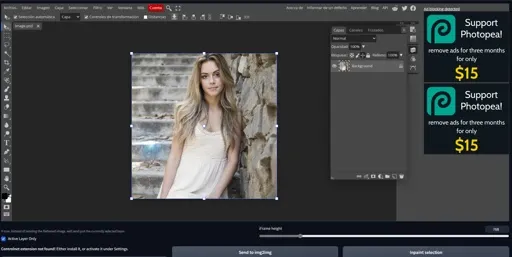
Photopea is essentially Photoshop in a browser. This is a simple extension to add a Photopea tab to AUTOMATIC1111 Stable Diffusion WebUI.
In the tab, you will have an embedded Photopea editor and a few buttons to send the image to different WebUI sections, and also buttons to send generated content to the embeded Photopea.
Consider supporting Photopea by going premium!
On your Stable Diffusion WebUI, click the Extensions tab, then the Install from URL internal tab in that section. Paste the URL for this repo and click Install.
In the Photopea extension tab, you will have the embedded Photopea window. It literally just embeds the exact same Photopea you'd have when accessing the website directly. You can learn how to use Photopea in their official documentation.
Active Layer Only: if this box is ticked, only the currently selected layer in Photopea will be sent to the WebUI when using one of the buttons.
iFrame height: by default, the Photopea embed is 768px tall, and 100% wide. If you have more or less monitor real estate, you can use the slider to increase or decrease the size of the Photopea window in your tab.
Send to Extras: sends the currently opened image's flattened contents to the Extras tab. Useful for upscaling etc.
Send to img2img: same as above, but sends the image to the img2img tab.
Inpaint Selection: in case there's an area selected in the active document, will create a mask with that shape and send both the mask and the image to img2img's "Inpaint Upload" tab.
In case you have the ControlNet extension installed, you'll also have:
ControlNet model index dropdown menu: in the WebUI Settings tab, you can set up more than one ControlNet to be run at the same time. This dropdown lets you choose which model the image will be sent to.
Send to txt2img ControlNet button: sends the image to ControlNet in the txt2img tab.
Send to img2img ControlNet button: sends the image to ControlNet in the ixt2img tab.
In the txt2txt and img2img tab galleries (where your generated images appear), there will also be a Send to Photopea button. You can press it to send the currently selected image back to the Photopea tab. It will be added as a new rasterized layer to the currently open document.
You can also copy and paste the generated results normally into Photopea, and have multiple documents open etc.
I've tried to comment the code thoroughly, especially because it's mostly hacks. Feel free to take it apart and reuse it.
When it comes to usage of the extension, I'm adding restriction guidelines from CreativeML Open RAIL-M license.
You agree not to use the extension or derivatives of the extension:
In any way that violates any applicable national, federal, state, local or international law or regulation;
For the purpose of exploiting, harming or attempting to exploit or harm minors in any way;
To generate or disseminate verifiably false information and/or content with the purpose of harming others;
To generate or disseminate personal identifiable information that can be used to harm an individual;
To defame, disparage or otherwise harass others;
For fully automated decision making that adversely impacts an individual’s legal rights or otherwise creates or modifies a binding, enforceable obligation;
For any use intended to or which has the effect of discriminating against or harming individuals or groups based on online or offline social behavior or known or predicted personal or personality characteristics;
To exploit any of the vulnerabilities of a specific group of persons based on their age, social, physical or mental characteristics, in order to materially distort the behavior of a person pertaining to that group in a manner that causes or is likely to cause that person or another person physical or psychological harm;
For any use intended to or which has the effect of discriminating against individuals or groups based on legally protected characteristics or categories;
To provide medical advice and medical results interpretation;
To generate or disseminate information for the purpose to be used for administration of justice, law enforcement, immigration or asylum processes, such as predicting an individual will commit fraud/crime commitment (e.g. by text profiling, drawing causal relationships between assertions made in documents, indiscriminate and arbitrarily-targeted use).

1. Modèle partagé uniquement à l'apprentissage et au partage. Droits d'auteur et interprétation finale réservés à l'auteur original.
2. Auteur souhaitant revendiquer le modèle : Contactez officiellement SeaArt AI pour l'authentification. Nous protégeons les droits de chaque auteur. Cliquer pour revendiquer
