banner_image ×
SeaArt AI Versione aziendale

# Script: AI-Generated Art - Gothic Dark Souls-Inspired Woman with Dragon Eyes a
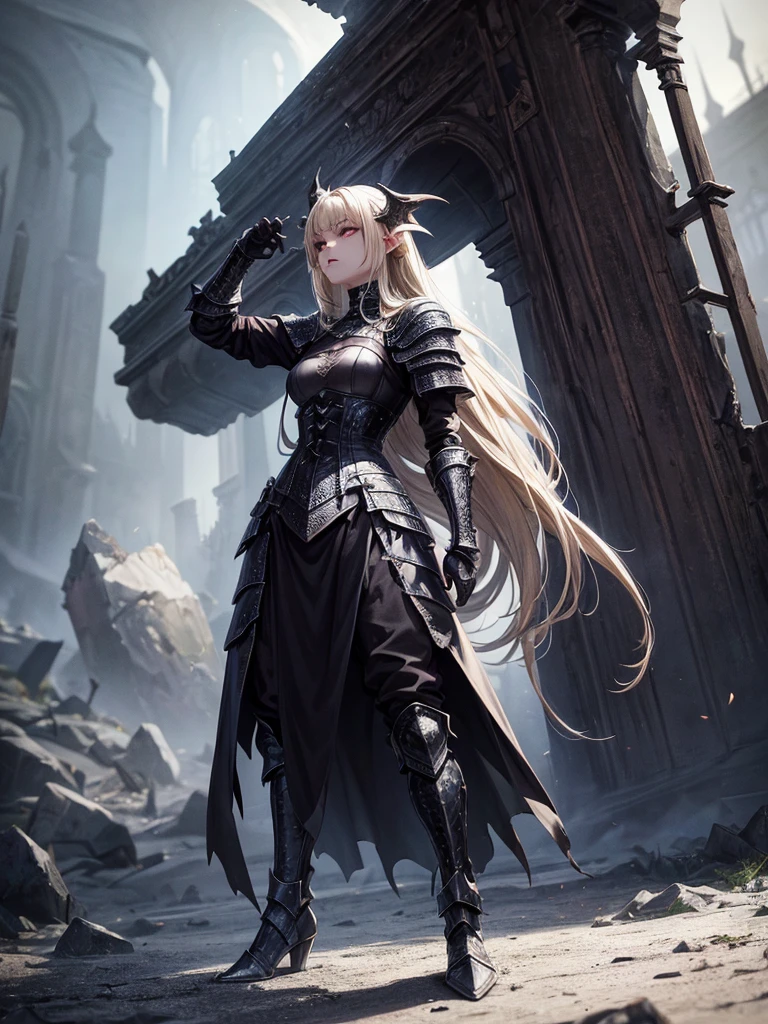

# Script: AI-Generated Art - Gothic Dark Souls-Inspired Woman with Dragon Eyes and Wings

**Objective:**
Create an AI-generated image of a woman with specific features and attire, inspired by the Gothic style of the Dark Souls series.

**Character Description:**
- **Gender:** Female
- **Hair:** Long blonde hair, tied back
- **Eyes:** Red, dragon-like
- **Dragon Features:** Small wings
- **Attire:** Full-body medieval armor
- **Style:** Gothic, similar to Dark Souls aesthetics

**Steps:**

1. **Gather Reference Images:**
   - Collect images of full-body medieval armor from the Dark Souls series.
   - Find examples of blonde hair tied back.
   - Look for images of red, dragon-like eyes and small dragon wings.
   - Compile Gothic art references to understand the desired aesthetic.

2. **Character Design:**
   - **Hair:** Design the long blonde hair tied back, ensuring it looks natural and flows realistically.
   - **Eyes:** Create piercing red eyes with elongated pupils to give a dragon-like appearance.
   - **Dragon Features:** Add small, subtle dragon wings that look natural on her back.
   - **Armor:** Design full-body medieval armor with intricate Gothic patterns and dark tones, appearing worn and battle-scarred. Ensure the armor covers the entire body, including helmet, chest plate, gauntlets, greaves, and boots.
   - **Overall Style:** Use dark, muted colors with high contrasts to emphasize the Gothic style. Incorporate dark shadows and dim lighting.

3. **Pose and Composition:**
   - Position the character in a dramatic pose, possibly standing or in mid-battle stance.
   - Choose a dark, eerie background that complements the Gothic theme, like a ruined castle or a foggy forest.
   - Use lighting to create a moody, atmospheric effect, casting shadows that highlight the character’s features and armor.

4. **AI Tools and Techniques:**
   - Use AI art generation tools like DALL-E, MidJourney, or Stable Diffusion.
   - Input the character description and upload refer
image
avatar
L
Luis Felipe Gomes Pereira
Informazioni sulla creazione
Simile
Registrazione
Prompts
# Script: AI-Generated Art - Gothic Dark Souls-Inspired Woman with Dragon Eyes and Wings **Objective:** Create an AI-generated image of a woman with specific features and attire , inspired by the Gothic style of the Dark Souls series . **Character Description:** - **Gender:** Female - **Hair:** Long blonde hair , tied back - **Eyes:** Red , dragon-like - **Dragon Features:** Small wings - **Attire:** Full-body medieval armor - **Style:** Gothic , similar to Dark Souls aesthetics **Steps:** 1 . **Gather Reference Images:** - Collect images of full-body medieval armor from the Dark Souls series . - Find examples of blonde hair tied back . - Look for images of red , dragon-like eyes and small dragon wings . - Compile Gothic art references to understand the desired aesthetic . 2 . **Character Design:** - **Hair:** Design the long blonde hair tied back , ensuring it looks natural and flows realistically . - **Eyes:** Create piercing red eyes with elongated pupils to give a dragon-like appearance . - **Dragon Features:** Add small , subtle dragon wings that look natural on her back . - **Armor:** Design full-body medieval armor with intricate Gothic patterns and dark tones , appearing worn and battle-scarred . Ensure the armor covers the entire body , including helmet , chest plate , gauntlets , greaves , and boots . - **Overall Style:** Use dark , muted colors with high contrasts to emphasize the Gothic style . Incorporate dark shadows and dim lighting . 3 . **Pose and Composition:** - Position the character in a dramatic pose , possibly standing or in mid-battle stance . - Choose a dark , eerie background that complements the Gothic theme , like a ruined castle or a foggy forest . - Use lighting to create a moody , atmospheric effect , casting shadows that highlight the character’s features and armor . 4 . **AI Tools and Techniques:** - Use AI art generation tools like DALL-E , MidJourney , or Stable Diffusion . - Input the character description and upload refer
Size
768X1024
Date
Jun 30, 2024
Modalità
Predefinito
Tipo
upscale
Checkpoint & LoRA
MeinaUnreal
Checkpoint
MeinaUnreal
Totale 0 commenti
0
0
0
0/400

App AI Veloci di SeaArt
ai_video_generationimg
Generazione video AI

Libera la tua immaginazione, AI realizza miracoli visivi per te
face_swap_titleimg
Scambio Facce Online Gratuito

Crea Video e Foto di Scambio Facce Divertenti e Realistici con Facilità
kiss_vidimg
Generatore di video di baci AI

Unisciti alla tendenza dei baci con il generatore di video di baci AI di SeaArt istantaneamente. Fai baciare due persone facilmente e crea un'animazione realistica.

ai_tools_4img
Filtro AI

Trasforma ogni foto in un'opera d'arte

gender_swapimg
Cambio di genere

Scambia i generi in foto e video con lo swapper di genere AI di SeaArt. Goditi trasformazioni divertenti e realistiche senza sforzo, gratuitamente online!

ghibli_filter_h1img
Filtro Ghibli

Trasforma qualsiasi foto in un'opera d'arte unica in stile Ghibli con un solo clic.

Esplora più app AI 

Explore Related

ControlNet
logo
Italiano
Applicazione
Crea Immagine Cyberpub Swift AI Addestramento Modello Bacheca Avanzata App Rapida Flusso di Lavoro
Informazioni
Laboratorio Classifica Chat AI Blog AI Notizie AI
Aiuto
Guides Customer Service
Ottieni l'Applicazione
icon
Download on the
APP Store
icon
GET IT ON
Google Play
Seguici
iconiconiconiconiconiconiconicon
© 2025 SeaArt, Inc.
Copyright Policy
Terms
Privacy 特定商取引法 資金決済法に基づく表示
Altro