Tipo
LORA
Data di pubblicazione
2024-01-08
Modello Base
SD 1.5
Parola Chiave
hitomi tanaka woman
Copia


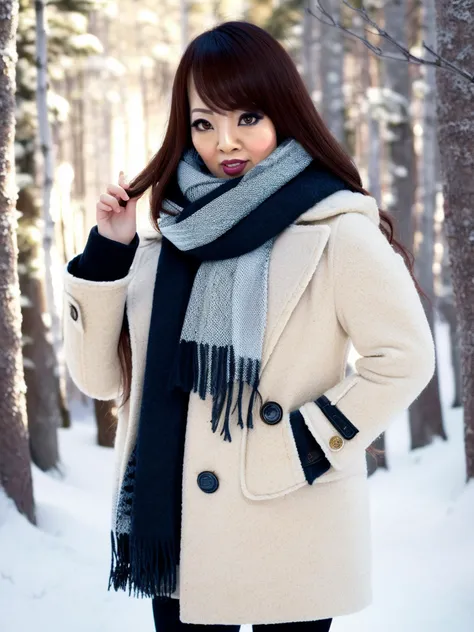
This lora is the second version of my first lora. It can reproduce Hitomi Tanaka, in a realistic way. It will work well with most of the realistic models. To be conform with civitai rules, all pictures and prompts I give are non-suggestive, because it's a real person.
To generate sfw pics of her, specify clothes wich will cover her body in your prompt and include (, ) in the negative prompt.
It was trained on a 48 images dataset, various res and size, with captions. The model used was majicmix, 20rep per images, 1000reg images 102x res, 1rep per reg image, network rank 128, alpha 1, 10 epoch, 19k steps.
This is epoch 6 wich i found the best, able to reproduce her while keeping flexibility to change her characteristics like hair color, hair style, clothes etc.
Trigger: hitomi tanaka woman
Lora weight: 0.7-1
Model: realistic one like majicmix
cfg: 6-8
Resolution: i use 512x768 for first composing, then img2img at 768x1024, denoising: 0.6-0.9 to get final composition.
Sampler: Euler A works well, sde karras can produce a "burn effect" at first composition, i use it to rend final composition.
Upscale: I use r-esrgan or ldsr and upscale 2x for final images.
ControlNet: Can be use but i lower its weight and stop controlling output at 0.15 usually to give some flexibility to the image generation. Only tried canny.
Anime Model: i had some good results but lora weight must be set under 0.55 to avoid weird faces.
I do the first composition, then second one, and if i'm unhappy with the face produced, I inpaint and prompt:"hitomi tanaka woman, hitomi tanaka face...(your style)" until I get the right results. You can lower a bit lora weight to get a smoother face.
sampler: euler a
resolution: 512x768
batch count: 10
steps: 20
cfg: 7
positive prompt: "hitomi tanaka woman, 1girl, white winter closed wool coat, medium shot, fashion shoot, soft light, best quality, masterpiece, photorealistic, in a snowy forest, RAW photo, <lora:HITOMI_TANAKA-REG-128:1>"
negative prompt: "(worst quality:2),(low quality:2),(normal quality:2),lowres,watermark, , "
Select the one I prefer (only from a composition point of vue), things will be fixed later if needed, send it to img2img
model: majicmix
sampler: euler a
resolution: 768x102>
batch count: 5
steps: 60
denoising: 0.65-0.9 (depending how much i need to alter it)
cfg: 7
positive prompt: "hitomi tanaka woman, 1girl, white winter closed wool coat, medium shot, fashion shoot, soft light, best quality, masterpiece, photorealistic, in a snowy forest, RAW photo, <lora:HITOMI_TANAKA-REG-128:1>"
(adjust lora weight if needed, i go usually from 0.8 to 1)
negative prompt: "(worst quality:2),(low quality:2),(normal quality:2),lowres,watermark, , "
Select the one I prefer
denoising: 0.3-0.75 depending
batch count: from 1 to 10 depending
positive prompt: "hitomi tanaka woman, hitomi tanaka face, fashion shoot, soft light, best quality, masterpiece, photorealistic, in a snowy forest, RAW photo, <lora:HITOMI_TANAKA-REG-128:1>"
(adjust lora weight if needed, i go usually from 0.8 to 1)
negative prompt: "(worst quality:2),(low quality:2),(normal quality:2),lowres,watermark, , "
Prompts are the one you will find in the text2img tab, the one you use to get your picture wich describe it globally. (or in img2img) if you made some modifications to your prompt at step 2).
Resize: 2
I will maybe work on a newer version later, i need to get a more deep understanding of lora training first, and all parameters involved.
I'm open to advices, enjoy ;)

1. I diritti dei modelli ripubblicati appartengono ai creatori originali.
2. I creatori originali che desiderano reclamare il proprio modello devono contattare il personale di SeaArt AI tramite canali ufficiali. Clicca per rivendicare
