Tipo
Other
Data di pubblicazione
2024-08-26
Modello Base
Other
Introduzione alla versione
delete image row
options menu
zoom option

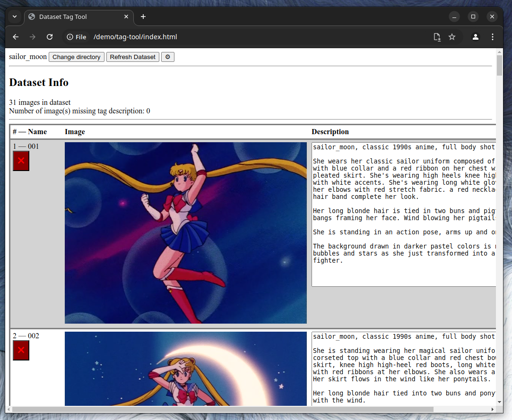

I am too lazy to edit text files.
I am too lazy to install complex dataset management tools.
If you are like me this tool is for you.
index.html. The tool will open without any dataset.
Chrome will prompt for authorization to access your file system. Accept "Edit files".
When you select the directory, images and text files are loaded.
When an image does not have an associated text file, the description text area will load empty. A text file will be created when you update the description.
Changes are triggered when the text area loses focus. In simple terms, type a change then click outside the text box.
Changes are immediate and irreversible. The tool does not keep a change history. The tool does not provide any undo capabilities. Check how your browser handles Ctrl+Z if you need to undo a text change.
In the tool, click the "Refresh Dataset" button.
You can remove images in the tool by clicking the red "X" button under the image name.
Removed images and text files are not deleted. They are moved to a deleted subdirectory.
MIT
Options menu
Zoom option
Remove image
Image file & image tag file are moved to the deleted subdirectory
Load Dataset
Refresh Dataset
Display image name, image, image tag file contents
Create/Update image tag file contents upon change


delete image row
options menu
zoom option
1. I diritti dei modelli ripubblicati appartengono ai creatori originali.
2. I creatori originali che desiderano reclamare il proprio modello devono contattare il personale di SeaArt AI tramite canali ufficiali. Clicca per rivendicare
