Tipo
Other
Data di pubblicazione
2024-06-01
Modello Base
Other

![Aesthetic Scorer with Webui [Tool]](https://image.cdn2.seaart.me/temp-convert-webp/jpeg/static/a8ff9bed549a10f298ce31f0e115e4a6/1717234874819/ca1364bf4fd70e197c5b8d96b40b6c0c_low.webp)
https://github.com/MNeMoNiCuZ/aesthetic-scorer/
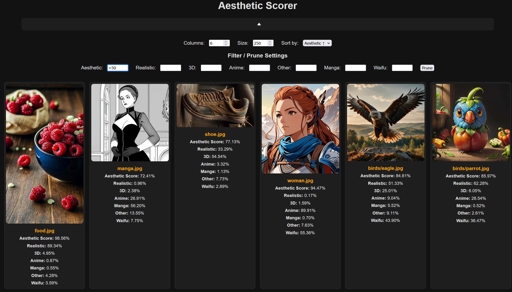
I updated an existing abandoned aesthetic scoring tool to make it a bit easier to work with, as well as provide a user interface.
The tool is meant to give you feedback as numeric values on your images. It will essentially tell you how pretty your images are, as well as give some other information, such as the image type (realistic, 3D, anime, manga, other), and the waifu-level???
Set up a virtual environment to run the script. Feel free to run the setup.bat to automatically set one up.
Install the requirements pip install -r requirements.txt. This is optionally done by the setup script.
Install the correct version of [pytorch](https://pytorch.org/) for your CUDA. It's usually:
pip3 install torch torchvision torchaudio --index-url https://download.pytorch.org/whl/cu118
or
pip3 install torch torchvision torchaudio --index-url https://download.pytorch.org/whl/cu121
1. Place the images or folders of images in the /input/ directory.
2. Run 1-rate.bat to rate the images with the system.
You can now view the images and their rating as a website:
3. Run 2-view.bat to launch the server and website.
On the website, you can expand the arrow below the title to show the options.
4. From the options, you can set the gallery column count, width and sorting options.
5. You can also play with the filter/pruning settings. Use > or < and integers as % to set the filter values
Example: Aesthetics >80 will keep only images that are rated at 0.8 or higher in aesthetics
6. By pressing the Prune-button, the pruning script will move any currently hidden images to a pruned directory, along with a json containing the pruned images data.
You can also do this by running the 3-prune.bat script. This will use the pruneconfig.ini as the pruning settings.


1. I diritti dei modelli ripubblicati appartengono ai creatori originali.
2. I creatori originali che desiderano reclamare il proprio modello devono contattare il personale di SeaArt AI tramite canali ufficiali. Clicca per rivendicare
