Tipo
Other
Data di pubblicazione
2023-09-04
Modello Base
Other

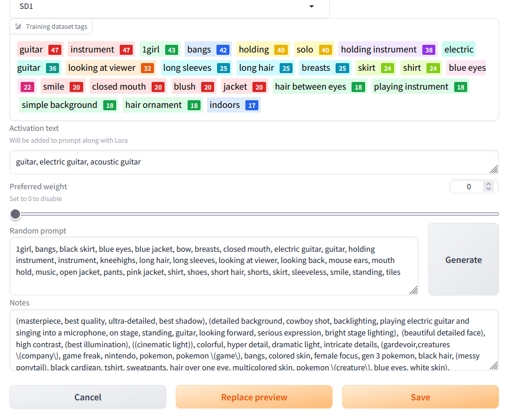

Hi, i am using Civitai Web Helper since its launch but after 1.5 the extension is a bit abandoned and i am slowly transitioning to the base model info of Automatic1111 that can add activation words automatically to the prompt when you click on a Lora.
So i made an easy script that reads all the "civitai.info" files in the Lora folder and creates a json file for them that contains: activation text, SD base model and a prompt in the Notes.
Note: if a json already exists, the script just skips that. If the civitai file contains error or is empty, the script just skips that.
All you have to do is change the folder inside the script: input_folder = r"C:\Programs\stable-diffusion-webui\models\lora" to your lora folder and run the script. You can do it by double clicking it if you have py files connected to python or you can just open your cmd and type: python ConvertCivitaiInfoToJSON.py if you have the script in the folder you are on with CMD. After this you can start clicking on a Lora and the activation text is automatically added to the prompt.
You can run the script everytime you download a new file from civitai, just continue using civitai WebHelper to download the info, and run the script to convert the informations.
I could integrate this with civitai-WebHelper to make it more powerful but as of right now i don't have time to improve my python coding skills to do that, feel free to do it if you want ;)
Have Fun!

1. I diritti dei modelli ripubblicati appartengono ai creatori originali.
2. I creatori originali che desiderano reclamare il proprio modello devono contattare il personale di SeaArt AI tramite canali ufficiali. Clicca per rivendicare
