
SeaArt に音楽生成ツールが登場しました!
公式からも紹介されていますが、皆さんお気づきでしたでしょうか?
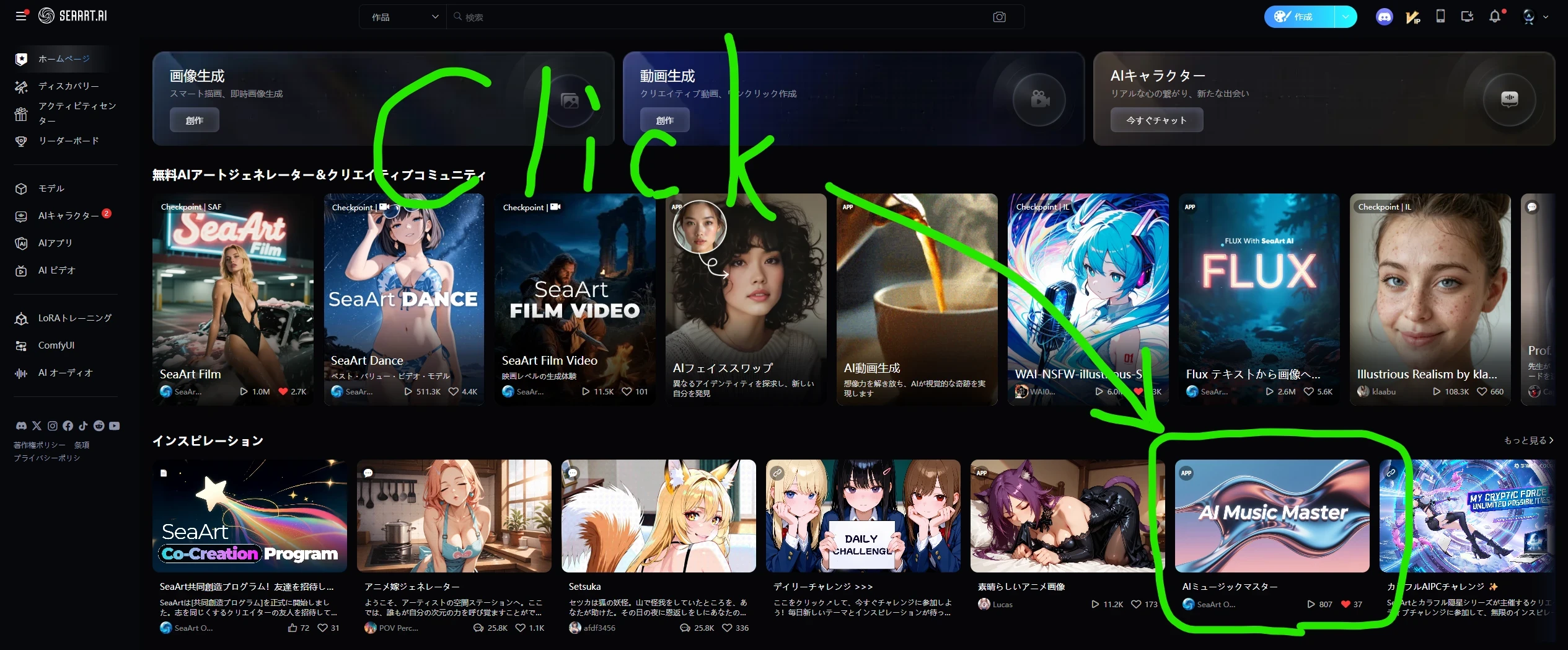
この記事では音楽は再生できない(と思われる)ため、サンプリング出力は下記の作品をご覧ください。
※ SeaArt の VideoEdit 機能を使用しているため再生時の縦横比についてはご容赦ください。
サンプリング作品はこちら → SeaArt AI Music Master サンプル作品
日本語版ボーナストラックはこちら → SeaArt AI Music Master サンプル作品(特別編)
動画編集に合わせて10秒の曲として生成しましたが、一分を超える楽曲も生成可能。(2分までは生成可能を確認済)
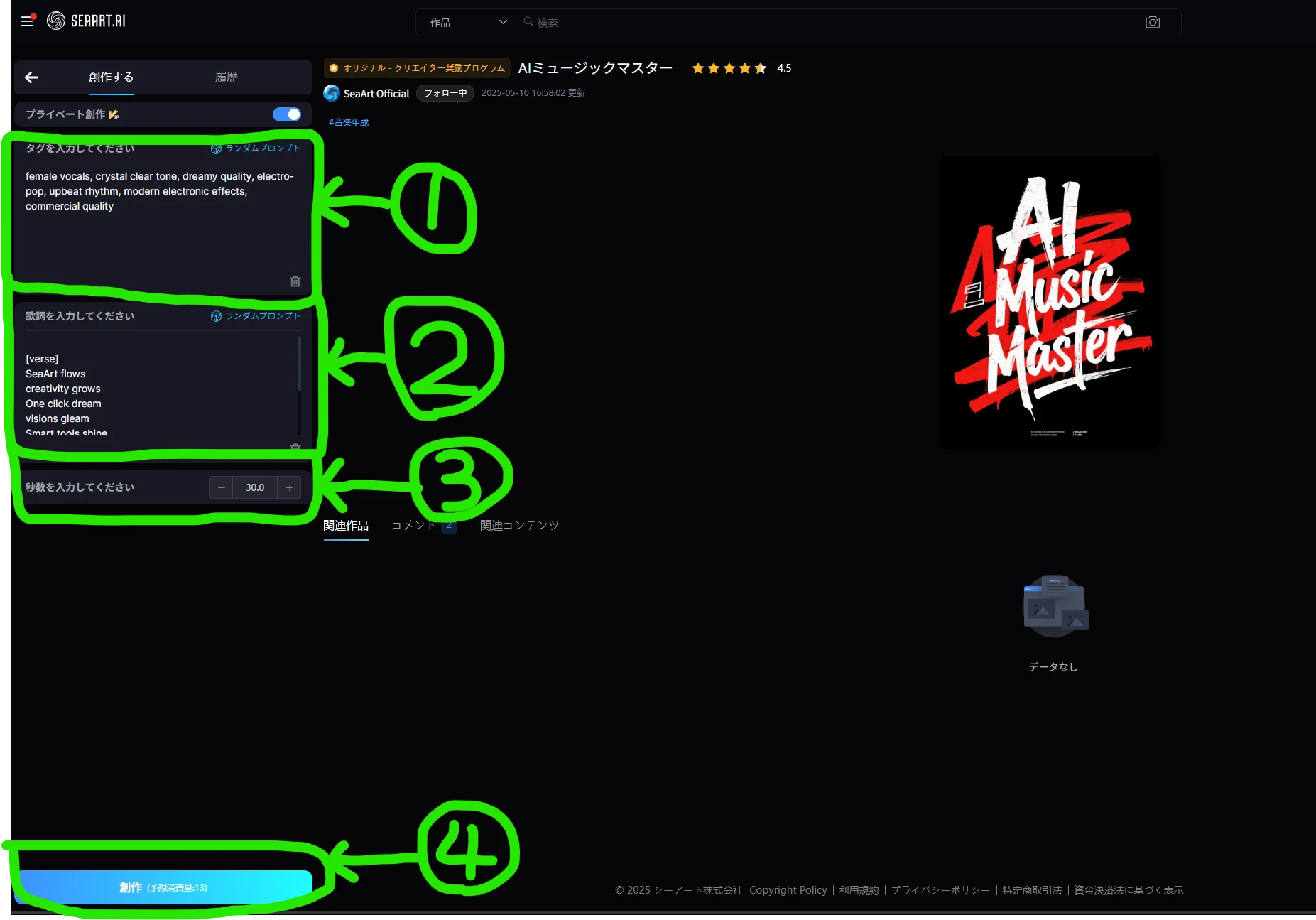
【たったの4ステップで生成可能(上記画像参照)】
- 楽曲のスタイルやイメージ、使用する楽器などを入力。(速度を変更したい場合は "BPM" ではなく、"Beats Per Minutes" と入力したほうが効果的なようですが、楽曲スタイルの影響を強く受けるようで、必ずしも指定した速度には調整できませんでした)
- 歌詞を入力します。(ローマ字入力をすることで日本語っぽく出力することも可能だと思います)
- 曲の長さを指定します。(最大値は不明です、もし試されたらコメントいただけると誰かが喜ぶかも)
- "創作"を選択して生成開始
曲のスタイルを指定するプロンプトについては、ジャンル指定のプロンプトの影響が強いようで BPM 等の速度調整はやや苦手なようですが、画像、動画のAI生成サービスで音楽も生成可能になったことはとても大きな変化だと思います。
画像生成から始まり、動画生成も大きな進化を遂げ、さらには最近では動画編集機能まで使用できるようになりました。
動画編集機能についてはまだまだ多くの改善点を感じますが、音楽生成ツールも使用可能になり、これから更なる進化が期待できそうです!
バグが増えてきたような気もしますが、早急な解消に向けて運営の方々も対応してくれているようですし、私はこの新しい取り組みを歓迎し楽しみたいと思います。(まだ認知度が低い影響かもしれませんが、画像と比べて生成速度が速く、動画と比べて低コストで使用できるため所有コインの減少に注意が必要かもしれません、実際に何度か試してみましたがそれくらい楽しいツールです👍)
ちなみに、ColinWine さんも同様の音楽生成用ワークフローを公開されているようです👀
勝手ながらこちらの記事でもリンク紹介させていただきますので興味のある方はぜひお試しください👍。
公式提供ツールはこちら → SeaArt AI Music Master
音楽生成ワークフローはこちら → エースステップ(ワークフロー)
↓ ↓ ↓ Video Edit 機能の使い方についてはこちらを参照してください。↓ ↓ ↓
【English ver.】
A music generation tool has been added to SeaArt!
It has been officially introduced, but did you notice it?
Since it is (probably) not possible to play music in this article, please see the work below for a sampling output.
*Please excuse the aspect ratio during playback as we used SeaArt's VideoEdit function.
A sampling of works is here → My sample generated work using SeaArt AI Music Master
I created a 10-second song to match the video editing, but it is possible to generate songs longer than one minute. (I have confirmed that it is possible to generate up to two minutes)
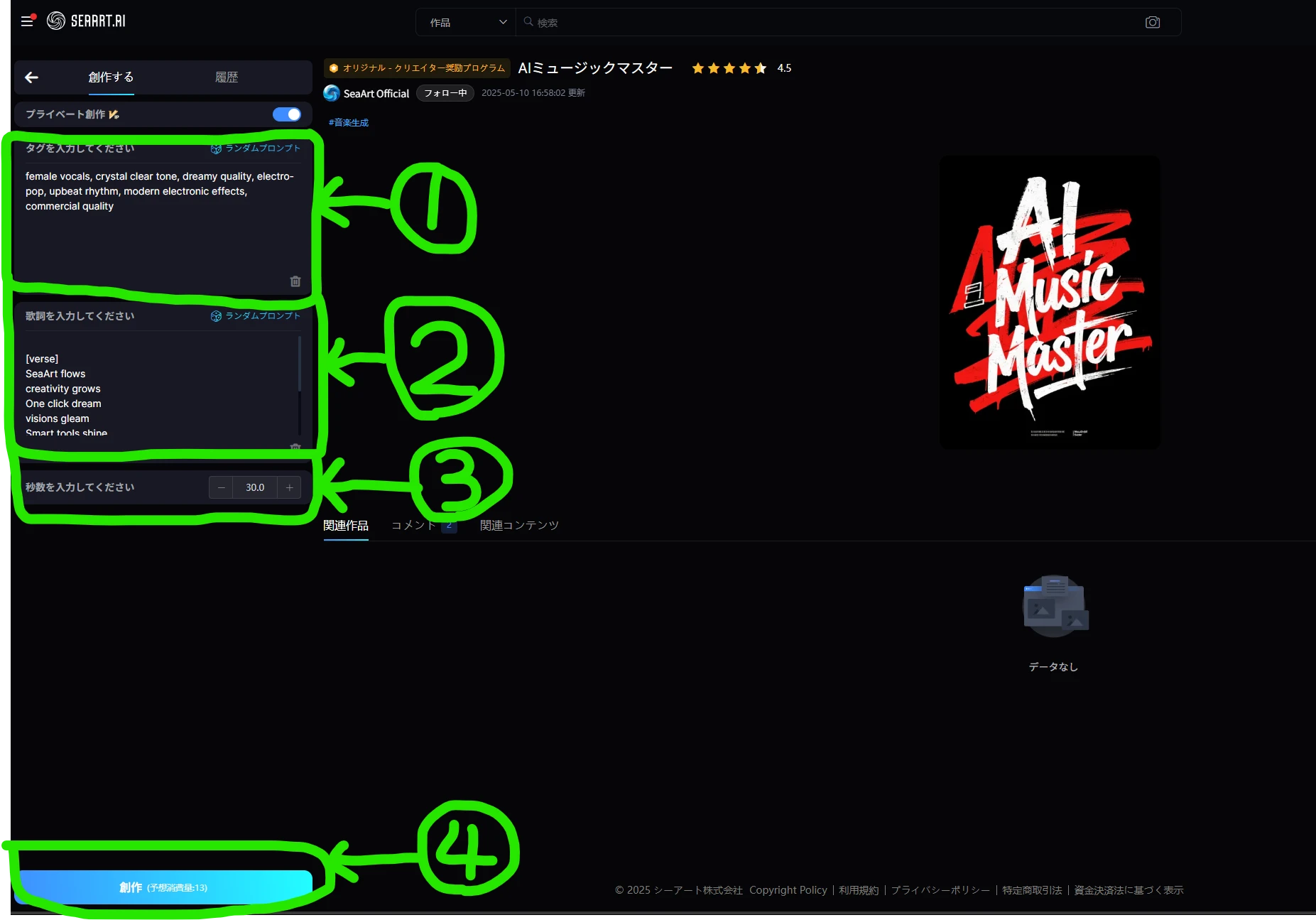
[It can be generated in just 4 steps (see image above)]
- Enter the style and image of the song, the instruments used, etc. (If you want to change the speed, it seems more effective to enter "Beats Per Minutes" instead of "BPM", but this seems to be strongly influenced by the style of the song, and I was not able to always adjust it to the specified speed.)
- Enter the lyrics. (I think it is possible to output it in a Japanese-like way by entering it in romaji.)
- Specify the length of the song. (The maximum value is unknown, if you try it, someone might be happy if you comment.)
- Select "Create" and start generating
The prompts for specifying the style of the song seem to be strongly influenced by the prompts for specifying the genre, and it seems that it is not very good at adjusting the speed such as BPM, but I think that it is a very big change that music can now be generated with an AI generation service for images and videos.
Starting with image generation, video generation has also evolved greatly, and recently it has become possible to use video editing functions.
I feel that there are still many areas for improvement in the video editing function, but the music generation tool is now available, and I think we can expect further evolution from now on!
It seems that there are more bugs, but the management seems to be working to resolve them as soon as possible, and I welcome and look forward to this new initiative. (This may be due to the low awareness, but it is faster to generate than images and can be used at a low cost compared to videos, so you may need to be careful about the decrease in your coins. I actually tried it several times and it is such a fun tool 👍)
By the way, Sir ColinWine also seems to have released a similar workflow for music generation 👀
I will provide a link to it in this article, so if you are interested, please give it a try 👍.
Official tools are available here → SeaArt AI Music Master
See the music production workflow here → Ace Step (Workflow)
↓ ↓ ↓ Please refer here for how to use the Video Edit function. ↓ ↓ ↓
【How to use SeaArt Video Edit】
Editor's Note / 編集後記
Thank you for reading to the end.
最後までお読みいただきありがとうございます。