🎨 The Ultimate 2026 Guide to AI Art & Video Generation
🚀 Master the Future of Creative AI: From Beginner to Professional
"The ghost in the machine, it turns out, is more of a technician than a poet. It responds best when you learn to speak its language."
🌟 Introduction: Beyond the Magic Box
The year 2026 marks a pivotal moment in creative technology. AI image and video generators have evolved from fascinating novelties into indispensable professional tools. What was once portrayed as a magical box where you simply type a wish and receive a masterpiece has matured into a sophisticated ecosystem of specialized models, each requiring unique approaches to unlock their full potential.
The prevailing idea is that of a conversation: you tell the AI what you want, and it understands your creative intent. This vision of a seamless, intuitive collaborator is powerful, and for simple tasks, it's often true. But beneath this user-friendly surface lies a world of surprising, counter-intuitive, and incredibly powerful techniques that separate casual users from professional creators.
Key Insight: The most advanced AI models of 2026 don't just respond to casual conversation; they respond to precision, structure, and a deep understanding of how they were trained. The key to unlocking production-quality results isn't about becoming a more eloquent poet—it's about becoming a systems thinker who can speak the structured, logical language the machine was built to understand.
🎯 What This Guide Covers
- ✅ Complete analysis of top AI image generators (FLUX.2, GPT Image 1.5, Hunyuan, Animagine, and more)
- ✅ Deep dive into video generation models (Kling, Sora, Veo, WAN)
- ✅ Advanced prompting techniques from JSON structures to Danbooru tags
- ✅ Head-to-head comparisons with real benchmark scores
- ✅ Platform ecosystems and professional workflows
- ✅ Specialized guidance for anime and stylized art
🔧 Part 1: Understanding AI Creative Tools
1.1 The Three Components of Generation
Every AI generation consists of three fundamental components that work together:
Component | Function | Example |
|---|---|---|
Model | Determines the image's fundamental style | FLUX.2 for photorealism, Animagine for anime |
Prompts | Define the content of the image | "A warrior with a glowing sword in a dark forest" |
Parameters | Refine preset characteristics | Resolution, aspect ratio, guidance scale |
[!IMPORTANT] If the instruction is vague, such as merely saying "design a picture" without specifying elements and purpose, the result is often unpredictable.
1.2 The Universal Prompt Formula
A fantastic way to start organizing your ideas is with this simple formula:
Subject + Style + Details
Example Breakdown: "Japanese anime style, girl, under a cherry blossom tree, smiling, sunny day."
Ingredient | Prompt Text | Purpose |
|---|---|---|
Style | Japanese anime style | Defines the overall artistic look |
Subject | girl | Identifies the main focal point |
Details | under a cherry blossom tree, smiling, sunny day | Describes environment, actions, mood |
🖼️ Part 2: The Premier Image Generation Models
2.1 Strategic Overview: Choosing Your Creative Engine
Selecting the right model is the most critical decision a creator will make. This choice dictates everything: aesthetic style, prompt adherence, anatomical accuracy, and commercial viability.
Complete Model Rankings (2026)
Model | LM Arena Score | Best For | Pros | Cons |
|---|---|---|---|---|
GPT Image 1.5 | 1264 | Text Rendering, Photorealism | Unmatched text rendering, robust API | Higher costs, strict content policy |
Gemini 3 Pro | 1235 | Speed, Photorealism | Exceptional speed (3-5s), ecosystem integration | Proprietary, less control |
Hunyuan Image 3.0 | 1198 | Anime & Character Art | Unmatched anime quality, character consistency | Less versatile for non-character work |
Flux 2 Max | 1180 | Customization | Open-weight, unparalleled flexibility | Requires technical expertise |
Midjourney v7 | ~1160 | Artistic & Creative Work | High aesthetic quality | Limited API, less control |
Seedream 4.5 | ~1140 | Budget-Conscious Use | Competitive pricing (0.02-0.05/image) | May not match top-tier detail |
Adobe Firefly 3 | ~1115 | Commercial Safety | Copyright-safe, Adobe CC integration | Lower quality, conservative outputs |
Stable Diffusion 3.5 | ~1095 | Open-Source Foundation | Highly customizable | Requires significant setup |
2.2 Deep Dive: FLUX.2 MAX
"JSON prompts give you pinpoint control over the scene. They're perfect for production workflows, UI tools, and batch automation."
Key Strengths
- 🎯 Unparalleled Control: Supports JSON-structured prompts for granular control
- 📸 Photographic Accuracy: Simulates real-world cameras, lenses, and lighting
- 🔤 Clean Typography: Superior text and infographics generation
- 🌍 Multilingual: Natively understands prompts in various languages
Critical Limitation
[!CAUTION] FLUX.2 does NOT support negative prompts! You must describe what you WANT, not what you want to avoid. This is the #1 mistake new users make.
"Always describe what you want, not what you want to avoid." — FLUX.2 Ultimate Prompting Guide
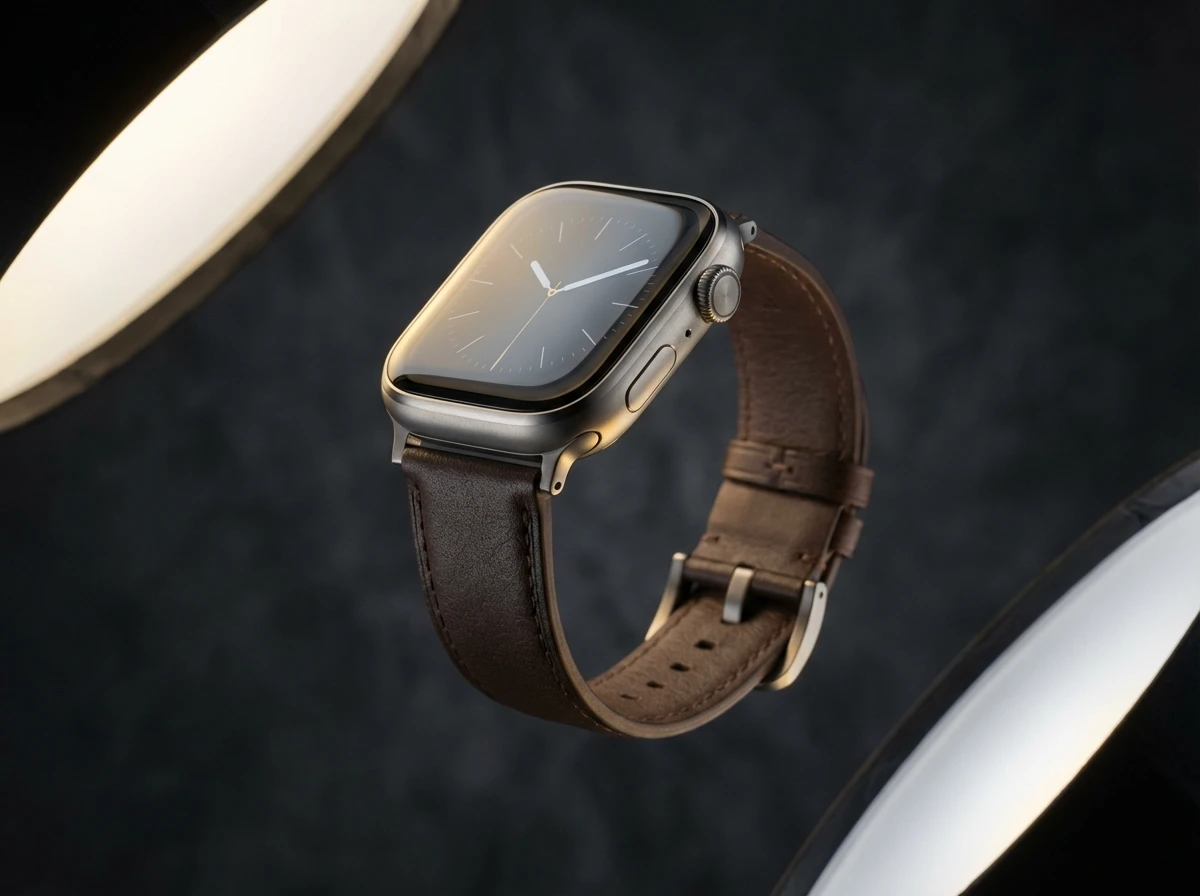
JSON-Structured Prompt Example
{
  "scene": "A professional product photograph of a sleek smartwatch",
  "subjects": [
    {
      "description": "Titanium smartwatch with leather strap",
      "position": "center-frame",
      "action": "floating at an angle"
    }
  ],
  "style": "high-end commercial product photography",
  "color_palette": ["#1F2124", "#BDBFC3", "#D4AF37"],
  "lighting": "two softbox rim lights with subtle reflections",
  "camera": {
    "angle": "three-quarter view",
    "lens": "85mm",
    "f-number": "f/2.8",
    "depth_of_field": "shallow"
  }
}
2.3 Deep Dive: GPT Image 1.5
The undisputed champion for text rendering.
Why It Leads
- 🏆 Highest LM Arena Score (1264)
- ✍️ Unbeatable text rendering — far exceeds all competitors
- 🎨 Exceptional photorealism with fine detail
- 🔗 Deep ChatGPT ecosystem integration
Pro Tip: Quoted Text
[!TIP] Always place text you want rendered inside quotation marks: "Welcome to 2026". Describe the material and lighting of the text (e.g., "embroidered in gold thread", "glowing pink neon").2.4 Deep Dive: Hunyuan Image 3.0
The definitive choice for anime, manga, and Asian artistic styles.
Key Advantages
- 🎭 Best-in-class anime quality — unmatched in the industry
- 👤 Character consistency — maintains features across generations
- 🎨 Broad stylistic range — webtoon, classic manga, game concepts
- 💰 Budget-friendly — competitive pricing for high volume
Effective Prompt Elements
- Modern Anime Style | Classic Manga Style | Webtoon Style
- Dramatic lighting, soft shading, cinematic
- Mid-swing with a glowing katana (action descriptions)
2.5 Deep Dive: Adobe Firefly 3
The only commercially safe option for enterprise work.
[!IMPORTANT] Adobe Firefly 3 is trained exclusively on licensed content, eliminating copyright concerns for professional designers and agencies.
Trade-offs
Advantage | Disadvantage |
|---|---|
Guaranteed copyright safety | Lower overall image quality |
Deep Creative Cloud integration | More conservative outputs |
Brand consistency tools | Requires subscription |
🎬 Part 3: The Leading Video Generation Models
3.1 The 2026 Paradigm Shift: Native Audio
Video is no longer a silent medium. The introduction of "Native Audio" capabilities means leading models can now generate synchronized sound, dialogue, and environmental effects simultaneously with pixels.
"Sora 2 defines the future, but Kling 2.6 delivers the present." — SeaArt AI Blog
3.2 Complete Video Model Comparison
Model | Primary Strength | Audio & Sound | Availability |
|---|---|---|---|
Kling 2.6 Pro | Realistic Motion & Physics | Production-Ready. Strong lip-sync. | ✅ Available Now |
Veo 3.1 | Cinematic Tone & Realism | Audio King. Best layered environmental audio. | ⚠️ Limited Access |
Sora 2 Pro | Highest Quality & Physics | Excellent Lip-Sync, but sterile audio. | ⚠️ Limited |
WAN 2.6 | Long-Form & Character Consistency | Stable up to 15 seconds. | ✅ Available |
Seedance | Expressive Motion Control | Image-to-video specialist. | ✅ Available |
3.3 Deep Dive: Kling 2.6 Pro — The Production Champion
"In a direct head-to-head comparison of image-to-video capabilities, Kling 2.6 Pro scored a decisive 91/100, while Sora 2 Pro trailed at 59/100 and Google's Veo 3.1 scored 63/100."
Why Kling Dominates
- 🏃 Superior motion and physics — wins every head-to-head test
- 👄 Best-in-class lip-sync — ideal for dialogue content
- 🎬 Flexible content guidelines — handles UGC and commercial
- 🔊 Native audio in English and Chinese
Test Results: "Skeleton Jumps and Walks"
Model | Score | Notes |
|---|---|---|
Kling 2.6 Pro | 49/50 | "Beautiful" and "incredible" — skeleton realistically jumped off stand |
Veo 3.1 | 31/50 | Failed to follow "jump" instruction |
Sora 2 Pro | 26/50 | Skeleton's leg fell off |
Prompting Tips for Kling
[Camera: Drone shot, panning down]
Woman sprints across a sunlit wheat field.
Audio: [Speaker, American accent, enthusiastic]: "I love this product!"
Background Audio: Futuristic synthesizer music, soft wind
3.4 Deep Dive: Veo 3.1 — The Audio King
Google's flagship for narrative content and atmospheric sound design.
Key Strength: Layered Environmental Audio
[!TIP] When prompting Veo, describe the background sounds you want: "footsteps, breathing, and wind" creates a much more immersive audio environment.
- 🎵 Best-in-class audio — balances dialogue, music, and ambient sounds
- 🎬 Cinematic tone control — understands lenses and mood
- 📖 Long-form coherence — designed for narrative clips
- ✨ Polished visuals — less "AI-like" with strong lighting
3.5 Deep Dive: Sora 2 Pro — The Future Vision
Sets the industry's quality "ceiling" but remains limited in availability.
Strengths vs. Limitations
Strengths | Limitations |
|---|---|
Highest realism and detail | Strict content filters |
Excellent detail following | Limited availability |
Near-perfect lip-sync | "Morphing" artifacts in complex scenes |
Audio sounds too "sterile" |
[!WARNING] Sora aggressively blocks prompts involving realistic people holding products or specific branding, making it unusable for many commercial applications.
3.6 Deep Dive: WAN 2.6 — Long-Form Specialist
The go-to for longer clips and absolute character consistency.
Key Features
- ⏱️ 15-second stable generations — double the competition
- 👤 Reference-to-video mode — maintains character fidelity
- 🎬 Multi-shot formatting — use
[Shot 1: 5s]syntax - 🎵 Ideal for music videos
Reference Syntax Example
Dance battle between @Video1 and @Video2
[Shot 1: 5s] Wide shot establishing the dance floor
[Shot 2: 5s] Close-up on @Video1's face, tracking shot
[Shot 3: 5s] Dolly zoom on @Video2's signature move
✍️ Part 4: Advanced Prompting Techniques
4.1 The Five Surprising Truths of AI Art
Truth #1: For Ultimate Control, You Write Code
Professional-grade models like FLUX.2 achieve pinpoint control through JSON format.
Instead of having a conversation, you provide a detailed blueprint. You can define the camera object with specific lens-mm and f-number, or assign exact hex codes to a color_palette.
This represents a fundamental shift from treating the AI like a painter's brush (natural language) to using it like a CAD program (JSON).
Truth #2: Never Say "Don't"
Some advanced models don't support negative prompts at all.
Wrong approach: "The boy in the photo can't stay still"
Correct approach: "Make the boy in the photo wave his hands"
[!TIP] This limitation is a strength in disguise. It pushes creators toward more thoughtful and precise positive prompting.
Truth #3: Anime Requires a Secret Language
Specialized anime models like Animagine, Illustrious, and NoobAI-XL operate on "Danbooru tags."
These are specific, standardized keywords used to categorize every conceivable element of an image:
- 🏷️ Quality tags:
masterpiece, best quality, absurdres - 👤 Character tags:
uzumaki naruto, from naruto - 🎨 Artist tags:
by artist:[name] - 📐 Concept tags:
from side, sailor collar, classroom
"The model can do content well despite what people claim. You just have to prompt it using danbooru tags instead of natural language."
Truth #4: Famous ≠ Best
The most hyped model isn't always the best tool for the job.
Model | Test Score | Reality |
|---|---|---|
Kling 2.6 Pro | 91/100 | Production-ready workhorse |
Sora 2 Pro | 59/100 | Sets quality ceiling, limited use |
Veo 3.1 | 63/100 | Best for atmospheric audio |
Truth #5: Your Best Photos Come From Cameras That Don't Exist
Simulate specific camera equipment the model already knows.
Era/Style | Prompt Keywords |
|---|---|
Modern Digital | "shot on Sony A7R IV, HDR, crisp detail" |
2000s Digicam | "flash photo, soft noise, candid look" |
80s Film | "warm tones, soft grain, retro contrast" |
Analog Film | "Kodak Portra 400, natural grain" |
The AI was trained on millions of real photos that retained their original metadata. It knows what a photo from a Sony A7R IV looks like compared to Kodak Portra 400 film.
4.2 The Golden Rules of Prompting
Rule #1: Prioritize the Subject
AI models give the most weight to the beginning of a prompt.
Weak | Strong |
|---|---|
"A futuristic city with a woman in a red coat in the style of a cinematic photo." | "Cinematic photo of a woman in a red coat, standing in a futuristic city." |
Rule #2: Be Specific and Concrete
Vague terms are useless. Replace them with visual details.
Weak | Strong |
|---|---|
"A beautiful portrait of a woman." | "Portrait of a woman with freckles, soft golden-hour light casting long shadows, warm tones, ultra-detailed skin texture." |
Rule #3: Use Technical Language
Camera Models: shot on Sony A7R IV, 2000s digicam style
Lens Types: 85mm lens, 35mm, fisheye view
Shot Angles: dutch angle, worm's eye view, cowboy shot
Lighting: chiaroscuro, volumetric lighting, golden-hour glow
Rule #4: Master Emphasis and Weights
Use parentheses and weight values: (keyword:weight)
(glowing sword:1.3)— increases emphasis by 30%(background detail:0.8)— reduces emphasis by 20%
Example: A warrior with a (glowing sword:1.3) and a leather shield.
Rule #5: Leverage Negative Prompts (When Applicable)
Essential negatives for SD-based models:
bad hands, 5-funny-looking-fingers, drawing, cartoon, anime, 3d,
(worst quality, low quality:1.4), signature, watermark, blurry
[!CAUTION] Remember: FLUX.2 and some other models do NOT support negative prompts.
4.3 Camera and Lighting Reference
Common Camera Shots
Shot / Angle | Effect |
|---|---|
close-up shot | Very near view of the subject |
cowboy shot | Framed from mid-waist to above head |
aerial view / bird's eye view | High elevation looking down |
worm's eye view | From below, looking up |
dutch angle | Tilted camera, creates unease/dynamism |
Quick Lighting Styles
- ☀️ Bright, happy:
sunny day - 📸 Soft, professional:
soft diffused lighting - 🎬 Dramatic, cinematic:
cinematic harsh flash lighting, volumetric lighting - 🌅 Warm, natural:
golden-hour glow, natural window key
⚔️ Part 5: Model Head-to-Head Comparisons
5.1 Video Model Showdown: The Witch Test
Test Parameters: Image-to-video of a witch stirring a cauldron. Evaluated prompt accuracy, believability, and motion consistency.
Model | Prompt Accuracy | Believability | Motion | Detail | Sound | Total |
|---|---|---|---|---|---|---|
Kling 2.6 Pro | 10/10 | 9/10 | 9/10 | 9/10 | 5/10 | 42/50 |
Sora 2 Pro | 5/10 | 6/10 | 5/10 | 8/10 | 9/10 | 33/50 |
Veo 3.1 | 4/10 | 5/10 | 5/10 | 8/10 | 10/10 | 32/50 |
Kling's Victory: The only model to accurately generate the "stirring" action with superior lip-sync. Veo's audio was most sinister while Sora's was eerie and well-mixed.
5.2 The Skeleton Test
Challenge: Animate a skeleton jumping off its stand and walking.
Model | Total Score | Result |
|---|---|---|
Kling 2.6 Pro | 49/50 | Perfect — skeleton realistically jumped and walked |
Veo 3.1 | 31/50 | Failed "jump" instruction, stand disappeared |
Sora 2 Pro | 26/50 | Skeleton's leg fell off |
5.3 Final Combined Scores
Model | Combined Score | Best Use Cases |
|---|---|---|
Kling 2.6 Pro | 91/100 | Production video, action scenes, advertising |
Veo 3.1 | 63/100 | Dialogue scenes, atmospheric storytelling |
Sora 2 Pro | 59/100 | Dialogue-heavy content, close-ups |
🌐 Part 6: Platforms and Ecosystems
6.1 SeaArt AI: Comprehensive Hub
An all-in-one, cloud-based platform for creative AI.
- 🎨 Access to multiple text-to-image models
- 🎬 Video generation with Kling 2.6
- 🧠 LoRA Training — train on 20-30 reference images
- 🤖 AI Characters — customized chatbots
- ⚡ Swift Tools — one-click upscaling and filters
- 🔄 Anime-to-Real-Life Converter
6.2 Production-Focused Platforms
AI Studios
End-to-end video production solution:
- 🎬 Integrates Sora 2, Veo 3.1, Kling 2.5
- ✂️ Timeline editor
- 🎙️ AI dubbing with 2,000+ voices
- 🎵 Copyright-cleared music and SFX library
ComfyUI
A powerful, node-based graphical user interface for Stable Diffusion — the preferred tool for power users building complex workflows.
6.3 Specialized Tool Comparison
Tool | Best For | Standout Features |
|---|---|---|
Runway ML | Cinematic & experimental | Strong motion control, visual effects |
HeyGen | Business videos | Reliable talking avatars |
Synthesia | Corporate training | Enterprise-scale consistency |
Vadoo AI | All-in-one creator | Multi-model platform |
Higgsfield | Cinematic shots | Camera language mastery |
🌸 Part 7: Specialized Anime Art Generation
7.1 Animagine XL 4.0 — Premier Anime Model
Fine-tuned from SDXL 1.0 on 8.4 million anime images (2,650 GPU hours).
Versions
- Animagine XL 4.0 Opt — Optimized for stability, accuracy, and color saturation (recommended)
- Animagine XL 4.0 Zero — Pretrained base for custom LoRA training
Prompting Order
rating → quality → year → series → character → pose/action → outfit → background → style
Example:
safe, masterpiece, best quality, very aesthetic, absurdres, 2024,
from naruto, uzumaki naruto, standing pose, orange jacket,
forest background, modern anime style
7.2 The Pony vs. Illustrious Debate
Model | Strengths | Best For |
|---|---|---|
Pony Diffusion V6 XL | Flexibility, LoRA compatibility, understands e621 tags | Maximum customization, furry art |
Illustrious | Superior prompt following, better ?, less LoRA reliant | Specific artist styles, complex details |
NoobAI-XL | Combines both strengths, deep Danbooru knowledge | Niche anime styles, character replication |
7.3 Anime Art Styles Catalog
Style | Key Features | Best For | Influences |
|---|---|---|---|
Classic Manga | Bold outlines, screentone shading | Action, drama | Dragon Ball, Naruto |
Modern Anime | Soft shading, gradient colors | Romance, fantasy | Your Name, Demon Slayer |
Webtoon | Full color, vertical format | Romance, drama | Solo Leveling |
Chibi/Cute | Large heads, small bodies | Comedy, merchandise | Lucky Star |
Semi-Realistic | Realistic proportions, anime faces | Seinen, thrillers | Vinland Saga |
🔧 Advanced Techniques
LoRA Training Best Practices
[!NOTE] LoRAs (Low-Rank Adaptations) are lightweight files (25-200 MB) trained on 20-30 reference images to teach specific styles, characters, or concepts.
Signs of a Good LoRA
- ✅ Flexibility — follows prompts outside its core purpose
- ✅ Clean faces — doesn't negatively affect facial features
- ✅ Appropriate size — smaller files (25-100 MB) often indicate skilled trainers
When NOT to Use a LoRA
[!TIP] Many LoRAs are unnecessary! Base models like Illustrious and Pony can already generate desired concepts with better prompting. Test the base model first.
Upscaling Methods
Method | How It Works | Best For |
|---|---|---|
Simple Upscale | Increases resolution, sharpens existing details | Perfect fidelity preservation |
Hires Fix | Second generative pass in latent space | Adding new fine details |
Ultimate SD Upscale | Tile-based processing | Large-scale images (no VRAM limit) |
✨ Conclusion: Your Path to AI Mastery
The overarching theme is clear: mastering AI generators in 2026 is less about crafting poetic descriptions and more about understanding their underlying technical logic.
"Whether it's writing prompts in a code-like JSON format, learning the 'secret language' of danbooru tags, or citing specific camera models to achieve a desired look, the path to mastery is paved with technical knowledge."
🎯 Quick Decision Guide
"As these tools embed themselves in our workflows, the line between artist and engineer is blurring. Will the next great creative revolution be led by those with the wildest imaginations, or by those who can most precisely translate that imagination into the cold, structured logic of the machine?"
📁 Supplementary Media Resources
Visual examples and demonstrations to accompany this guide:
Resource | Type | Link |
|---|---|---|
AI Generation Demo Video | 🎬 Video | |
Example Output 1 | 🖼️ Image | |
Example Output 2 | 🖼️ Image | |
Example Output 3 | 🖼️ PDF FIle |


[!NOTE] These external resources provide practical visual examples of the AI generation techniques discussed in this guide.
📚 Glossary of Key Terms
Term | Definition |
|---|---|
LoRA | Low-Rank Adaptation — lightweight file trained to teach a base model new styles/concepts |
Danbooru Tags | Standardized keywords for categorizing anime art elements |
JSON Prompting | Structured prompt format using JSON for precise control |
ComfyUI | Node-based UI for Stable Diffusion workflows |
Negative Prompt | Terms for things you want the AI to avoid |
ControlNet | Neural network for adding extra conditions to diffusion models |
Hires Fix | Upscaling in latent space during generation |
Native Audio | AI-generated sound synchronized with video |
Diffusion Model | Generative model that creates images from noise |
SDXL | Stable Diffusion XL — open-source image generation base model |
Fine-tuning | Training a pre-trained model on specialized data |
Latent Space | Lower-dimensional representation where diffusion operates |
MoE | Mixture of Experts — efficient model architecture |
Image-to-Video | Animating a still image into motion |
Text-to-Image | Generating images solely from text prompts |
🎨 The best way to learn is by doing. Don't be afraid to jump in, experiment with different prompts, and see what you can create. Your next masterpiece is just a prompt away.
Article compiled from comprehensive 2026 AI media generation research, model documentation, community insights, and professional workflow analyses.