詳細
おすすめ
add_detail__v3
weak_anti_bokeh
strong_anti_bokeh
ANTI Bokeh - Add detail - CFG
オリジナル

ANTI Bokeh - Add detail - CFG

854
35
508
#詳細
#道具
#bokeh
#FLUX

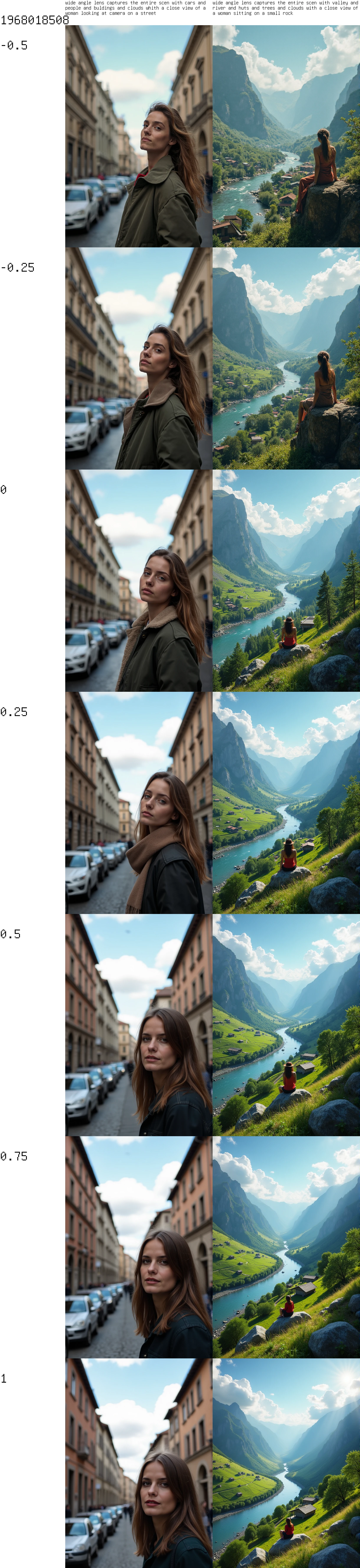
lora (weight) from -0.5 to 1

minus - is more cozy / natural / bit more bokeh
plus - is more straight mostly more background, less bokeh, bit less face-details

look -> image post

bokeh have two versions (lora (weak / strong) from -0.4 to 0.8

you can use CFG-Scale higher than 2, it generates slower i know, but it is the requirement for mor details like the description on FLUX_Distilled
https://civitai.com/models/843551?modelVersionId=943787

training were pictures with patterns and silhouettes, including the inversion (negative image) without captions.

it adds details, it adds a background at a simple prompt even if you don't call it.


What i have found out that . . .

first the schedule-type is important (DDIM or SGM-Uniform or BETA)
you can also try FluxRealisitic with this three schedulers

second the prompt order and some usefull trigger are important

eg:

"detailed, sharp outlines, contrast, wide angle lens captures the entire scen with a street or clouds (your words for details in background eg: car, people, building)",

and then the object of interest

"a woman in front posing on a street"


and on simple prompt eg: "photo of a woman" it adds at least a blurry background


avoid the word photo, portrait that makes more bokeh


???????????? ... and tell me

翻訳を表示

評価とレビュー

-- /5
0 件の評価

まだ十分な評価やレビューが集まっていません

avatar
お知らせ
2024-08-24
モデルを公開
2025-01-01
モデル情報を更新
モデル詳細
タイプ
LORA
投稿日時
2025-01-01
基本モデル
Flux.1 D
バージョン紹介

same image set, new train-parameter

i have linked an image post

許可範囲
創作許可範囲
オンライン画像生成
統合
ダウンロード
商用利用の許可範囲
生成された画像は販売または商業目的での使用
モデルの転売やモデル統合後の販売
QR Code
SeaArt Appをダウンロード
モバイルでAI創作の旅を続けよう