タイプ
Other
投稿日時
2024-04-12
基本モデル
Other

by @IndustrialVectors
repository GitLab
license MIT
The download link gets you the contents of the custom node as a zip. You need to the contents to path_to_your_comfyui/custom_nodes/comfyui_ksamplertimer.
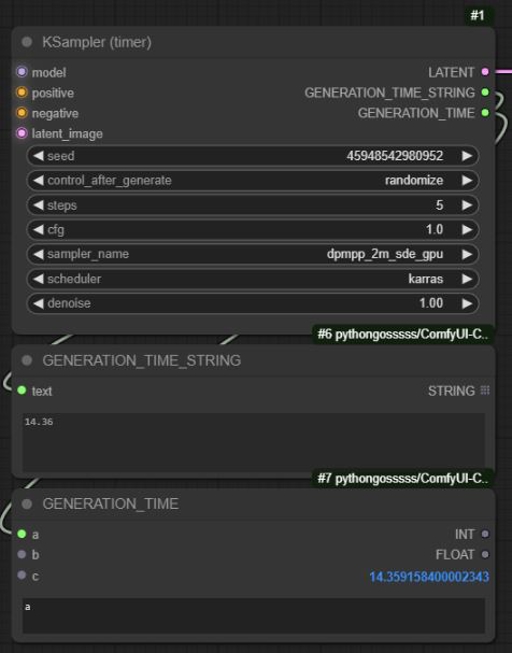
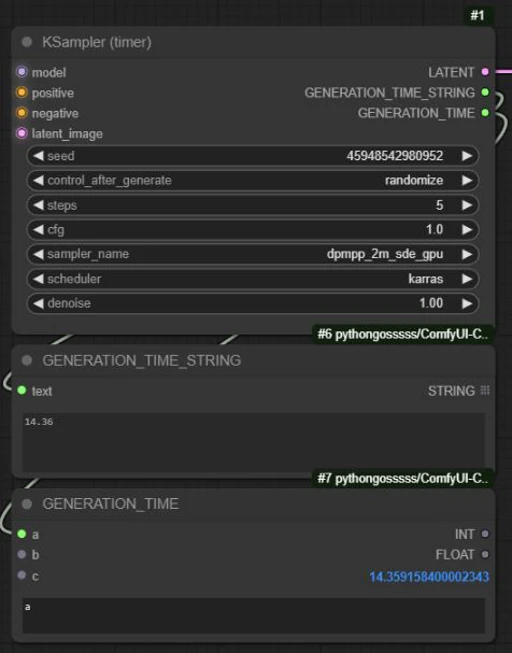
A custom node that returns the generation time of the KSampler.
Intended for benchmarking or debugging.
In ComfyUI, open the Manager, click "Install via GIT URL"
Paste https://gitlab.com/lanterieur/comfyui_ksamplertimer.git in the text field.
Hit Enter/OK.
Clone this project into the custom_nodes directory of your ComfyUI install directory.git clone https://gitlab.com/lanterieur/comfyui_ksamplertimer.git
(Re)Start ComfyUI
The custom node is called KSampler (timer).
The node is found under add node > sampling > KSampler (timer).
This node is just a wrapper around the native KSampler. This node adds two outputs to the KSampler:
GENERATION_TIME_STRING
The time in seconds as a float string with 2 numbers after the comma.
GENERATION_TIME
The time in seconds as a float.
The time returned is for the whole batch.
You may have to divide the generation time by the batch size to get the average generation time. (See examples on how to do it.)
See the sample workflows in the workflows sub directory.


1.転載モデルは学習・共有目的のみで使用し、著作権は原作者に帰属します
2.モデルの認証は公式チャンネルでご連絡ください。クリエイターの権利保護に努めています クリックして認証
