
유형
Other
게시 날짜
2023-09-23
기본 모델
Other
버전 소개
Initial version

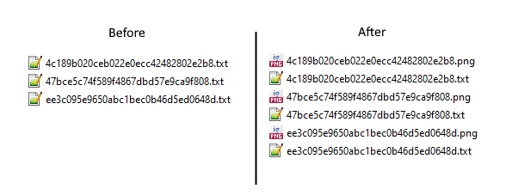

This is a script to generate images from a folder. I made it to batch generate and save images from prompt files.
Download the archive, and ????? the script to the "scripts" folder (located in your webui folder).
Save all your prompt files as ".txt" files in a chosen folder.
Select the "Prompts from folder" script in "txt2img", and set the path to your folder in "Directory Path".
Press "run". It will generate and save the images to your chosen folder.
Note: Do not put anything in the txt2img prompt, as the prompt files will override it.
To generate regularization images for your dataset:
use the same model you are going to train (animefinal-full-pruned.ckpt if NAI, etc)
same Clip Skip as training
use the same VAE embedded in your training (or none if none)
same prompt as the caption for the training image (use the prompt files of your dataset with the script)
use DDIM as sampling method
resolution equal to your training resolution (not the same as the training image!)
seed should be equal to your training seed (420 if you didn't touch it in the scripts).
remove any activation tags on the prompts before generating
Initial version
1. 재게시된 모델의 권리는 원 제작자에게 있습니다.
2. 모델 원작자가 모델을 인증받으려면 공식 채널을 통해 SeaArt.AI 직원에게 문의하세요. 저희는 모든 창작자의 권리를 보호하기 위해 노력합니다. 인증하러 이동
