banner_image ×
SeaArt AI 기업

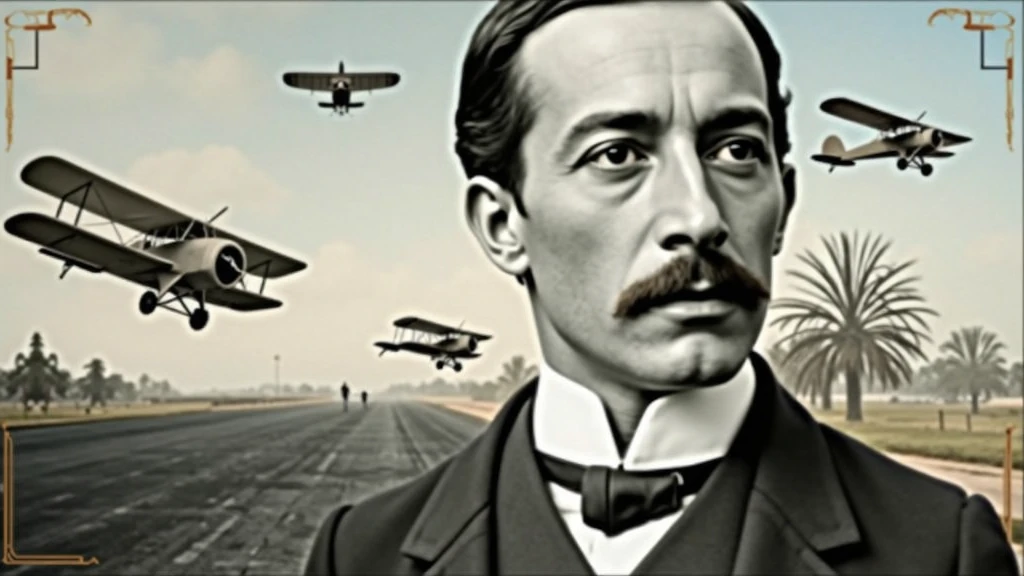
Background: background-image: Use an image that refers to the history of aviati

Background:

background-image: Use an image that refers to the history of aviation. It could be a photo of an old runway, a blue sky or a montage with vintage aviation elements. Another option is a background that matches Santos Dumont's era., as an early 20th century setting.
Color Effect: Consider a sepia tone or a slight texture to give the background a historic, vintage feel..
main image:

Portrait of Santos Dumont: Place a central image of Santos Dumont. It could be a classic photo of him or a stylized illustration.. If you use an illustration, make sure it captures the essence of Dumont's pioneering spirit and personality.
Historical Aircraft: Include images of your most famous inventions, like the 14-Bis or the Demoiselle, somewhere on the cover. These planes can be in the background or as part of the design..
Leading text:

Video Title: Add a big, eye-catching title, as “Santos Dumont: Aviation Pioneer and His Technological Vision”. Use an elegant, easy-to-read font, like “Garamond” or “Montserrat”.
Color and Effect: Use colors that contrast with the background, like white or gold. Consider adding a light shadow or outline to improve readability..
Additional Text:

Subtitle or Short Description: Include shorter text that provides more context, as “Exploring the History and Innovations of the Father of Aviation”. Use a smaller font and keep the color consistent with the title, but a little less prominent.
Position and Colors: Position the subtitle below the main title, ensuring that it does not overlap the main image. Use a complementary color to the main text.
Graphic elements:

Icons and Symbols: Add subtle aviation-related graphics, like stylized wings, old planes or aircraft parts. Position them to complement the main image and text., without overloading the cover.
Borders and Dividers: Use discreet borders or dividers to separate text from images, if necessary.
Logo and B
image
avatar
S
SOFT BYTE
생성 정보
리믹스
기록
프롬프트
Background: background-image: Use an image that refers to the history of aviation . It could be a photo of an old runway , a blue sky or a montage with vintage aviation elements . Another option is a background that matches Santos Dumont&#39 ; s era ., as an early 20th century setting . Color Effect: Consider a sepia tone or a slight texture to give the background a historic , vintage feel .. main image: Portrait of Santos Dumont: Place a central image of Santos Dumont . It could be a classic photo of him or a stylized illustration .. If you use an illustration , make sure it captures the essence of Dumont&#39 ; s pioneering spirit and personality . Historical Aircraft: Include images of your most famous inventions , like the 14-Bis or the Demoiselle , somewhere on the cover . These planes can be in the background or as part of the design .. Leading text: Video Title: Add a big , eye-catching title , as “Santos Dumont: Aviation Pioneer and His Technological Vision” . Use an elegant , easy-to-read font , like “Garamond” or “Montserrat” . Color and Effect: Use colors that contrast with the background , like white or gold . Consider adding a light shadow or outline to improve readability .. Additional Text: Subtitle or Short Description: Include shorter text that provides more context , as “Exploring the History and Innovations of the Father of Aviation” . Use a smaller font and keep the color consistent with the title , but a little less prominent . Position and Colors: Position the subtitle below the main title , ensuring that it does not overlap the main image . Use a complementary color to the main text . Graphic elements: Icons and Symbols: Add subtle aviation-related graphics , like stylized wings , old planes or aircraft parts . Position them to complement the main image and text ., without overloading the cover . Borders and Dividers: Use discreet borders or dividers to separate text from images , if necessary . Logo and B
사이즈
1024X576
날짜
Aug 25, 2024
모드
스튜디오
유형
cell
Checkpoint & LoRA
SeaArt Infinity
Checkpoint
SeaArt Infinity
0개의 댓글
0
1
0
0/400
프로모션 존

원클릭 이블 스타일
icon
원클릭 이블 스타일
avatar
J
avatar_frame
Jensen
fgfdhdfh
icon
fgfdhdfh
avatar
A
Alexa Randell
bnhjfj
icon
bnhjfj
avatar
R
Reva#21uK17
꿈의 소녀 스타일링하기
icon
꿈의 소녀 스타일링하기
avatar
J
avatar_frame
Jensen
정장 착용자
icon
정장 착용자
avatar
A
Arcx Forge
유년시절을 회상하다
icon
유년시절을 회상하다
avatar
B
bingtanghulu
오래된 감시 화면
icon
오래된 감시 화면
avatar
人
人像大师
에프
icon
에프
avatar
N
Nancy Parker
헤어스타일 변경
icon
헤어스타일 변경
avatar
南
南闲
천상의 비의
icon
천상의 비의
avatar
M
Maomao
꿈의 세계 속 소녀
icon
꿈의 세계 속 소녀
avatar
N
Neko89
테스트
icon
테스트
avatar
B
Black Jocer
간단한 4단계 발전기 - 저렴한 비용, 높은 디테일!
icon
간단한 4단계 발전기 - 저렴한 비용, 높은 디테일!
avatar
L
avatar_frame
LitchAI
후
icon
후
avatar
L
lazer2008._47372
사실적인 애니메이션 미스티 (포켓몬)
icon
사실적인 애니메이션 미스티 (포켓몬)
avatar
K
Kaizen
초 사이어인 변신 필터
icon
초 사이어인 변신 필터
avatar
A
avatar_frame
Arcane
WAN2.2개 모델로 이미지에서 동영상으로(10秒、다국어 프롬프트)
icon
WAN2.2개 모델로 이미지에서 동영상으로(10秒、다국어 프롬프트)
avatar
猫
avatar_frame
猫ニコ
FLUX
icon
FLUX
avatar
S
Sebastian marcano
아쿠아 플레이 AI
icon
아쿠아 플레이 AI
avatar
大
大凯智障君
WAN2.2--비디오의 첫 번째와 마지막 프레임
icon
WAN2.2--비디오의 첫 번째와 마지막 프레임
avatar
Y
avatar_frame
YUXINN6362
피규어 한 번에 보기
icon
피규어 한 번에 보기
avatar
成
avatar_frame
成语
메이커 포즈 보간
icon
메이커 포즈 보간
avatar
D
Devman
화면 밖으로 나가기 최적화 버전
icon
화면 밖으로 나가기 최적화 버전
avatar
B
bingtanghulu
영상 + 텍스트를 비디오로
icon
영상 + 텍스트를 비디오로
avatar
M
avatar_frame
Mia x
AI 비디오:钻石服装女孩
icon
AI 비디오:钻石服装女孩
avatar
暖
avatar_frame
暖阳Nuan
AI 비디오:선반 위에서 장난치는 고양이가 되기
icon
AI 비디오:선반 위에서 장난치는 고양이가 되기
avatar
暖
avatar_frame
暖阳Nuan
레고미
icon
레고미
avatar
C
avatar_frame
Crimson Intellect Ai
더보기 보기 

관련 추천

컨트롤넷
logo
한국어
응용
이미지 창작 AI 캐릭터 스위프트 AI 모델 훈련 Canvas AI 앱 워크플로우
정보
스튜디오 리더보드 AI 채팅 AI 블로그 AI 뉴스
도움말
가이드 고객 서비스
응용 프로그램 가져오기
icon
Download on the
APP Store
icon
GET IT ON
Google Play
우리를 팔로우하세요
iconiconiconiconiconiconiconicon
© 2025 SeaArt, Inc.
Copyright Policy
<약관>
<개인 정보 정책> 特定商取引法 資金決済法に基づく表示
더 보기