유형
Checkpoint
게시 날짜
2024-10-14
기본 모델
SDXL 1.0
버전 소개
RAYMNANTS 3.0 is the first revision, the previous versions were never released publicly.


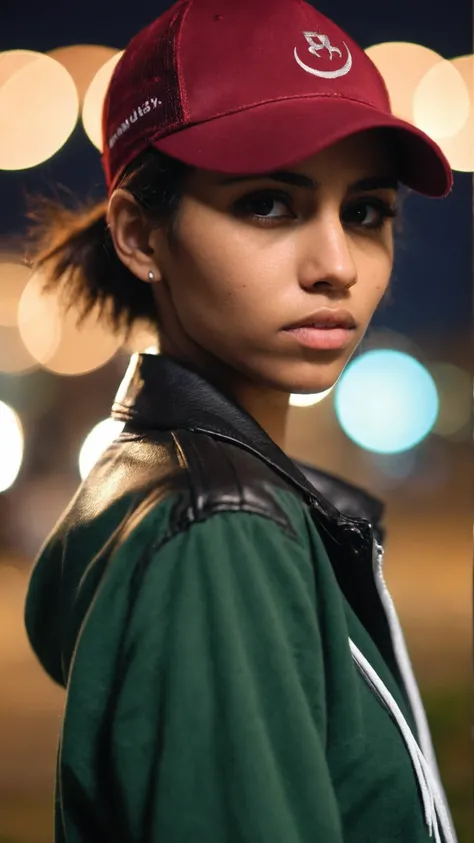
Thanks for taking a look at the Ray- series of models.
Back in November-December 2023, I trained the first model in the series, RAYMNANTS, on a series of thousand-ish personal assets (street photo RAW or edited, digital paintings, etc.) with the goal of creating a model that would make people that look like people, and with the visual style I like best (slightly grainy DSLR photo). From there, I trained two additional family of models with different styles that I link below as well.
I kept the models under wraps as my employer was interested in it but since it ended up in a dead-end and with the recent Flux models explosion, I figured I might as well give my work back to the community before SDXL falls into complete obsolescence.
Thank you all for the inspiration, knowledge and keeping the dream alive.
I hope you folks will have a good time with my models~
R.
+-+-+-+-+-+-+-+-+-+-+-+-+-+-+-+-+-+-+-+-+-+-+-+-+-+-+-+-+-+-+
Check out my painterly model: RAYCTIFIER
Check out my stylized model: RAYBURN
+-+-+-+-+-+-+-+-+-+-+-+-+-+-+-+-+-+-+-+-+-+-+-+-+-+-+-+-+-+-+
My best realistic model, geared towards RAW Photography or Video Still style rendering, but that can do much more.
I’ve put efforts into it to train to not only do believable people, but also to have a certain flair and some dynamism. It tends to produce slightly grainy pictures, with overall muted colors.
I used selective tag-style captioning that hopefully make for easy prompting. I hope you’ll like it.
Keep it simple:
Simple media keywords like “Video still of” or “RAW DLSR Photography of” work well.
Just start with subject, then add more details. The model reacts well to ethnicities or ages in prompts in general, although prompting non-white/grey hair colors for 60+yo people tend to make them younger as as result. The opposite is also true with white hair kids!
Use negative only if you need it, the more generic image correction negative you will use the more the output will start looking generic. Furthering this, RAYMNANTS functions best without generic embeddings.
Quick tip: the model reacts well with using negative keywords in the positive, like for instance “ugly” i.e. try “ugly 20yo Czech woman” instead of “beautiful 20yo Czech woman” and you will get much more interesting faces in general. You can also try the A1111 style syntax ugly|pretty that will do the first half of your steps with the keyword ugly before switching out for the pretty one. Try and experiment with more words!
Video still of a 35 yo Mongol woman, sad, in a room with burgundy walls.
RAW DSLR photography of an old man, emaciated, wearing a worn-down tracksuit, in a street at dawn, vaporwave, soft bokeh
Cinematic movie still, a raging fantasy dwarf, 50yo, muscular, long flowing beard, golden rim light, dynamic action shot, shallow depth of field
Stay within SDXL picture dimensions for the initial gen if you can. (as a rule of thumb adding height and width together should more or less fall within the 2000 range, i.e. 1024+1024=2048 or 832+1216=2048. 1900 to 2100 is okay, 2150 upwards with probably start repeating latent blocks. Multiples of 64 work better too!)
The model performs well with a variety of sampler, I have a personal preference for the classic DPM++ 2M Karras, 30 steps, CFG 5-8; but some of the newer sampler/schedulers work well too, like DEIS/DDIM.
Add an extra 5-8 steps for upscaling x2 at 0.2-0.3 denoising. Upscaler choices are 4x_NMKD-Siax_200k, 4x_foolhardy_Remacri. 1x_ITF_SkinDiffDetail_Lite_v1 is recommended for portraits.
It can sometimes give you desaturated/low contrast output, especially with "video still"as a media type; but that’s easily fixable by adding keywords like e.g. saturated, contrasted, vibrant, etc. to the prompt.
When using the ugly keyword to get more real looking people, the model sometimes outputs asymmetrical eyes. If you really like the seed otherwise, you can try to dampen the effect by weighing the “ugly” token down.
Eyes irises aren’t always round, and sometimes look glassy. This is usually fixed with a small upscaling or a low denoising second pass.
Grainy output and non-supermodel people: that’s literally what the model has been trained for, so that’s what you get.
The model can do tasteful , but isn't suitable for anything beyond that. Male below the belt is fairly unknown to the model.

RAYMNANTS 3.0 is the first revision, the previous versions were never released publicly.
1. 재게시된 모델의 권리는 원 제작자에게 있습니다.
2. 모델 원작자가 모델을 인증받으려면 공식 채널을 통해 SeaArt.AI 직원에게 문의하세요. 저희는 모든 창작자의 권리를 보호하기 위해 노력합니다. 인증하러 이동
