50M
+Creator



Upload your images, set training parameters, and build a custom FLUX LoRA model online


Train in Your Browser
Run your training job directly on SeaArt AI. Works from any browser, just upload images, configure settings, and launch your custom model session from any device.

Monitor Training in Real Time
Set preview prompts before launching, the platform generates live sample images during training so you can track whether the model is learning your target style correctly.



Custom Trigger Words
Assign a custom keyword to your trained character or style. Drop that trigger word into any FLUX prompt to reproduce your trained look consistently across generations.

From image selection to parameter tuning to deployment, the full training workflow runs on SeaArt AI.

Upload images directly or pull from personal work saved on SeaArt AI. The platform applies FLUX-compatible natural language tagging to your dataset automatically. Aim for 20 to 40 images at 1024x1024 with clear characters and rich angles for consistent training results.
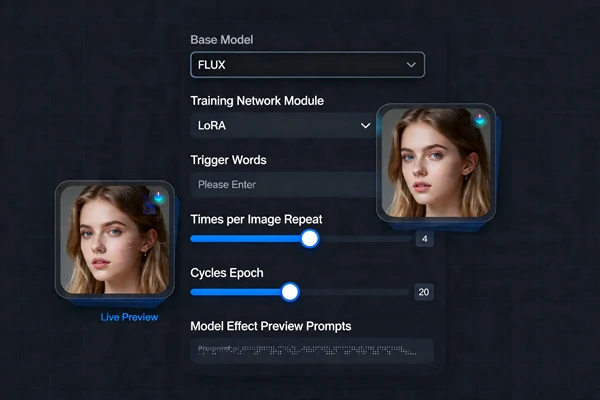
Name your training task and set LoRA as the training module. Define trigger words, adjust repeat count per image, and set total epoch count. For FLUX portrait training, the Prodigy optimizer handles learning rate automatically, preview prompts generate real-time sample images during training to track progress.

Your custom FLUX model becomes available on SeaArt AI the moment training completes. Use it in the AI image generator, combine it with other LoRA layers, or pair it with FLUX AI image generator workflow for sharper, more refined outputs across every generation.
Upload Your Dataset
Upload photos with clear subjects, varied angles, and clean backgrounds, at least 10 to 20 images recommended.
Configure Training Settings
Name your task, pick a base model, set LoRA parameters, and add your trigger words.
Launch and Generate
Click Train Now, wait for completion, then use your model in any FLUX generation workflow.

What is FLUX model training?
SeaArt AI's model training feature lets you create a custom LoRA model fine-tuned on the FLUX architecture by uploading your own image dataset. The trained model learns your subject's appearance or style and can be triggered in any compatible FLUX generation workflow.

How many images do I need for FLUX LoRA training?
Twenty to forty well-curated images works well for character training, shoot for 1024x1024 resolution with clear characters, rich angles, and varied backgrounds. Blurry images, watermarks, and inconsistent styles in your dataset can reduce the final model quality.
What are trigger words and how do I use them?
Trigger words are custom keywords you set during training that activate your trained character or style when included in a prompt. Once your FLUX training is done, drop the trigger word into any FLUX prompt to reproduce your trained look.
Can I try FLUX training online for free?
Free users on SeaArt AI receive 130 Stamina daily, usable for training tasks and image generation runs. Training cost depends on your dataset size and epoch count - the platform shows an estimated cost before you confirm the run.
Ready to build your own AI model? Join SeaArt AI and run your first FLUX LoRA training job online. Get Stamina daily to get started, your first training run is included with the free tier.