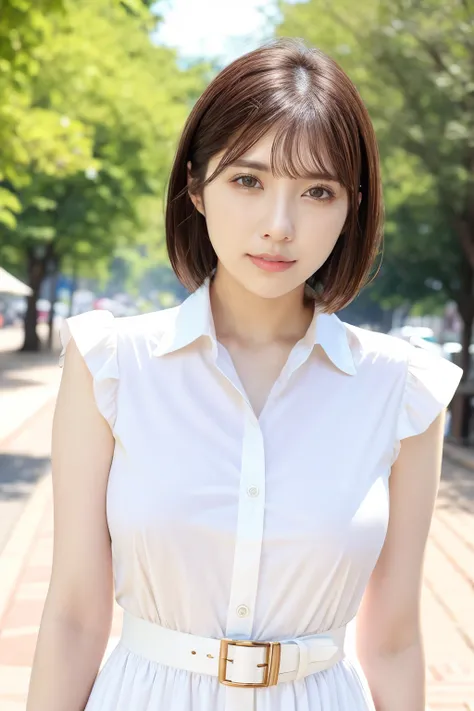
Imitation model. Modelled after young Japanese AV actress Mai Tsubasa (つばさ舞).
Introducing the new S-model, Mai Tsubasa. Almost perfect in many ways, good figure, optimal body proportions, not too busty, not too doll-like, not too muscular, not too chubby. Just nice. Debuted only back in 2021, Mai is perhaps one of the rising star in the JAV industry, and over time is expanding in terms of the genres that she covers. IMO, appearance wise she would easily go S-tier among the gravure community as well. It is strange how there's a LoRA for Konan, Yua, and even Karen, but not Mai. So here's another tick to the S-tier checklist.
~~~~~~~~~~~~~~~~~~~~~~~~~~
Recommended LoRA strength: 0.8 (0.6-1.0 are plausible range dependent on checkpoints; higher values >1 exaggerates expression.. 0.9 can be good in certain scenarios)
Main Prompt:
maitsubasa_jav, , short hair, brown hair, smile, lipstick
variations: bob cut, wet hair
facial variations: parted lips, pink lipstick, makeup, thick makeup, teeth, smile, grin
Use of facial prompts depend on checkpoints, you can make a case for using it or not - personal preference
~~~~~~~~~~~~~~~~~~~~~~~~~~~~~~~~~~~~~~
Checkpoints thatworks well
1) Realisian.
No doubt. Still the best model for most JAV LoRAs I made.
2) RealisticMix
Face can be abit off. But considered decent.
3) PerfectWorld & MajicMix Realistic
SImilar performance, in different ways and style. But likely less accurate than the first 2 models.
~~~~~~~~~~~~~~~~~~~~~~~~~~~~
Note for achieving good resemblance:
Because there's a cheerful vibe to Mai's appearance, most of the time, Adetailer correction might over-correct her expression or over-exaggerate the "grin". So I had recommend that you split the process in 2 steps, even though you can technically get away with just using the main prompt.
How to maximise facial resemblance:
1. Generate the main prompt using a LoRA strength of 0.8-1.0. so its probably safe to say that this weight is stable for use.
Note: In this step do not add "smile", "grin", or "teeth" in the main prompt if you want only a natural light smile. Ok to have "parted lips", "lipstick" or "makeup".
2. Next turn on facial Adetailer, and put something like
"face of maitsubasa_jav, short hair, brown hair, parted lips, lipstick, smile, makeup, teeth <lora here>"
For the loRA weight in the Adetailer, you can choose to use 0.9 or 1.0. Experiment this, its different for every checkpoint.
For Adetailer strength, you can try 0.4 - 0.45 for close-up or cowboy shots, and even 0.5 for full body ones.
It is still better to use AD at baseline generation (512,768 etc) and then upscale it later.
Recommended approach: is to not use HiRes, but upscale it with img2img instead.
Use a denoise strength of 0.15 -0.20 (anything higher will overcorrect face during the process), and turn off Adetailer. Do not use anything more than 0.25 else the eyes might look bit weird.
~~~~~~~~~~~~~~~~~~~~~~~~~~~~~~~~~
Issues:
No issues so far, apart from some badHands (in some checkpoints).
Post-production edits/Reproducibility:
Minimal badHand edits. all img2img original upscales.
Happy prompting. And do share [SFW] creations~