×
SeaArt AI Empresa

### **Promo Brief for a Movie Poster Featuring Pyramids and an Eerie Pharaoh Mum
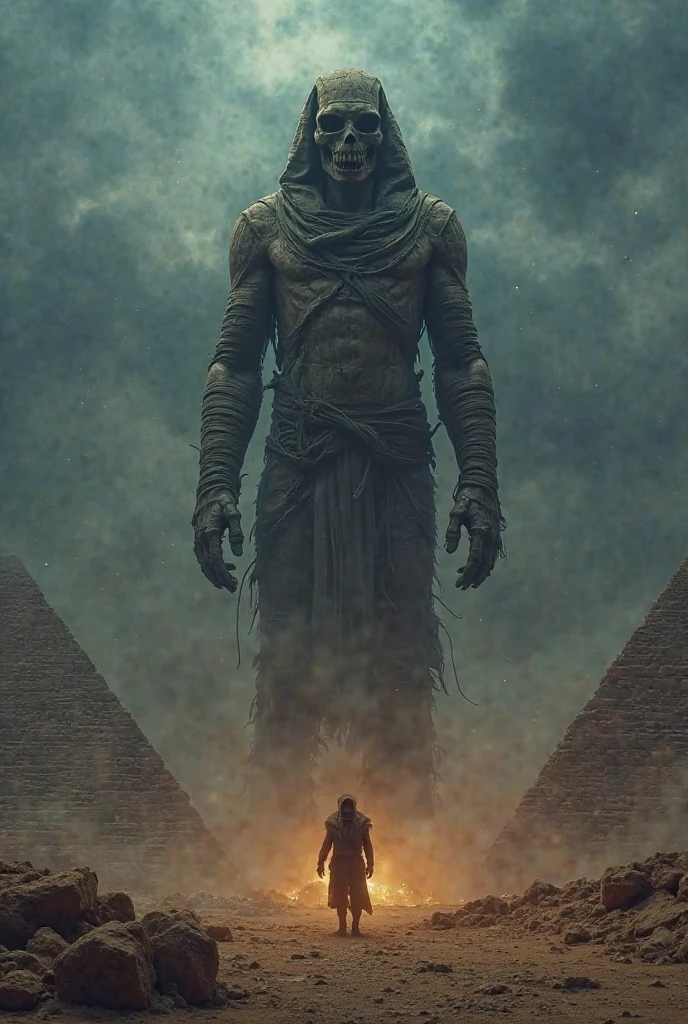

### **Promo Brief for a Movie Poster Featuring Pyramids and an Eerie Pharaoh ?????**

---

#### **1. Visual Narrative (Sensory Description)**:
- **Primary Focus**: The poster should prominently feature an enormous, towering ????? as the central figure, dominating the composition. The ?????’s colossal size will evoke a sense of overwhelming dread and power, making it clear that this ancient force is the primary antagonist.
- **Pyramids**: The pyramids must be depicted on a monumental scale, almost as large as the ????? itself, to emphasize their historical grandeur and reinforce the film's Egyptian setting. They should loom in the background, partially illuminated by faint light, creating a dramatic interplay between the natural and supernatural.
- **Atmosphere**: The overall mood should evoke a chilling blend of ancient horror and suspense. Elements like swirling sandstorms or dense fog can envelop the scene, adding a layer of mystery and foreboding. The environment should feel alive with tension, drawing viewers into a world where the past has come back to haunt the present.

---

#### **2. Color Palette**:
- **Dominant Colors**:
  - **Dark Red/Brown**: Used extensively for the ?????’s skin and details to convey decay, danger, and ancient malevolence. These colors should appear weathered and cracked, suggesting centuries of entombment.
  - **Dark Blue/Grey**: Employ these tones for the sky and ground to create a cold, ominous tone. The blue-grey hue of the stormy sky will mirror the desolation below, while the dusty grey of the desert adds texture and depth.
  - **Gold/Yellow**: Subtle accents of gold or yellow can highlight reflective surfaces on the pyramids or glowing hieroglyphics, adding a mystical and cinematic touch.
  - **White/Ivory**: Use white sparingly for text or bright highlights to create sharp contrast and draw attention to key elements.

---

#### **3. Lens Selection**:
- **Macro Lens**: Use a macro lens to capture intricate details of the ?????, such as its cracked skin, hollow eyes, and tattered wrappings. This will amplify the sense of dread and realism.
- **Wide-Angle Lens**: A wide-angle lens is essential for showcasing both the ????? and the pyramids in all their massive glory. This lens will emphasize scale and perspective, making the viewer feel small and insignificant in comparison.
- **Telephoto Lens**: A telephoto lens can be employed to zoom in on specific features of the ????? or pyramids, creating dramatic close-ups that build tension and heighten the impact of the imagery.

---

#### **4. Camera Work**:
- **Angles**:
  - **Low Angle Shot**: Capture the ????? from a low angle to make it appear even more imposing and terrifying. Its sheer size should dominate the frame, creating a sense of awe and fear.
  - **High Angle Shot**: Use a high-angle shot for the pyramids to emphasize their vastness and historical significance. This angle will also help balance the ?????’s dominance by giving equal weight to the architectural marvels.
- **Depth of Field**:
  - Apply a shallow depth of field to focus attention on the ????? or key elements, leaving the background slightly blurred to create a sense of distance and isolation.
  - In some areas, use a deeper depth of field to highlight the vastness of the pyramids, ensuring they remain visually striking despite the ?????’s prominence.
- **Camera Movement**:
  - Keep the camera mostly static to maintain a tense and unsettling atmosphere.
  - Introduce subtle movements, such as slow pans or gentle tilts, to guide the viewer’s eye across the poster and reveal details gradually.
  - Consider using a dolly shot to transition smoothly from the pyramids to the ?????, connecting the two elements seamlessly.

---

#### **5. Lighting**:
- **General Lighting**:
  - Use dim, low-key lighting to establish a dark, eerie ambiance. The lighting should feel minimalistic, almost as though it’s coming from a single source like moonlight or flickering torches.
  - Avoid harsh lighting; instead, opt for soft, diffused light to cast deep shadows and enhance the chilling effect.
- **Shadows and Highlights**:
  - Shadows should be prominent and detailed, especially around the ?????’s face and body, to accentuate its skeletal structure and decay.
  - Highlights can be used sparingly on reflective surfaces (e.g., the ?????’s teeth, golden accents on the pyramids) to create moments of startling brightness.
- **Psychological Impact**:
  - The interplay between light and shadow should evoke feelings of unease and uncertainty. Occasional flashes of light or faint glows can add to the suspenseful atmosphere.

---

#### **6. Contrast**:
- **Color Contrast**:
  - Create stark contrasts between warm tones (dark reds, browns) and cool tones (blues, greys) to heighten the visual drama and tension.
  - Use contrasts between dark and light areas to draw the viewer’s eye to critical elements, such as the ?????’s eyes or the sharp edges of the pyramids.
- **Light vs. Shadow**:
  - Strong contrasts between light and shadow are essential to give the image depth and dimension. Shadows should dominate, with light serving as a haunting focal point.

---

#### **7. Additional Elements**:
- **Typography**:
  - Use bold, serif fonts for the title to evoke a sense of antiquity and gravitas. The title should be placed prominently at the top or bottom of the poster, ensuring it stands out against the dark background.
  - Incorporate quotes or taglines in a clean, modern font to provide context and intrigue without detracting from the visuals.
- **Composition**:
  - Place the ????? centrally or slightly off-center to balance its dominance with the expansive pyramids.
  - Ensure there is negative space around key elements to avoid overcrowding and allow the imagery to breathe.
- **Symbolism**:
  - Include subtle symbols like hieroglyphics, sarcophagi, or ancient artifacts to reinforce the Egyptian theme and deepen the narrative.

---

#### **8. Title Placement**:
- **Title**: **"The Return of the ?????"**
  - The title should be written in a cinematic style, using bold, uppercase letters with a weathered, ancient font to reflect the film’s themes of resurrection and terror.
  - Position the title either at the top of the poster (above the ?????) or along the bottom (below the pyramids), depending on which element you want to emphasize more.
  - Add a subtle glow or embossed effect to the text to make it stand out against the dark background, but ensure it doesn’t overpower the visual elements.

---

### **Final Notes**:
The poster should aim to captivate viewers with its chilling aesthetic and immersive design. By combining a dark color palette, meticulous lighting, and dramatic composition, the poster will effectively communicate the film’s themes of ancient horror and suspense. The goal is to leave viewers intrigued and slightly unsettled, eager to explore the story further.
image
avatar
H
hossam ali
Informações de criação
Remix
Registro
Prompts
### **Promo Brief for a Movie Poster Featuring Pyramids and an Eerie Pharaoh ????? ** --- #### **1 . Visual Narrative (Sensory Description)**: - **Primary Focus**: The poster should prominently feature an enormous , towering ????? as the central figure , dominating the composition . The ????? ’s colossal size will evoke a sense of overwhelming dread and power , making it clear that this ancient force is the primary antagonist . - **Pyramids**: The pyramids must be depicted on a monumental scale , almost as large as the ????? itself , to emphasize their historical grandeur and reinforce the film's Egyptian setting . They should loom in the background , partially illuminated by faint light , creating a dramatic interplay between the natural and supernatural . - **Atmosphere**: The overall mood should evoke a chilling blend of ancient horror and suspense . Elements like swirling sandstorms or dense fog can envelop the scene , adding a layer of mystery and foreboding . The environment should feel alive with tension , drawing viewers into a world where the past has come back to haunt the present . --- #### **2 . Color Palette**: - **Dominant Colors**: - **Dark Red/Brown**: Used extensively for the ????? ’s skin and details to convey decay , danger , and ancient malevolence . These colors should appear weathered and cracked , suggesting centuries of entombment . - **Dark Blue/Grey**: Employ these tones for the sky and ground to create a cold , ominous tone . The blue-grey hue of the stormy sky will mirror the desolation below , while the dusty grey of the desert adds texture and depth . - **Gold/Yellow**: Subtle accents of gold or yellow can highlight reflective surfaces on the pyramids or glowing hieroglyphics , adding a mystical and cinematic touch . - **White/Ivory**: Use white sparingly for text or bright highlights to create sharp contrast and draw attention to key elements . --- #### **3 . Lens Selection**: - **Macro Lens**: Use a macro lens to capture intricate details of the ?????, such as its cracked skin , hollow eyes , and tattered wrappings . This will amplify the sense of dread and realism . - **Wide-Angle Lens**: A wide-angle lens is essential for showcasing both the ????? and the pyramids in all their massive glory . This lens will emphasize scale and perspective , making the viewer feel small and insignificant in comparison . - **Telephoto Lens**: A telephoto lens can be employed to zoom in on specific features of the ????? or pyramids , creating dramatic close-ups that build tension and heighten the impact of the imagery . --- #### **4 . Camera Work**: - **Angles**: - **Low Angle Shot**: Capture the ????? from a low angle to make it appear even more imposing and terrifying . Its sheer size should dominate the frame , creating a sense of awe and fear . - **High Angle Shot**: Use a high-angle shot for the pyramids to emphasize their vastness and historical significance . This angle will also help balance the ????? ’s dominance by giving equal weight to the architectural marvels . - **Depth of Field**: - Apply a shallow depth of field to focus attention on the ????? or key elements , leaving the background slightly blurred to create a sense of distance and isolation . - In some areas , use a deeper depth of field to highlight the vastness of the pyramids , ensuring they remain visually striking despite the ????? ’s prominence . - **Camera Movement**: - Keep the camera mostly static to maintain a tense and unsettling atmosphere . - Introduce subtle movements , such as slow pans or gentle tilts , to guide the viewer’s eye across the poster and reveal details gradually . - Consider using a dolly shot to transition smoothly from the pyramids to the ?????, connecting the two elements seamlessly . --- #### **5 . Lighting**: - **General Lighting**: - Use dim , low-key lighting to establish a dark , eerie ambiance . The lighting should feel minimalistic , almost as though it’s coming from a single source like moonlight or flickering torches . - Avoid harsh lighting ; instead , opt for soft , diffused light to cast deep shadows and enhance the chilling effect . - **Shadows and Highlights**: - Shadows should be prominent and detailed , especially around the ????? ’s face and body , to accentuate its skeletal structure and decay . - Highlights can be used sparingly on reflective surfaces (e . g ., the ????? ’s teeth , golden accents on the pyramids) to create moments of startling brightness . - **Psychological Impact**: - The interplay between light and shadow should evoke feelings of unease and uncertainty . Occasional flashes of light or faint glows can add to the suspenseful atmosphere . --- #### **6 . Contrast**: - **Color Contrast**: - Create stark contrasts between warm tones (dark reds , browns) and cool tones (blues , greys) to heighten the visual drama and tension . - Use contrasts between dark and light areas to draw the viewer’s eye to critical elements , such as the ????? ’s eyes or the sharp edges of the pyramids . - **Light vs . Shadow**: - Strong contrasts between light and shadow are essential to give the image depth and dimension . Shadows should dominate , with light serving as a haunting focal point . --- #### **7 . Additional Elements**: - **Typography**: - Use bold , serif fonts for the title to evoke a sense of antiquity and gravitas . The title should be placed prominently at the top or bottom of the poster , ensuring it stands out against the dark background . - Incorporate quotes or taglines in a clean , modern font to provide context and intrigue without detracting from the visuals . - **Composition**: - Place the ????? centrally or slightly off-center to balance its dominance with the expansive pyramids . - Ensure there is negative space around key elements to avoid overcrowding and allow the imagery to breathe . - **Symbolism**: - Include subtle symbols like hieroglyphics , sarcophagi , or ancient artifacts to reinforce the Egyptian theme and deepen the narrative . --- #### **8 . Title Placement**: - **Title**: **"The Return of the ????? "** - The title should be written in a cinematic style , using bold , uppercase letters with a weathered , ancient font to reflect the film’s themes of resurrection and terror . - Position the title either at the top of the poster (above the ????? ) or along the bottom (below the pyramids) , depending on which element you want to emphasize more . - Add a subtle glow or embossed effect to the text to make it stand out against the dark background , but ensure it doesn’t overpower the visual elements . --- ### **Final Notes**: The poster should aim to captivate viewers with its chilling aesthetic and immersive design . By combining a dark color palette , meticulous lighting , and dramatic composition , the poster will effectively communicate the film’s themes of ancient horror and suspense . The goal is to leave viewers intrigued and slightly unsettled , eager to explore the story further .
Tamanho
688X1024
Data
Apr 7, 2025
Modo
Lab
Tipo
cell
Checkpoint & LoRA
SeaArt Infinity
Checkpoint
SeaArt Infinity
comentário(s)
0
1
0
0/400
Área de promoções

Corações de Doce! | !
icon
Corações de Doce! | !
avatar
A
avatar_frame
Arcane
Transforme Qualquer Coisa em Fotos Vintage
icon
Transforme Qualquer Coisa em Fotos Vintage
avatar
I
IvoleGrey
Textura Estilizada de Escultura em Pedra
icon
Textura Estilizada de Escultura em Pedra
avatar
A
avatar_frame
AI-KSK
Um
icon
Um
avatar
A
Alejo
Tornar-se uma cena de filme
icon
Tornar-se uma cena de filme
avatar
J
avatar_frame
JAY
wfesad
icon
wfesad
avatar
K
Key Comearound
projeção desconhecida
icon
projeção desconhecida
avatar
A
avatar_frame
Arcane
Sra. pintura
icon
Sra. pintura
avatar
J
avatar_frame
Jensen
fhgdh
icon
fhgdh
avatar
G
gsryryeryeyery
Baguete de estimação
icon
Baguete de estimação
avatar
A
avatar_frame
AI-KSK
chaveiro para animais de estimação
icon
chaveiro para animais de estimação
avatar
pandy
SeaArt SonoVision Imagem para Vídeo
icon
SeaArt SonoVision Imagem para Vídeo
avatar
じ
avatar_frame
じゃがいも
Gerador de vídeo Coldplay Kiss Cam
icon
Gerador de vídeo Coldplay Kiss Cam
avatar
雨
avatar_frame
雨上がり
CAMINHE EM DIREÇÃO À CÂMERA
icon
CAMINHE EM DIREÇÃO À CÂMERA
avatar
青
avatar_frame
青苹果
Filtro de Câmera Lenta do Momento da Explosão — Perspectiva Intensa em Câmera Lenta
icon
Filtro de Câmera Lenta do Momento da Explosão — Perspectiva Intensa em Câmera Lenta
avatar
A
avatar_frame
Arcane
Drone Capture-me
icon
Drone Capture-me
avatar
J
avatar_frame
Jay Huang
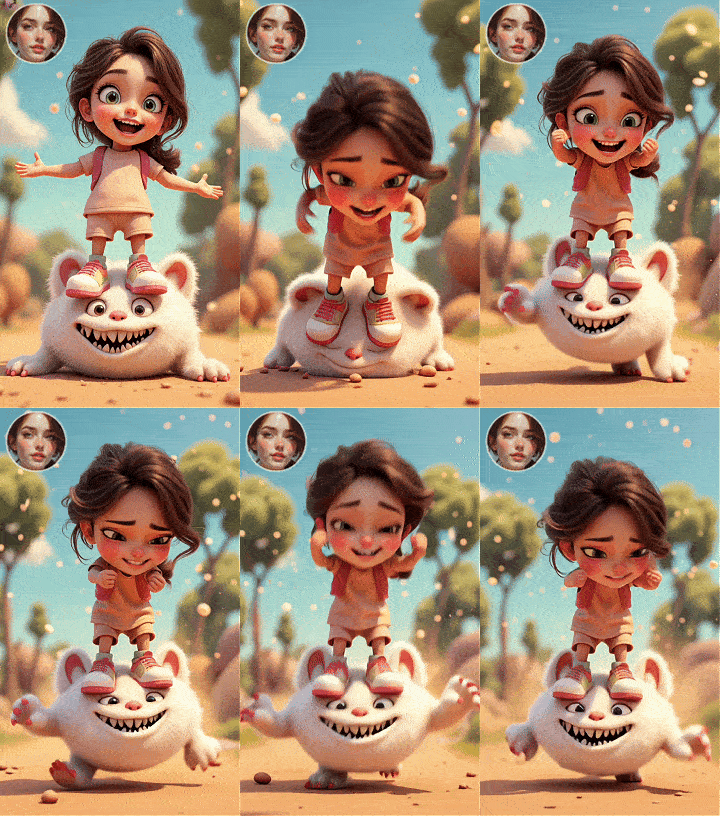
Vamos, meu pequeno monstro
icon
Vamos, meu pequeno monstro
avatar
洛
avatar_frame
洛希瓣酒徒
Mostre a tatuagem em suas costas
icon
Mostre a tatuagem em suas costas
avatar
青
avatar_frame
青苹果
Inversão da Gravidade
icon
Inversão da Gravidade
avatar
A
avatar_frame
Arcane
Imagem para vídeo WAN2.2 modelos para criar vídeo a partir de imagem(10Segundos、Prompt multilíngue)
icon
Imagem para vídeo WAN2.2 modelos para criar vídeo a partir de imagem(10Segundos、Prompt multilíngue)
avatar
猫
avatar_frame
猫ニコ
Referência de vídeo com várias imagens
icon
Referência de vídeo com várias imagens
avatar
S
avatar_frame
SeaArt Official
Eu Amo Você
icon
Eu Amo Você
avatar
H
hornyloser
Beijos apaixonados Vídeo de brincadeira (imagem para vídeo)
icon
Beijos apaixonados Vídeo de brincadeira (imagem para vídeo)
avatar
P
Puro Arte
Imagem para vídeo WAN2.2--Gerar vídeo a partir de imagens(ultra-clear)
icon
Imagem para vídeo WAN2.2--Gerar vídeo a partir de imagens(ultra-clear)
avatar
Y
avatar_frame
YUXINN6362
Filtro de Chute Voador Dinâmico
icon
Filtro de Chute Voador Dinâmico
avatar
A
avatar_frame
Arcane
Ver Mais 

Recomendações relacionadas

ControlNet
logo
Português
Aplicativo
Criar imagem Personagem IA Swift AI Treinamento de modelo Canvas Apps de IA Fluxo de trabalho
Sobre
Lab Classificação Chat IA Blog Notícias
Ajuda
Guias Atendimento ao Cliente
Obter aplicativo
icon
Download on the
APP Store
icon
GET IT ON
Google Play
Siga-nos
iconiconiconiconiconiconiconicon
© 2025 SeaArt, Inc.
Copyright Policy
Termos
Política de Privacidade 特定商取引法 資金決済法に基づく表示
Mais