ประเภท
LORA
เวลาโพสต์
2024-08-30
โมเดลพื้นฐาน
Flux.1 D






NOTE: People asking me why I need buzz points. Answer is I need as many civitai buzz possible to run multiple flux tests. One run cost around 2600 buzz, and usually per model I need to run like 2-3 times to get decent enough result. In the future once I know the optimal settings I will stop asking for buzz donations from Early Access program.
Anyway in short, more buzz = more loras, so gimme gimme now x2.
Support me at: https://ko-fi.com/makina69
Quick tips on the easiest way to start your Flux journey from my experience so far:
Forge - this has the familiar WebUI A1111 style if you just can't be bothered to learn comfy.
github.com/lllyasviel/stable-diffusion-webui-forge/releases/download/latest/webui_forge_cu121_torch231.7z
To ????? 7z file: www.7zip.org
Start > Command Prompt as Administrator then go to the unzipped folder and run update.bat then
run run.bat to start the webui.
Get the checkpoint flux.1d fp8:
huggingface.co/lllyasviel/flux1_dev/blob/main/flux1-dev-fp8.safetensors
Clip_l & t5xxl_fp8_e4m3fn & put them in /models/textencoders of your Forge directory
huggingface.co/comfyanonymous/flux_text_encoders/tree/main
Put this in /models/vae: huggingface.co/black-forest-labs/FLUX.1-schnell/resolve/main/ae.safetensors
Realism Lora, put in /models/lora - civitai.com/models/631986/xlabs-flux-realism-lora
This is optional, you can use your own favourite upscaler. ESRGAN/4x_NMKD-Superscale-SP_178000_G.pth · uwg/upscaler at main (huggingface.co)
Put in /models/ESRGAN
Below is the usual settings I use: (Use LMS for best skin texture)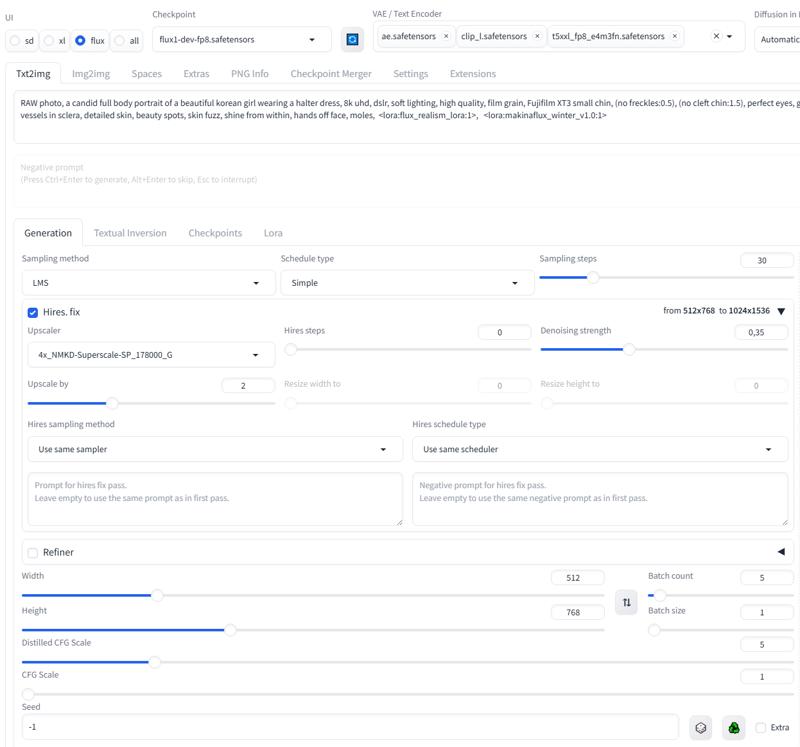
1. สิทธิ์ของโมเดลที่โพสต์ซ้ำเป็นของผู้สร้างต้นฉบับ
2. ผู้สร้างต้นฉบับที่ต้องการรับรองโมเดล โปรดติดต่อเจ้าหน้าที่ SeaArt AI ผ่านช่องทางทางการ คลิกเพื่อรับรอง
