ประเภท
Other
เวลาโพสต์
2024-08-26
โมเดลพื้นฐาน
Other
การแนะนำเวอร์ชัน
delete image row
options menu
zoom option

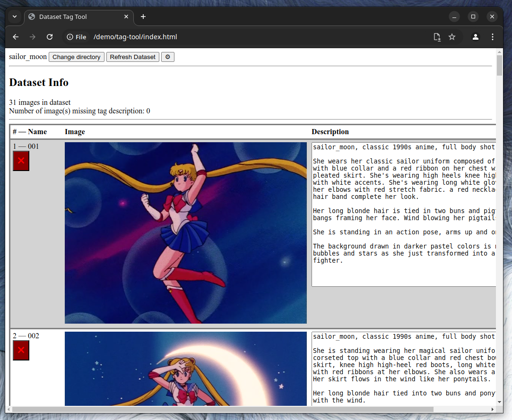

I am too lazy to edit text files.
I am too lazy to install complex dataset management tools.
If you are like me this tool is for you.
Open the HTML file: index.html.
The tool will open without any dataset.
Click "Select Directory" and navigate to your dataset folder.
Chrome will prompt for authorization to access your file system. Accept "Edit files".
When you select the directory, images and text files are loaded.
The tool scans the dataset directory for images and text files.
When an image does not have an associated text file, the description text area will load empty. A text file will be created when you update the description.
Changes are triggered when the text area loses focus. In simple terms, type a change then click outside the text box.
Changes are immediate and irreversible. The tool does not keep a change history. The tool does not provide any undo capabilities. Check how your browser handles Ctrl+Z if you need to undo a text change.
In your file manager, add the images to the dataset directory.
In the tool, click the "Refresh Dataset" button.
You can remove images manually in your file manager, then hit the "Refresh Dataset" button.
You can remove images in the tool by clicking the red "X" button under the image name.
Removed images and text files are not deleted. They are moved to a deleted subdirectory.
Click the Cogwheel button to open the options panel.
MIT
Options menu
Zoom option
Unreleased
Remove image
Image file & image tag file are moved to the deleted subdirectory
First release to CivitAI
Load Dataset
Refresh Dataset
Display image name, image, image tag file contents
Create/Update image tag file contents upon change


delete image row
options menu
zoom option
1. สิทธิ์ของโมเดลที่โพสต์ซ้ำเป็นของผู้สร้างต้นฉบับ
2. ผู้สร้างต้นฉบับที่ต้องการรับรองโมเดล โปรดติดต่อเจ้าหน้าที่ SeaArt AI ผ่านช่องทางทางการ คลิกเพื่อรับรอง
