ประเภท
Other
เวลาโพสต์
2023-09-07
โมเดลพื้นฐาน
Other
การแนะนำเวอร์ชัน
This workflow is for new versions of WAS-NS
Adjust the Image Adjustment Filters Edge Enhance as needed.

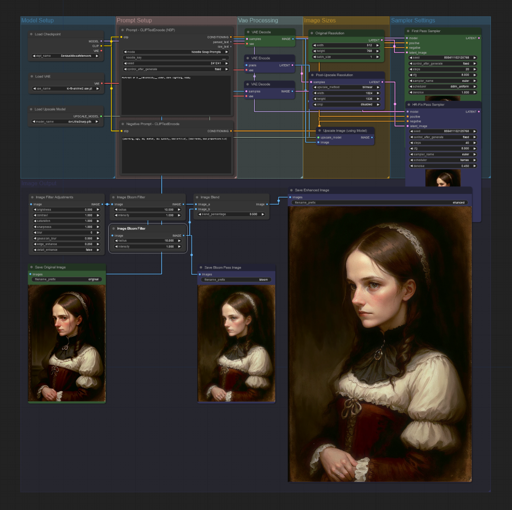
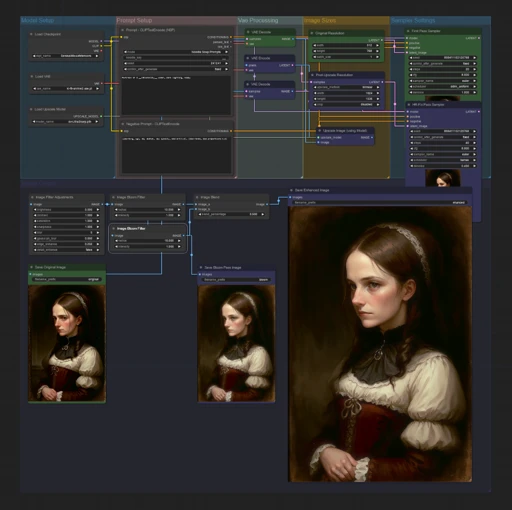
These are worksapces to load into ComfyUI for various tasks such as HR-Fix with AI Model Upscaling
HR-Fix Bloom Workspace depends on Filters Suite V3, and NSP CLIPTextEncode nodes from here: https://civitai.com/models/20793/was-node-suites-comfyui
Extract "ComfyUI-HR-Fix_workspace.json" (or whatever the worksapce is called)
Load workspace with the "Load" button in the right-hand menu and select "ComfyUI-HR-Fix_workspace.json"
Select your desired diffusion model
Select VAE model or use diffusion models vae
Select your desired upscale model
change prompt and sampling settings as seen fit.
(currently v1 set to 512x768 x4= 2048x3072, v2 has a resize so final size is 1024x1536)

This workflow is for new versions of WAS-NS
Adjust the Image Adjustment Filters Edge Enhance as needed.
1. สิทธิ์ของโมเดลที่โพสต์ซ้ำเป็นของผู้สร้างต้นฉบับ
2. ผู้สร้างต้นฉบับที่ต้องการรับรองโมเดล โปรดติดต่อเจ้าหน้าที่ SeaArt AI ผ่านช่องทางทางการ คลิกเพื่อรับรอง
