
Flux.1 Kontext: Redefining Creative Control
FLUX.1 Kontext introduces a suite of tightly integrated features that collectively shift the paradigm of AI image creation from a simple one-shot generation process to a dynamic and controlled editing experience. These capabilities empower users with a level of precision and consistency previously unattainable in a single model.
In-Context, Multimodal Editing
The foundational capability of the Kontext suite is its ability to perform in-context, multimodal editing. This means the model accepts both an image and a text prompt as simultaneous inputs. This approach fundamentally unifies the acts of image generation and image editing. Users can upload an existing image and modify it using simple, natural language instructions, eliminating the need for complex workflows involving masks, layers, or model fine-tuning. The model "understands" the content of the image and applies the text-based instruction within that visual context.
Character and Object Consistency
A standout and highly sought-after feature is the model's remarkable ability to maintain character and object consistency. FLUX.1 Kontext can extract the unique visual identity of a person or an object from a reference image and preserve that identity across multiple generated scenes, poses, and environments. For example, a creator can take a single photograph of a character and generate a series of images placing that same character in a jungle, a cyberpunk city, or a historical setting, all while maintaining consistent facial features, hairstyle, and even clothing style. This capability extends beyond characters to inanimate objects, allowing a specific product or logo to be placed in various marketing contexts with its unique characteristics intact.
Precise Local Editing
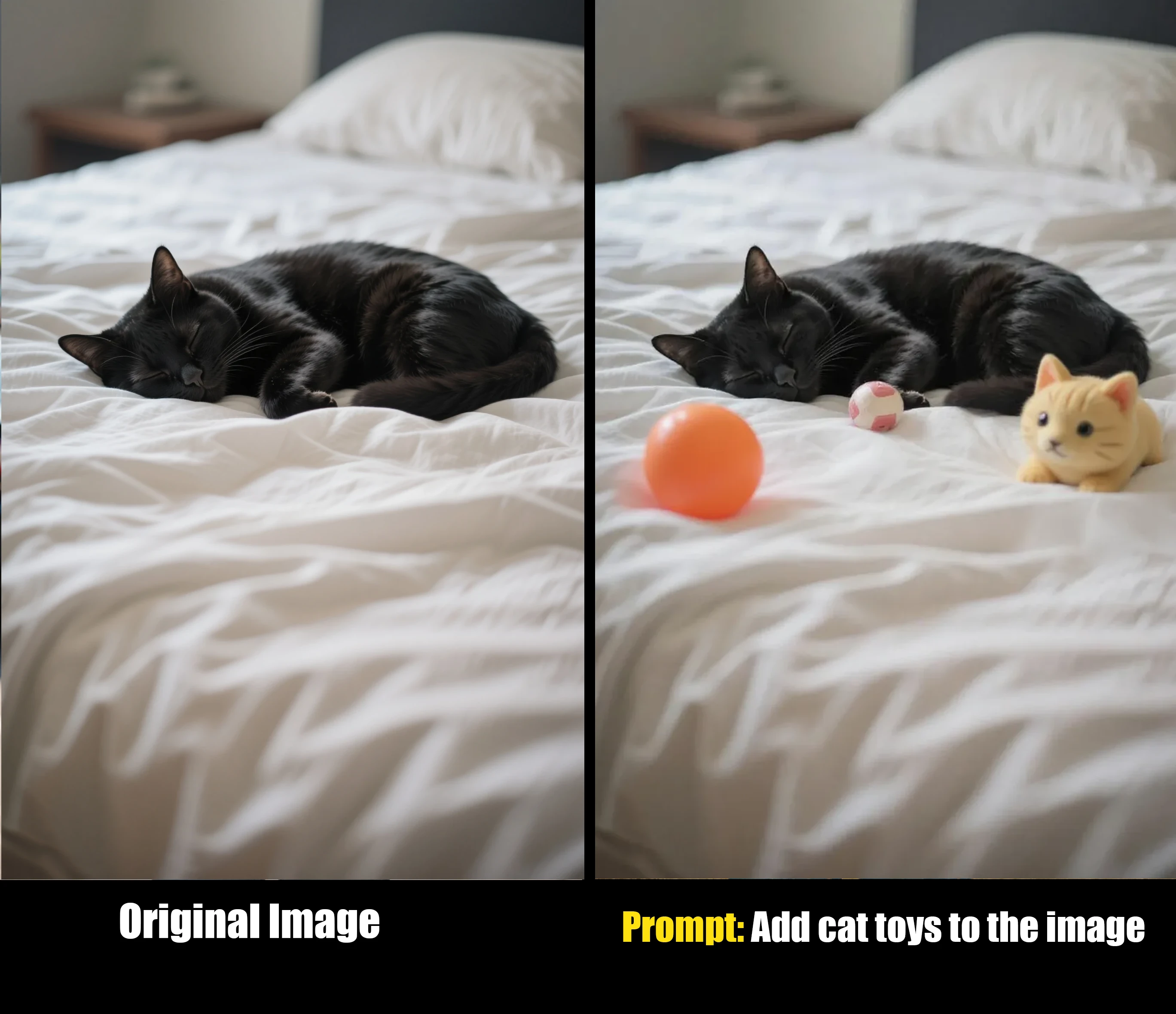
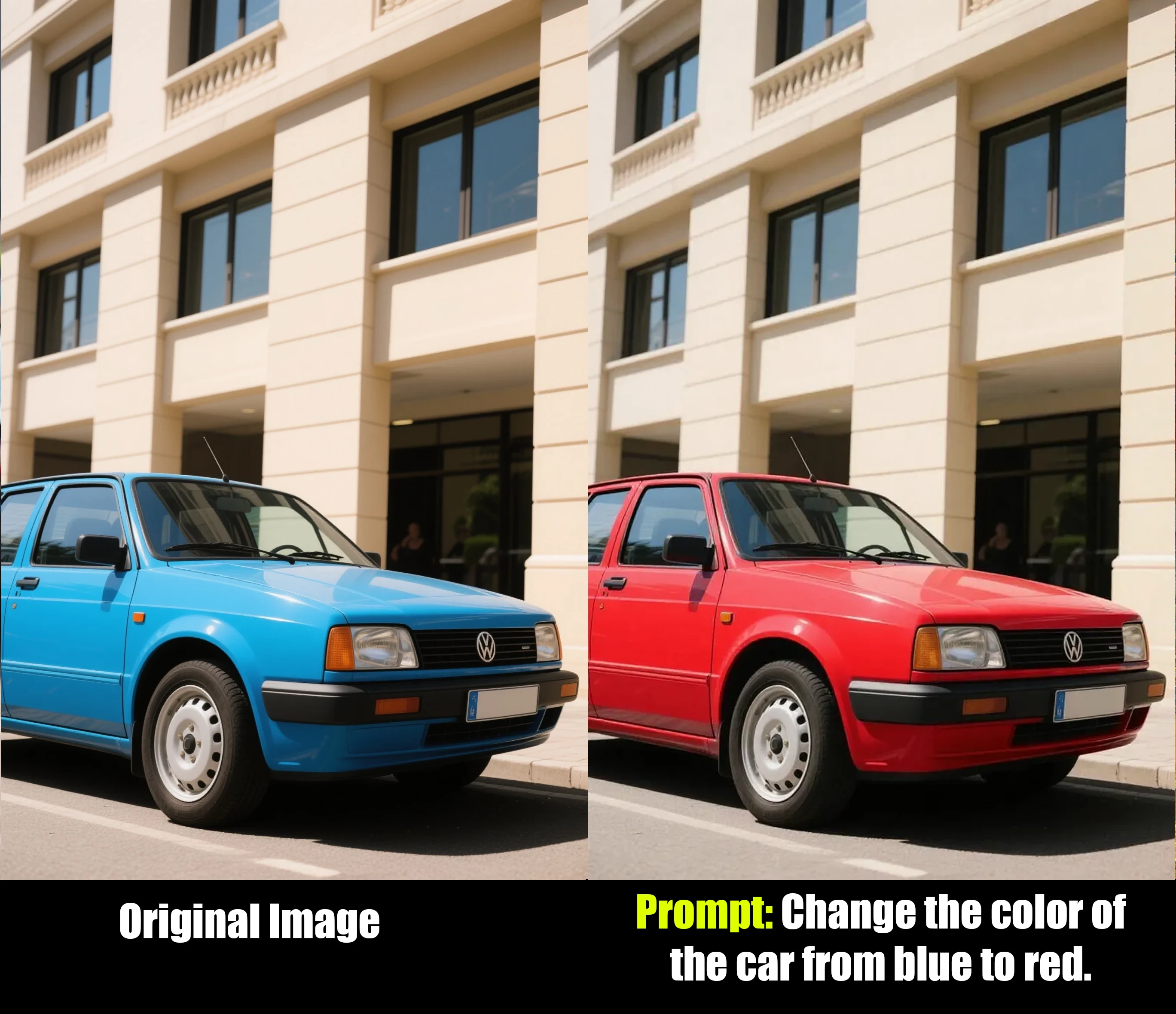
The model enables precise local editing, giving users the power to make targeted modifications to specific regions of an image without affecting the rest of the composition. This surgical precision allows for edits that would traditionally require meticulous manual work in photo editing software. Examples include changing the color of a car from blue to red, adding sunglasses to a cat's face, altering a person's expression from a smile to a frown, or replacing one object with another, all while the background and surrounding elements remain perfectly untouched.
Advanced Style Transfer and Referencing
FLUX.1 Kontext excels at style transfer, allowing users to generate novel scenes that adopt the unique artistic style of a reference image, guided by a text prompt. A user can provide a photograph and a prompt like
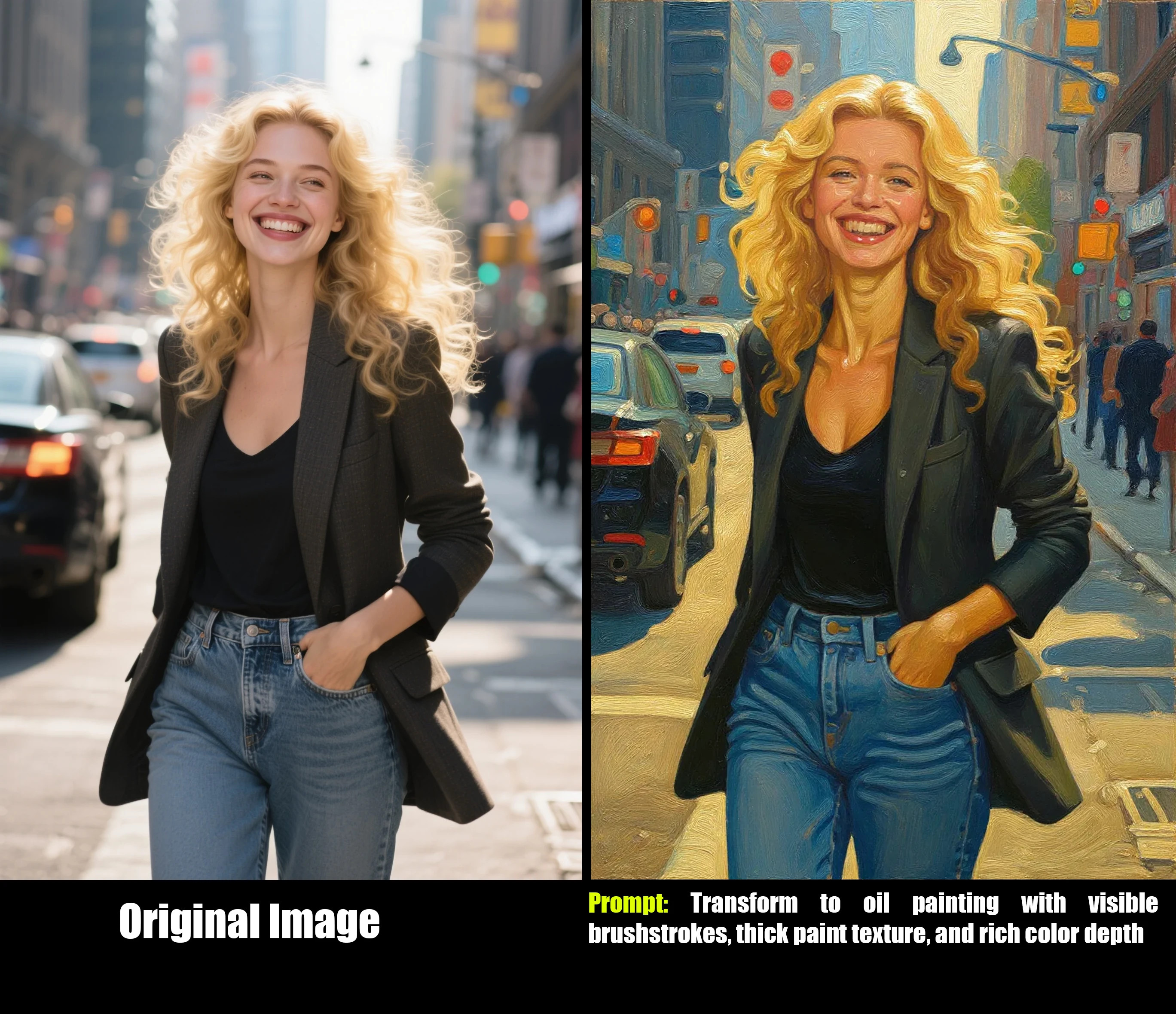
"Transform to oil painting with visible brushstrokes, thick paint texture, and rich color depth" or "Restyle to Claymation style" to completely reimagine the image's aesthetic while preserving its core composition.
Iterative, Multi-Turn Workflows
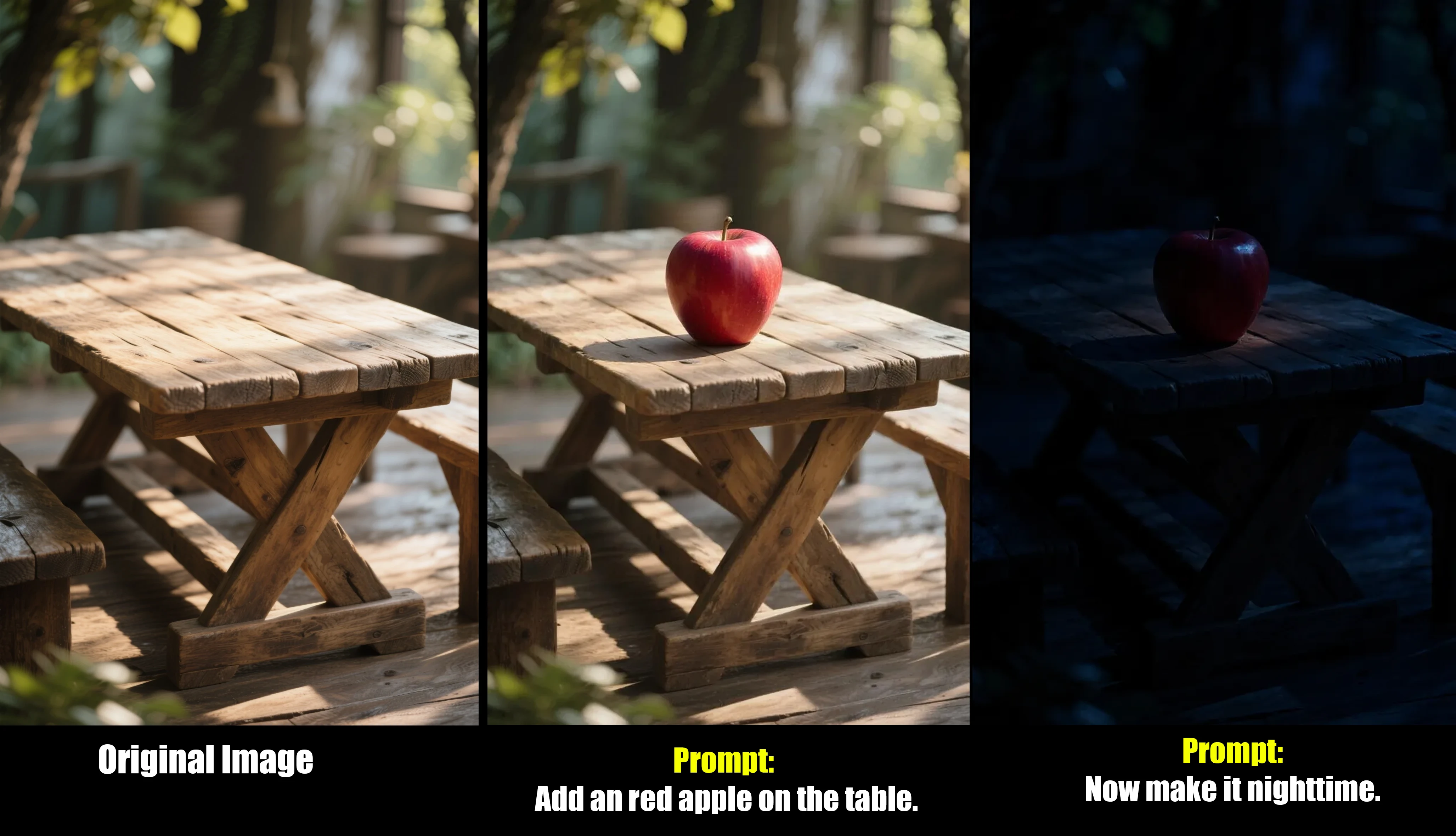
The entire suite is designed to support iterative, multi-turn workflows, mirroring the natural creative process of refinement. A user can apply an initial edit, and then, using the newly generated image as the new context, apply another instruction, and so on. This step-by-step process allows for the gradual building of complex scenes and transformations. Crucially, the model is engineered to maintain image quality and avoid "visual drift"—where the subject's identity degrades over successive edits—enabling coherent, multi-step creative sessions. A typical workflow might be:
1. Start with a photo of a room. 2. Prompt: "Add an apple on the table." 3. Using the new image, prompt: "Now make it nighttime.".
Superior In-Image Text Editing
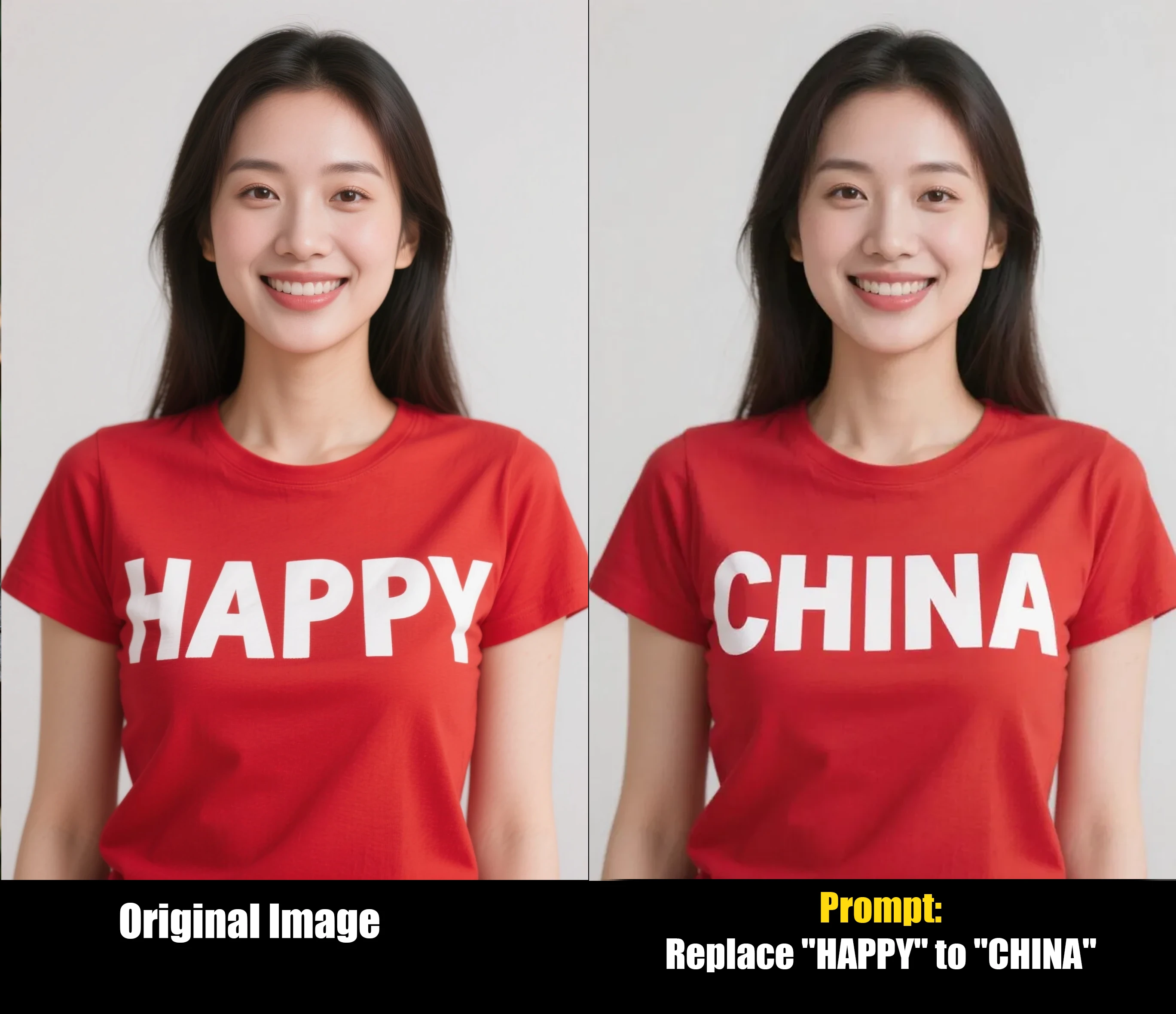
One of the most widely praised and practically useful capabilities of FLUX.1 Kontext is its proficiency in editing text within an image. The model can swap out words or phrases on signs, product labels, posters, and clothing with exceptional accuracy. It intelligently preserves the original font, style, color, perspective, and lighting effects of the text it replaces. A simple prompt like
"Replace 'Happy' with 'CHINA'" on an image of a asian woman wearing a t-shirt.
Together, these features signal a significant evolution in human-AI interaction for visual creation. Traditional models are largely stateless; a user provides a prompt and receives an image. Any subsequent edit requires a new, fully descriptive prompt that re-establishes the entire scene from scratch. FLUX.1 Kontext, by contrast, operates more like a conversational partner. Its ability to maintain context across multiple turns—remembering a character's face, preserving the state of an image after an edit—transforms the creative process into a fluid, stateful dialogue. This is a more intuitive and powerful paradigm, moving the user's role from that of a "prompter" to a "director" who guides the AI through a collaborative and iterative journey of refinement.
Practical Applications and Advanced Use Cases
The advanced capabilities of FLUX.1 Kontext translate into tangible, real-world value across a diverse range of industries. By bridging the gap between high-fidelity generation and precise editing, the model unlocks workflows that were previously time-consuming, expensive, or technically impossible.
Creative and Graphic Design
For designers and artists, Kontext serves as a powerful accelerator for the creative process.
Rapid Ideation and Prototyping: The model can be used to quickly generate concept art for characters, environments, and products, allowing for rapid exploration of different ideas. For example, a game designer can visualize a character in various armor sets or a product designer can create mockups of a new device in different materials and colors.
Consistent Asset Generation: A key application is the creation of consistent character sheets for animation, video games, or graphic novels. A single reference image can be used to generate multiple views of the same character (front, side, back) or to depict them in different poses and emotional states, ensuring visual continuity.
Style Exploration: Designers can apply dozens of distinct artistic styles to a base image, creating mood boards or presenting clients with a wide array of visual directions in minutes. This can range from photorealism to specific art movements like Pop Art or Impressionism.
Marketing and Advertising
In the fast-paced world of marketing, Kontext offers unprecedented agility and cost-efficiency.
Dynamic Ad Creation: A single, high-quality product photograph can be repurposed into a multitude of advertisements. The product can be seamlessly placed into dozens of different lifestyle contexts—a city street, a beach, a cozy home—without the need for expensive and logistically complex photoshoots.
Brand Asset Management: The model's object-level control allows marketers to place company logos and brand assets onto various surfaces with photorealistic integration. A logo can be applied to a billboard, a laptop, or a T-shirt, with the model automatically adjusting for lighting, perspective, and surface texture.
Hyper-Personalized Campaigns: Text on promotional materials can be instantly modified to target different demographics, languages, or sales events. A "Summer Sale" banner can be changed to a "Winter Clearance" banner while perfectly preserving the original design and typography.
Media, Film, and Storytelling
For visual storytellers, character and scene consistency is paramount, a challenge Kontext is uniquely equipped to solve.
Coherent Visual Storyboarding: Directors and writers can create entire storyboards with consistent characters moving through a sequence of scenes, providing a clear and coherent visual narrative for a film or animation project.
Pre-visualization and Set Design: The model can be used to generate and iteratively modify scenes for film and television, helping to visualize set designs, lighting schemes, and camera angles while maintaining the consistent appearance of actors and locations.
E-commerce and Fashion
Kontext provides powerful tools for enhancing the online shopping experience.
Virtual Try-On: Fashion brands can showcase their apparel on a consistent set of virtual models, placing them in various settings to match the style of the clothing line.
Real-Time Product Customization: In sectors like automotive or home goods, customers can visualize product variations in real-time. For instance, an online car configurator could use Kontext to instantly show the vehicle in a different color or with different wheels.
Personal and Professional Content Creation
The model also democratizes high-level editing for individual creators and professionals.
Professional Photo Enhancement: A casual selfie can be transformed into a polished, professional headshot by prompting the model to change the background to a neutral studio setting, adjust the lighting, and even alter the subject's attire to business wear.
Social Media Content Remixing: Creators can easily reformat images for different platforms (e.g., converting a 16:9 landscape photo to a 9:16 vertical story), remove unwanted text or photobombers, or place themselves in fantastical, eye-catching environments.
Photo Restoration: The model has shown remarkable ability to restore and clean up old, faded, or damaged photographs, breathing new life into cherished memories with enhanced clarity and detail.
Mastering FLUX.1 Kontext - A Comprehensive Prompting Guide
Achieving optimal results with FLUX.1 Kontext requires a mental shift from traditional text-to-image prompting. The key is to think like a director giving instructions rather than an author writing a description. This section provides a comprehensive guide to effective prompting, synthesizing best practices from official documentation and community findings.
The Core Philosophy: Giving Instructions, Not Descriptions
The fundamental principle of prompting Kontext is to tell the model what you want to change in the provided image, not to describe the entire scene from scratch. The model already understands the existing visual context; your prompt should be a clear, imperative command that surgically modifies that context.
General Best Practices
A few core principles apply to nearly all interactions with FLUX.1 Kontext:
Be Specific and Clear: Vague language leads to unpredictable results. Use precise action verbs like "change," "replace," "add," "restyle," or "transform." Describe colors, textures, and objects with detail. Avoid ambiguous terms like "make it look better".
Start Simple, Then Iterate: For complex transformations, break the process down into a sequence of smaller, logical edits. Apply one change, review the result, and then build upon it. This iterative approach gives you more control and often yields better outcomes than a single, overly complex prompt.
Preserve Intentionally: Explicitly tell the model what elements of the image should remain unchanged. Use phrases like "while maintaining the same facial features," "keep the original composition," or "everything else should remain unchanged" to protect key aspects of the image from unintended alterations.
Name Subjects Directly: Avoid using ambiguous pronouns like "he," "she," or "it." Instead, use descriptive identifiers to clearly specify your target. For example, instead of "make her hair longer," use "make the woman with the red dress have longer hair".
Task-Specific Prompting Frameworks
Different tasks benefit from specific prompt structures. The following table provides a quick-reference framework for common use cases.
| Task | Prompt Template / Good Example | Explanation / Principle | Bad Example |
| Color Change | Change the [object]'s color to [color]. "Change the car color to red." | Direct, simple command targeting a single attribute. | "Make the image have a red car." |
| Object Replacement | Replace the [object A] with a. "Replace the banana with a mango in the same position." | Clearly identifies the object to be removed and its replacement. | "I want a mango instead of a banana." |
| Style Transfer | Transform to [specific style] with [descriptive features]. "Transform to oil painting with visible brushstrokes, thick paint texture, and rich color depth." | Names a specific style and describes its key visual characteristics for better adherence. | "Make it a painting." |
| Character Relocation | Place [descriptive noun] in [new setting] while maintaining [features to preserve]. "Place the woman with the green headscarf in a jungle while maintaining her facial features and pose." | Explicitly controls composition and preserves character identity to prevent drift. | "Put her in a jungle." |
| Text Editing | Replace '[old text]' with '[new text]'. "Replace 'JOY' with 'BFL' on the sign, keeping the same font style." | Uses quotation marks for precision and includes an optional preservation clause for style. | "Change the text to BFL." |
Troubleshooting Common Problems
Even with good prompts, issues can arise. Here is how to address the most common challenges:
Problem 1: The character's identity changes too much.Cause: The prompt is too broad or uses a transformative verb like "transform."Solution: Use a more targeted prompt that focuses on the specific attribute you want to change, and add a preservation clause. Instead of "transform the person into a Viking," use "Change the clothes to Viking armor while preserving all facial features".
Problem 2: The main subject moves or changes scale when the background is altered.Cause: The model has too much creative *** to recompose the scene.Solution: Be ? about compositional control. Instead of "put him on a beach," use a more restrictive prompt like "Change the background to a beach while keeping the person in the exact same position, scale, and pose. Only replace the environment around them".
Problem 3: The applied style is inaccurate or loses detail.Cause: The style prompt is too generic.Solution: Describe the visual characteristics of the style in more detail. Instead of "make it a sketch," use "Convert to pencil sketch with natural graphite lines, cross-hatching, and visible paper texture".
By mastering these principles and frameworks, users can unlock the full potential of FLUX.1 Kontext, moving from simple generations to sophisticated, multi-step creative projects with predictable and high-quality results.
Current Limitations and the Future Horizon
Despite its groundbreaking capabilities, FLUX.1 Kontext is not without its limitations. Acknowledging these current weaknesses is as important as celebrating its strengths, as they define the challenges and opportunities for its future development.
Known Issues and Limitations
Several recurring issues have been identified through official documentation and user testing:
Image Quality Degradation in Multi-Turn Editing: The model's performance can degrade during excessive iterative editing sessions. After a certain number of sequential edits (official demonstrations suggest this can occur after more than six steps), visual artifacts, blurriness, and a general loss of quality may become apparent. This limitation presents a direct trade-off with one of the model's core strengths. The very thing that makes Kontext fast for short edits—its use of Flow Matching to learn simplified, "straighter" paths from noise to an image—becomes a potential weakness over long sessions. Each iterative step is an approximation, and when these approximations are chained together, errors can accumulate, leading to the observed visual drift.
Instruction Following Failures: While generally excellent at prompt adherence, the model can, in rare cases, fail to follow instructions accurately. This may manifest as the model ignoring a specific requirement or detail within a complex prompt.
Limited World Knowledge: Like all generative models, FLUX.1 Kontext's knowledge is based on its training data. Its understanding of the world is not exhaustive, which can limit its ability to generate contextually accurate content for highly niche, obscure, or specialized subjects.
Stylistic Complexity: The model can struggle to perfectly replicate highly unique, intricate, or complex artistic styles that are not well-represented in its training data.
Ethical Concerns and Training Data Transparency: Black Forest Labs has not disclosed the specific datasets used to train the FLUX.1 models. This lack of transparency has led to speculation that the data was scraped from the internet without authorization—a controversial practice with potential legal and ethical ramifications. Furthermore, the model's high degree of realism has sparked discussions about its potential for misuse in creating deceptive or harmful content.
Conclusion - The Dawn of Interactive Generation
The model's core contribution is its successful implementation of an interactive, "conversational" workflow. The combination of a highly intelligent Diffusion Transformer architecture with the speed of Flow Matching training allows for a fluid, iterative creative process. Users are no longer confined to single, stateless commands but can engage in a multi-turn dialogue with the AI, refining a visual concept step-by-step while the model maintains context and consistency. This transforms the user's role from that of a mere "prompter" to a "creative director," guiding the AI's output with a level of control that was previously the exclusive domain of complex, manual editing software.
This shift has profound implications for creative industries. It dramatically lowers the barrier to entry for high-level photo manipulation, empowers designers and marketers with unprecedented agility, and provides storytellers with a powerful tool for maintaining visual narrative coherence. In doing so, it blurs the lines between a generative tool, an editing suite, and a collaborative partner.
Thank you for reading our article on the FLUX.1 Kontext image model! We hope you found it informative and insightful. We would love to hear your thoughts and impressions. Please feel free to leave your comments and feedback in the section below. If you enjoyed this article, don't forget to give it a like and favorite it for future reference. Your support helps us create more content like this.