Tür
LORA
Yayınlanma tarihi
2024-08-30
Temel Model
Flux.1 D






NOTE: People asking me why I need buzz points. Answer is I need as many civitai buzz possible to run multiple flux tests. One run cost around 2600 buzz, and usually per model I need to run like 2-3 times to get decent enough result. In the future once I know the optimal settings I will stop asking for buzz donations from Early Access program.
Anyway in short, more buzz = more loras, so gimme gimme now x2.
Support me at: https://ko-fi.com/makina69
Quick tips on the easiest way to start your Flux journey from my experience so far:
Forge - this has the familiar WebUI A1111 style if you just can't be bothered to learn comfy.
github.com/lllyasviel/stable-diffusion-webui-forge/releases/download/latest/webui_forge_cu121_torch231.7z
To ????? 7z file: www.7zip.org
Start > Command Prompt as Administrator then go to the unzipped folder and run update.bat then
run run.bat to start the webui.
Get the checkpoint flux.1d fp8:
huggingface.co/lllyasviel/flux1_dev/blob/main/flux1-dev-fp8.safetensors
Clip_l & t5xxl_fp8_e4m3fn & put them in /models/textencoders of your Forge directory
huggingface.co/comfyanonymous/flux_text_encoders/tree/main
Put this in /models/vae: huggingface.co/black-forest-labs/FLUX.1-schnell/resolve/main/ae.safetensors
Realism Lora, put in /models/lora - civitai.com/models/631986/xlabs-flux-realism-lora
This is optional, you can use your own favourite upscaler. ESRGAN/4x_NMKD-Superscale-SP_178000_G.pth · uwg/upscaler at main (huggingface.co)
Put in /models/ESRGAN
Below is the usual settings I use: (Use LMS for best skin texture)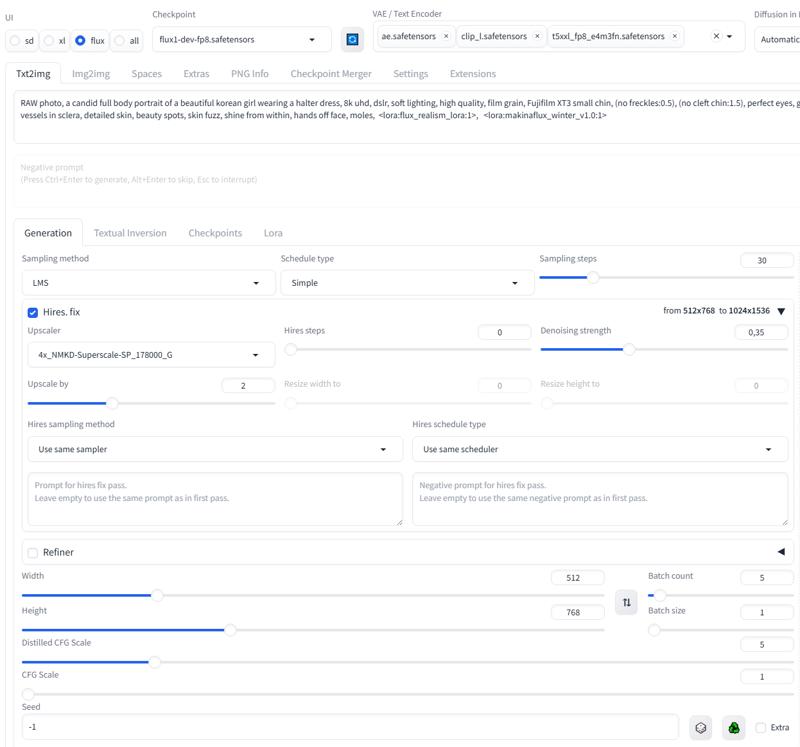
1. Yeniden paylaşılan modellerin hakları orijinal yaratıcılara aittir.
2. Orijinal model yaratıcıları, modellerini talep etmek için resmi kanallar aracılığıyla SeaArt AI personeliyle iletişime geçmelidir. Talep etmek için tıklayın
