

Dear creators, the exciting moment has arrived! Have you been yearning to transform the brilliant ideas in your mind into vivid images? Do you want to experience the magic of cinematic camera movements and create stunning short videos? Now, with SeaArt's newly launched video model SeaArt Film Video, you'll gain unprecedented creative power!
No need for complicated shooting gear or editing skills. With the prompt formulas we've carefully prepared, you can easily master all kinds of dazzling cinematic camera effects—instantly elevating your video's quality with blockbuster-level aesthetics!
This is not just a tutorial, but an invitation to a new world of visual imagery. Join us in exploring the infinite possibilities of SeaArt Film Video and unleash your inner director! 🚀
✨ Chapter One: Spinning and Jumping with Eyes Closed—Mastering Subjects and Space
This type of camera movement focuses on rotation and changes in camera distance to highlight the subject, creating a sense of space and visual impact.
Effect 1: Subject Rotation + Cut to Medium Shot
Effect Description: The camera first circles around the subject for a 360-degree comprehensive view, then quickly switches to a medium shot, focusing on the subject's exciting actions or expressions. Combining dynamic and static elements with balanced tension.
Prompt Formula: Camera rotates 360 degrees around [subject feature description], second shot cuts to medium shot, [subject action/expression description].
Prompt Example: Camera rotates 360 degrees around [an agent wearing a black trench coat and sunglasses against a virtual data stream background], second shot cuts to medium shot, [agent holding guns in both hands, leaning back to dodge incoming bullets, trench coat hem rising].
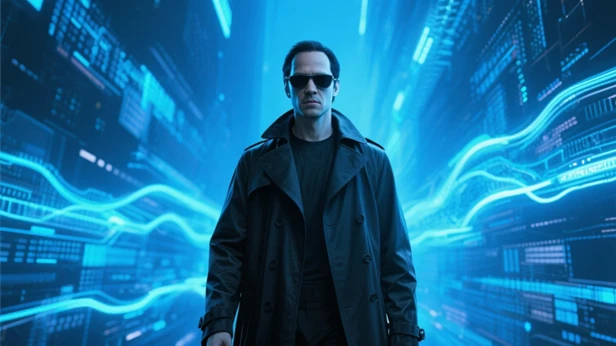
Uploaded Image

Final Result
Inspired by "The Matrix. "The scene begins with the camera smoothly circling Neo, standing in a digital rain background, his expression stern. Then, the camera quickly switches to a medium shot, capturing his classic bullet-dodging backward lean, his trench coat flowing, movements graceful and full of tension.
Effect 2: 360-Degree Circling + Pull Back
Effect Description: The camera performs a slow and detailed 360-degree circling around the subject, fully showcasing the subject's appearance, clothing, expressions, and other details. Then the camera gradually pulls back, integrating the subject into a broader environment, creating an epic or lonely feeling.
Prompt Formula: Perform 360-degree camera movement on [subject description], camera slowly rotates around [subject], showing [subject]'s [specific details, such as: appearance/clothing/expression] details from different angles, then camera pulls back [description of the overall environment atmosphere shown].
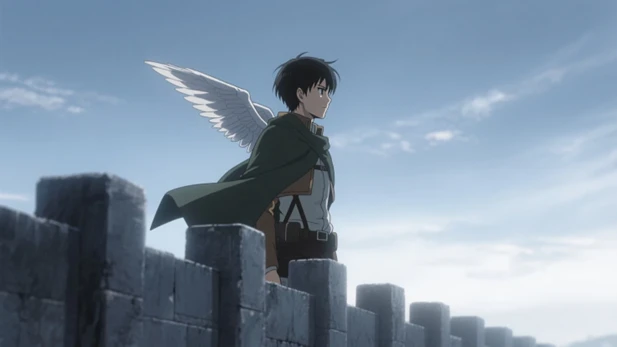

Prompt Example: Perform 360-degree camera movement on [Captain Levi of the Survey Corps wearing his uniform and holding vertical maneuvering equipment blades standing at the edge of a high wall], camera slowly rotates around [Levi], showing [Levi]'s cold gaze and blood-stained blade details from different angles, then camera pulls back [showing a ruined city behind him and the approaching shadows of titans in the distance].
Uploaded Image
Final Result
Inspired by "Attack on Titan. "The camera meticulously circles Captain Levi, standing on the edge of Wall Maria, gazing into the distance. Viewers can see his determined profile and the Wings of Freedom cape fluttering in the wind. Then the camera slowly pulls back and upward, Levi's figure gradually diminishes, finally blending into the vast ruined city, creating an image filled with intertwined despair and hope.
Effect 3: Rotation + Extreme Pull Back (Reverse is also amazing! )
Effect Description: The camera first rotates 360 degrees around the subject. After completing the subject showcase, it begins to pull back extremely far, placing the subject in an immensely grand or unexpected scene, creating a strong visual contrast and sense of destiny.
Prompt Formula: [Subject description, such as: an ancient compass spinning rapidly in their hand] 360-degree rotation, after completing the rotation begins to slowly pull back, gradually revealing the entire [grand/unusual scene description, such as: the compass is actually the core controlling a huge floating island, with rolling clouds and the faintly visible ground below] panorama.

Prompt Example: [A One Ring emitting faint golden light in the darkness, with burning Elvish script faintly visible] 360-degree rotation, after completing the rotation begins to slowly pull back, gradually revealing the entire [the ring is placed on the edge of a rugged black rock in Mount Doom, with rolling lava below and the smoke-covered lands of Mordor in the distance] panorama.
Final Result (Text to Video)
Inspired by "The Lord of the Rings. "The camera first focuses on an ordinary gold ring (the One Ring), perhaps lying quietly on a rough rock or in Frodo's hand. As the camera rotates 360 degrees around it, the Elvish script on the ring begins to emit a faint fiery red glow. After the rotation completes, the camera begins to slowly pull back and upward. The ring quickly shrinks in the frame, and we gradually see it is at the precarious edge of Mount Doom's crater, with rolling molten lava below and the vast, desolate lands of Mordor in the background. The sky is covered with black clouds, and in the distance stands the silhouette of Barad-dûr, creating a strong sense of destiny and oppression.
✨ Chapter Two: One Continuous Shot, Into the Microscopic—Exploring Fantastical Visual Transitions ✨
This type of camera movement focuses on extreme pushing into or pulling out from specific parts of the subject, achieving fantastical scene transitions or revealing stunning details.
Effect 4: Pushing Into the Mouth
Effect Description: The camera steadily and continuously pushes toward the subject's mouth, as if entering it, creating a unique visual immersion with a touch of the bizarre/whimsical. Suitable for depicting entry into another world or revealing a character's inner thoughts.
Prompt Formula: Smooth camera transition, pushing into [subject description]'s mouth, [optional: interior scene description or transition effect, such as: inside is a universe filled with stars/a magical forest full of candy].
Prompt Example: Smooth camera transition, pushing into [Totoro opening his huge mouth in a yawn], inside transforms into a peaceful forest composed of soft grass and towering trees.

Uploaded Image

Final Result
Inspired by "My Neighbor Totoro. "The scene begins with the adorable Totoro opening his signature large mouth, making a deep roar (or yawning). The camera smoothly pushes forward, gradually filling the view with Totoro's fuzzy mouth cavity, ultimately transitioning seamlessly into a fantastical forest interior, where sunlight filters through leaves, creating dappled light patterns, filled with a fairy tale atmosphere.
Effect 5: Pushing Into the Pupil + Scene Transition
Effect Description: The camera steadily pushes into the subject's pupil. When the pupil fills the entire frame, it naturally transitions to an entirely new scene, achieving an imaginative scene change. Commonly used to represent memories, visions, or entry into a character's mental world.
Prompt Formula: Smooth transition, pushing into [subject description]'s pupil, second shot [detailed description of new scene, such as: revealing a buried war memory/a futuristic cityscape].
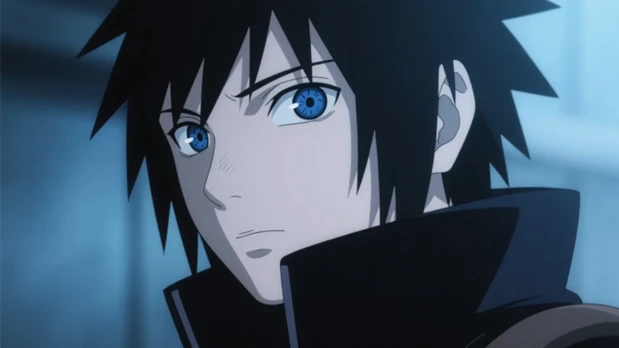
Prompt Example: Smooth transition, pushing into [Itachi Uchiha's crimson Mangekyo Sharingan] pupil, second shot [revealing the Tsukuyomi world, where Kakashi is bound to a cross, experiencing endless ? in black and white silhouette imagery].
Uploaded Image

Final Result
Inspired by "Naruto. "The camera focuses on Sasuke Uchiha's face, his Sharingan slowly spinning. The camera gradually pushes toward his deep pupil, and when the frame is filled with the tomoe pattern in his eye, it smoothly transitions to a fragment of his memory, such as a warm scene of training with his brother Itachi, or the tragic night when his clan was destroyed, creating a powerful sense of temporal and spatial transition.
Effect 6: Approaching the Eye + Detail Close-up
Effect Description: The camera starts from a distance, slowly rises while simultaneously pushing forward, gradually approaching the subject's face, ultimately focusing on an extreme detail of the eye, such as a water droplet on eyelashes or a reflection in the eye, to amplify emotion or reveal key information.
Prompt Formula: Camera rises and approaches [subject description]'s face, finally extreme close-up on the eye [specific detail description, for example: a dinosaur head reflected in the pupil/a flash of determination in the eyes/a drop of sweat sliding from the furrowed brow to the corner of the eye].
Prompt Example: Camera rises and approaches [Walter White in a dim meth lab RV, wearing a yellow hazmat suit and gas mask, his eyes tired but determined]'s face, finally extreme close-up on his [bloodshot eyes, with blue crystals reflecting eerie light in his pupils, a drop of sweat sliding from his furrowed brow].

Inspired by "Breaking Bad. "Inside the dim, shaky RV, Walter White wears his iconic yellow hazmat suit, his face showing only exhaustion from oxygen deprivation and extreme tension, his eyes mixing desperation with madness. The camera starts at ? height, slowly pushing upward and focusing on his face (perhaps only showing his eyes, the rest covered by the mask). As the camera gets extremely close to his eyes, we see a close-up where we can see his bloodshot eyeballs from working in dangerous chemical environments for extended periods, his pupils reflecting the beakers with reacting crystals emitting an eerie blue glow, a drop of sweat sliding from his furrowed brow to the corner of his eye, refracting the dangerous yet mesmerizing light of the chemical equipment. The entire scene is filled with suffocating tension and the character's inner struggle and darkening.
✨ Chapter Three: Unlimited Dynamics, Tracking and Following—Capturing Extreme Dynamic Moments ✨
This type of camera movement simulates various filming techniques such as drones, handheld stabilizers, and bullet time, giving the image strong dynamism and visual impact, particularly suitable for chase scenes, battles, and epic scenarios.
Effect 7: Floating Character Follow
Effect Description: The camera follows the subject floating or flying in the air like a shadow, filming from different positions and angles, creating a sense of weightlessness, dreaminess, or powerful force.
Prompt Formula: Camera follows from [starting position description, such as: below/side/behind] [floating/flying subject and posture description, such as: superhero in red cape patrolling above the city/wizard chanting spells in mid-air], the entire process presenting constantly changing perspectives and spatial relationships, [subject action or environment interaction description, such as: hero nimbly avoiding building obstacles/wizard surrounded by elemental energy].
Prompt Example: Camera follows from [behind Doctor Strange] [as he floats in the Mirror Dimension, with surrounding space constantly folding and shattering], the entire process presenting constantly changing perspectives and spatial relationships, [Doctor Strange forms hand seals, conjuring complex magic circles to defend against Dormammu's attacks].

Inspired by "Doctor Strange. "Doctor Strange floats in the constantly twisting, flipping Mirror Dimension city, his red levitation cloak billowing behind him. The camera starts behind him, following him from multiple angles fluidly, sometimes showing his complex hand movements during spellcasting, sometimes showing the upside-down chaotic cityscape from his perspective, creating a strong sense of surrealism and magical wonder.
Effect 8: Aerial Dive + Close Approach
Effect Description: The camera starts from a high aerial view, showing a vast scene, then quickly dives like an eagle, approaching a specific target or subject on the ground, bringing a strong visual impact and sense of speed.
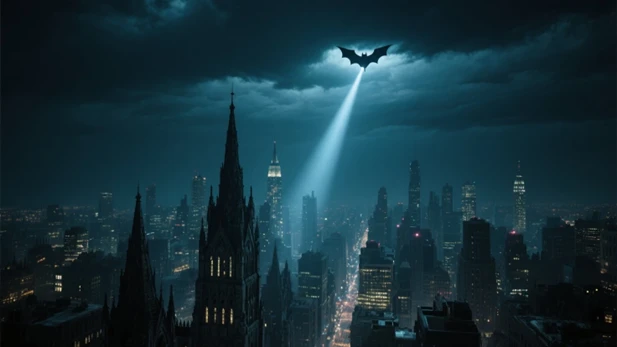

Prompt Formula: High aerial camera view, [description of magnificent scene seen from high altitude, such as: Gotham City's night sky and Gothic architecture], then rapidly diving close to [detailed description of ground target or subject, such as: Batman standing on a gargoyle statue atop the city's tallest building, cape fluttering in the wind].
Prompt Example: High aerial camera view, then the camera rapidly moves diving close to the ground, Batman is standing on the road, black cape fluttering in the wind.
Uploaded Image
Final Result
Inspired by the "Batman" series and many anime openings. The scene begins with the night sky of Gotham City (or any iconic city), the Bat-Signal cutting through the clouds. Then the camera rapidly dives downward like a bat, passing through layers of skyscrapers, finally steadying behind Batman as he stands on a roadside, his cape billowing in the wind.
Effect 9: Bullet Time
Effect Description: The classic "bullet time" effect, where time seems to freeze at the moment when the subject makes a key action, showcasing this frozen dynamic moment, with the background usually blurred to highlight the subject.
Prompt Formula: Camera movement showing bullet time effect, filming [subject and their signature high-difficulty action pose, such as: Neo leaning back dodging bullets/Jotaro Kujo using Star Platinum's Ora Ora], capturing a moment as if the world is frozen, subject's action pose elegant with rich details (such as: flying clothing edges/ripples in the air/trajectory of punches), background blurred to highlight the subject, overall image with strong visual impact.
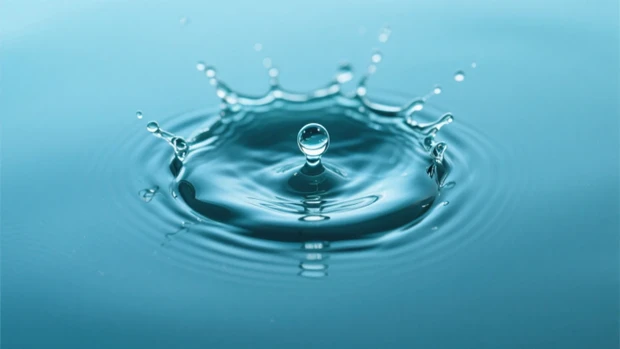

Prompt Example: Camera movement showing bullet time effect, capturing a moment as if the world is frozen, each tiny splashing water droplet and ripple at the crown's edge rich in detail, background simple or blurred to highlight the subject, overall image with strong microscopic beauty and visual impact of physical dynamics.
Uploaded Image
Final Result
Inspired by natural phenomena, capturing the moment a water droplet hits a lake surface, through camera effects, allowing viewers to completely focus on this fleeting yet perfectly captured natural miracle. The entire image is filled with serene, dynamic beauty and the magic of physical phenomena.
Effect 10: Handheld Stabilizer Follow Shot
Effect Description: Simulating the camera effect of following a subject's movement with a handheld stabilizer, the image remains stable and smooth yet full of dynamism and presence, particularly suitable for chase scenes, running, exploration, etc.
Prompt Formula: Follow shot with handheld stabilizer of [subject description], in [specific scene, such as: ancient streets of Kyoto/crowded Akihabara/eerie abandoned hospital], [subject's specific action, such as: parkour chase on rooftops/struggling through crowds/nervously exploring with flashlight], camera moves flexibly with [subject]'s actions, image stable with strong dynamism, [environmental elements quickly passing by, such as: Japanese-style shop signs on both sides/flashing anime billboards/swaying hospital beds] flash by quickly, adding tension or immersion.
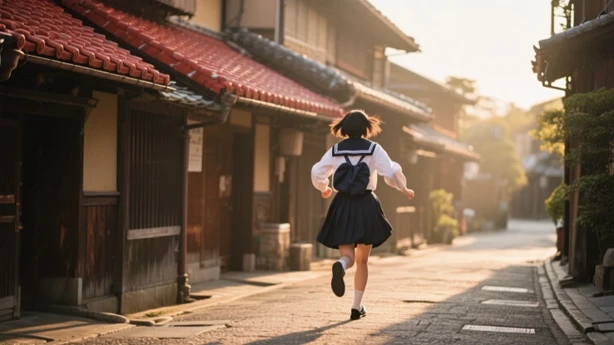

Prompt Example: Follow shot with handheld stabilizer of [a girl in Japanese school uniform], being chased by mysterious shadows [in Kyoto's small alleys with cherry blossoms falling at night], camera moves flexibly with [the girl]'s running and sharp turns, image stable with strong dynamism, ancient wooden houses and dim lanterns on both sides quickly flash by.
Uploaded Image
Final Result
Inspired by many Japanese chase scenes. The camera closely follows a high school student in uniform as they run through the bustling streets of Shibuya after school or through the traditional alleys of Kyoto, perhaps escaping from something or chasing someone. Despite the complex environment and intense movement, the image remains stable and smooth, allowing viewers to feel the sense of speed and rapid changes in the surrounding environment (such as store signs, pedestrians, and street vendors), creating a strong sense of immersion and vibrant urban atmosphere.
Effect 11: Drone Camera Tracking
Effect Description: Simulating drone tracking from different heights and angles (such as high overhead view, low following, side parallel, etc. ) of a moving subject, very suitable for showing subject dynamics in vast scenes, such as vehicles driving, animals running, athletes competing, etc.
Prompt Formula: Using drone to track [subject and movement method, such as: Kaneda Shotaro riding a red sci-fi motorcycle/Max driving a modified war vehicle/sky pirates piloting an airship] on [vast scene, such as: Neo-Tokyo's highway in a futuristic city/vast wasteland/sky race track above the clouds], drone follows [subject]'s movement from different heights and angles (can specify, such as: following from behind and above capturing light trails from motorcycle taillights/filming dust clouds raised by the war vehicle from low altitude on the side), [optional: how the final shot is handled, such as: camera circles to the front of the subject showing their determined expression/gradually rises higher and disappears at the horizon].
Prompt Example: Drone high-altitude follow shot, filming from directly behind the subject, at a marathon scene, a female athlete running forward.
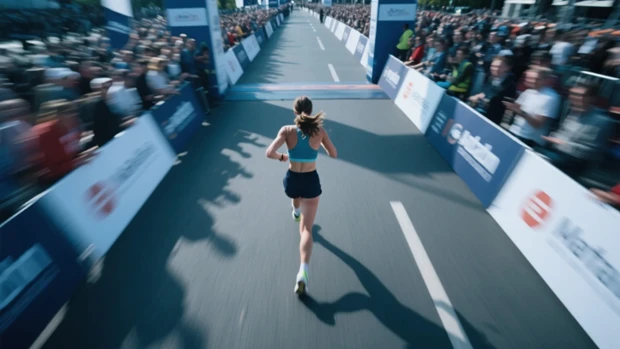
Uploaded Image

Final Result
Inspired by marathon live broadcasts, using drones to follow athletes' real-time running trajectories, and simulating the tension of a live event.
✨ Chapter Four: Time Magic, Capturing Fleeting Moments—Interpreting Special Photography Techniques ✨
This type of camera movement borrows from special expression techniques in photography, such as time-lapse and high-speed photography, allowing you to show time compression or moment magnification in videos.
Effect 12: Time-lapse Photography
Effect Description: Through time-lapse camera movement, long-term scene changes (such as sunrise and sunset, cloud movement, bustling traffic, flowers blooming and withering, etc. ) are compressed and shown in a short time, bringing a wonderful sense of time flying.
Prompt Formula: Time-lapse camera movement, recording [main dynamic elements and scene, such as: seasonal changes in Totoro's forest/clouds gathering and dispersing with stars rotating above Hogwarts Castle/flying vehicles traversing and buildings growing in a future city], showing [specific time passage process, such as: from spring bloom to snow-covered landscape/from daytime bustle to night tranquility to dawn breaking/a ruined city gradually rebuilding and regaining vitality].
Prompt Example: Time-lapse camera movement, recording [an ancient temple covered in green vegetation, with a huge cherry tree in front of the temple], showing [the cherry tree from ? branches to buds, then to full bloom, and finally petals falling like snow, with new green leaves sprouting on branches] throughout the process, clouds gathering and dispersing in the background sky, day and night alternating
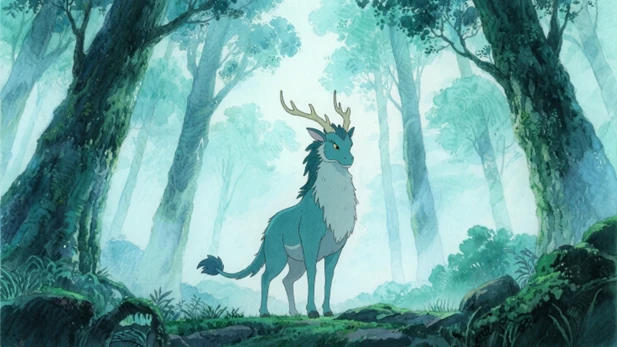
Uploaded Image

Final Result
Inspired by Studio Ghibli films. The camera is fixed, showing a scene full of natural atmosphere, such as the giant camphor tree in "My Neighbor Totoro" or the kodama forest in "Princess Mononoke. "Through time-lapse photography, it records the changing of seasons: buds sprouting, flowers blooming, lush green leaves, fiery red leaves, snow covering, while clouds in the sky move rapidly and stars rotate, showing the endless cycle of nature and the magic of time.
Effect 13: High-Speed Photography Detail Capture
Effect Description: Filming at an extremely high virtual frame rate, capturing and slow-playing those exciting moments that are difficult to see with the ? eye and occur in an extremely short time, such as water droplets falling, objects breaking, flowers blooming, etc. , showing the beauty of details that are normally difficult to perceive.
Prompt Formula: Capturing with high-speed camera movement [specific object or phenomenon] at [specific moment or brief process of occurrence, such as: the instant two samurai swords clash/the moment a magic bullet hits a shield/the instant a superhuman releases an energy wave], [observable microscopic detail description, such as: sparks and metal fragments flying when sword blades collide/energy ripples and cracks appearing on the magic shield/air distortion and tiny particles when energy waves spread] clearly visible, highlighting [the object or phenomenon]'s [sense of power/beauty/destructive force] process.
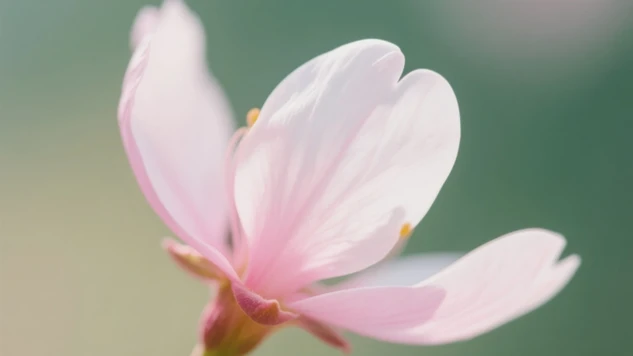
Prompt Example: Capturing with high-speed camera movement the blooming moment of an ultra-clear, realistic cherry blossom bud, flower, and stamen clearly visible, highlighting the process of the flower opening.
Uploaded Image

Final Result
Inspired by plant filming techniques in nature documentaries, freezing and magnifying the brief yet brilliant moment of cherry blossom blooming, allowing people to feel the delicacy and beauty of nature.
✨ Creators, these are just the "appetizers" that SeaArt Film Video has prepared for you! Are you eager to try these cool camera movement effects in your own creations?
Remember, creativity is unlimited! These classic scenes are just the beginning. Boldly combine these prompt formulas, incorporate your love and understanding of films and anime, to recreate, reimagine, and explore more of your own unique camera language! SeaArt Film Video is here to help you bring every imaginative idea to life in stunning visuals!
Start creating now! We look forward to seeing every exciting moment you create with Film Video, whether paying homage to classics or surpassing them!