Chi tiết
Gợi Ý
v1.0
Eyes detection (Adetailer)

Eyes detection (Adetailer)

0
8
0
#eyes
#เครื่องมือ
#การตรวจจับ

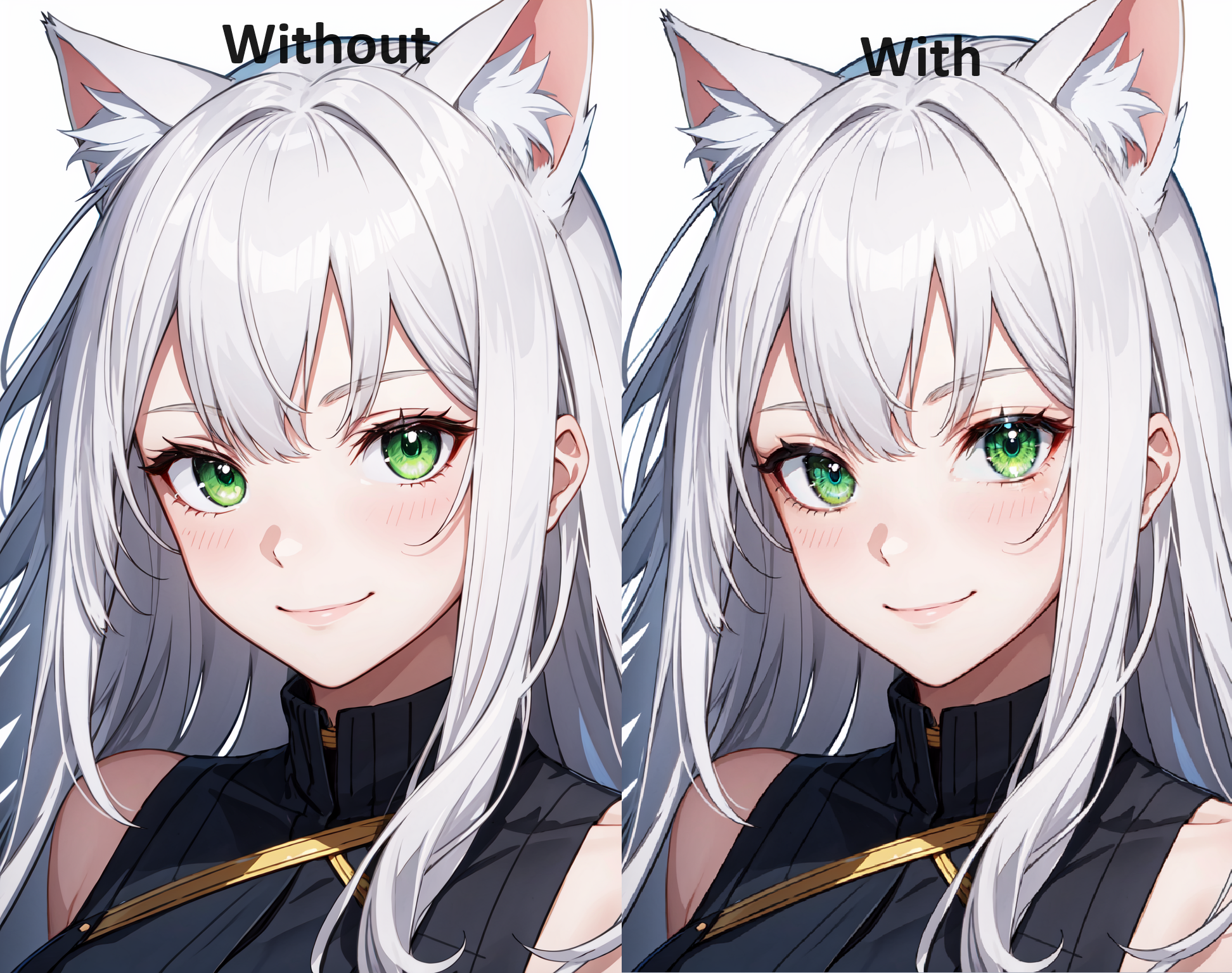
This model detects eyes so you can add more detail to the eyes.

Can be used for:

  • Adding details to eyes

  • Enhance character specific eyes (Hu Tao, AI Hoshino, etc.)

  • Use with models for eyes

How to use:

Open Adetailer tab

  • Open detection tab

  • Insert you prompts, leave empty for same prompts as main generation

  • Decide confidence threshold (recommended 0.3-0.5) usually finds it around 0.8 or higher but might not find the eye if character has disfigured eye or looking away.

  • Mask only the top

    • Apply to top (2) highest confidence score.

    • Depends on the amount of eyes you want to detect, default would be 2!

    • Example: character with eyepatch only detect 1

    • Example: Kokushibo from demonslayer has 6 eyes so apply to top 6

    • 0 = default = no limit, all scores above threshold are applied

  • Mask Preprocessing set to merge to do all detections at the same time

    • Use this mainly for an image of a solo character

    • Have a higher threshold so background characters don't get applied

  • Inpainting, choose to leave settings the same as the main generation or custom

How to install:

  1. Go to https://github.com/Bing-su/adetailer and install Adetailer

  2. Place the this file (Eyes.pt) in "stable-diffusion-webui\models\adetailer"

  3. and reload WebUI.

Install for Automatic1111:

  1. Open "Extensions" tab.

  2. Open "Install from URL" tab in the tab.

  3. Enter https://github.com/Bing-su/adetailer.git to "URL for extension's git repository".

  4. Press "Install" button.

  5. Wait 5 seconds, and you will see the message "Installed into stable-diffusion-webui\extensions\adetailer. Use Installed tab to restart".

  6. Go to "Installed" tab, click "Check for updates", and then click "Apply and restart UI". (The next time you can also use this method to update extensions.)

  7. Completely restart A1111 webui including your terminal. (If you do not know what is a "terminal", you can reboot your computer: turn your computer off and turn it on again.)

Check out my posts on my Pixiv: https://www.pixiv.net/en/users/20080642

If you'd like to support me a little check out my ko-fi page: https://ko-fi.com/yukinoai

If you want to see all my exclusive (and uncensored) posts check out my Patreon: https://www.patreon.com/Yukino_AI

Xem bản dịch

Đánh giá và nhận xét

-- /5
0 đánh giá

Chưa nhận đủ đánh giá hoặc bình luận

no-data
Không có dữ liệu
Y
Thông báo
2024-07-25
Đăng mô hình
2023-09-24
Cập nhật thông tin mô hình
Chi tiết mô hình
Loại
Other
Thời gian đăng tải
2023-09-24
Mô Hình Cơ Bản
SD 1.5

Phạm Vi Giấy Phép
Model Source: civitai

1. Quyền đối với các mô hình được đăng lại thuộc về người sáng tạo ban đầu.

2. Người sáng tạo gốc muốn xác nhận mô hình vui lòng liên hệ nhân viên SeaArt AI qua kênh chính thức. Nhấp để xác nhận

Phạm Vi Giấy Phép Tạo Dựng
Hình Ảnh Trực Tuyến
Thực Hiện Kết Hợp
Cho phép tải xuống
Giấy Phép Thương Mại
Hình ảnh được tạo có thể bán hoặc sử dụng cho mục đích thương mại
Cho phép bán lại hoặc bán sau khi hợp nhất
QR Code
Tải xuống ứng dụng SeaArt
Tiếp tục hành trình sáng tạo AI trên thiết bị di động