


日本語版
Due to recent user inquiries, we have created this guide to explain the ComfyUI Free Duration rules, how it's calculated, and how you can earn more.
But wait—it gets better! Next week, we’re launching a major upgrade to our Free Duration system! Expect richer rewards for active creators and rebalanced SVIP perks that offer better value for every tier—with Master SVIPs enjoying up to 12 hours of daily runtime! (Stay tuned for the official announcement!)
`
⏱️ Free Duration Composition
Total Free Duration = Base Amount + Creator Bonus📃Note: Free duration is for daily use only and does not roll over.
1. Base Amount (Fixed)
Provided daily based on your membership tier
Ordinary User | Basic SVIP | Standard SVIP | Professional SVIP | Master SVIP | |
Base Amount | 20min/d | 30min/d | 150min/d | 300min/d | 750min/d |
Next week, we'll be adjusting the usage duration for SVIP users to better align with the pricing of each tier.
2. Creator Bonus (Dynamic)
Extra time awarded daily based on your previous day's creation points ranking.
Active Creator (top 70%) | Outstanding Creator (top 50%) | Core Creator (top 30%) | Star Creator (top 10%) | Official Partnered Creator | |
Creator Bonus | +15min/d | +30min/d | +50min/d | +120min/d | Unlimited |
`
🧐 Understanding the Info Popup
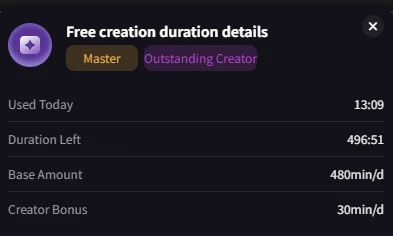
Used Today
The actual runtime consumed by your free tasks today.
·Excluded: ❌ Editing, Queuing, Paid tasks, Failed tasks.
·Cancelled Tasks: You have 3 free cancellations per day (no time deducted). After that, cancelled task runtime is deducted.
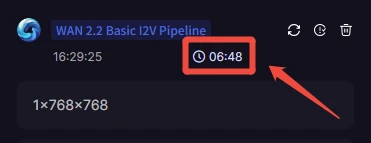
·How to check the duration of your tasks
Duration Left
Remaining free runtime available for today.
New Feature
Next week, we'll be adding a section to display your best ranking for Workflows/Apps from the previous day.
`
❓ Points & Ranking Mechani
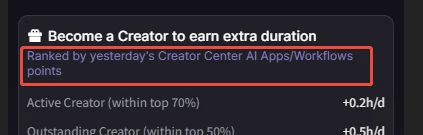
Q: Why does my Creator Bonus change daily? It depends on your dynamic ranking in Workflow and AI Apps points from the current round.Q: How to check my points?1.Click "Ranked by yesterday's ......" in the popup directly
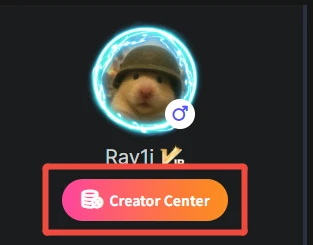
2.Click “Creator Centre” beneath your avatar on your personal homepage.
Q: How are points calculated?Cycle: Accumulated monthly (e.g., Dec 1–31).
Scope: Includes ALL your historical works. (e.g., Runs in December from a workflow published in October still count).
Key Metrics:
·Apps: Run count, favorites, ratings, etc.
·Workflows: Favorites and ratings, etc. (Run count is NOT a core factor to prevent spamming).
Q: Which points determine my Creator Bonus?A: Only the current round's points from your Workflows and AI Apps. You can view point details in the Creator Center.
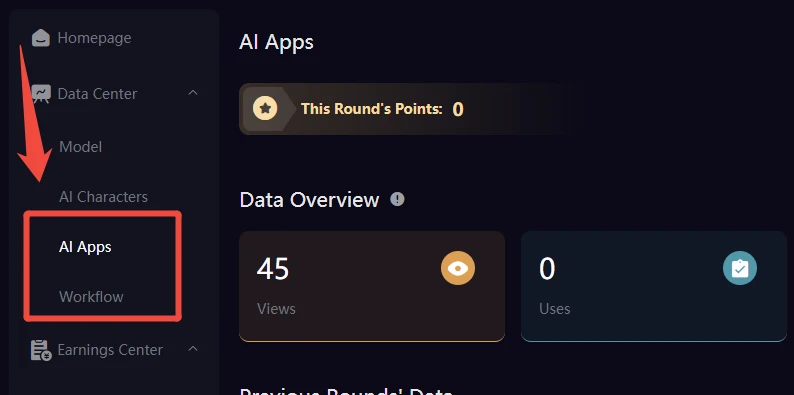
Q: I have many runs, why are my points low?A: Workflow points are NOT based on run counts. The core metrics are Favorites and Ratings.Q: Why is there a huge gap between my Workflow and AI App points?A: They use two completely different, independent calculation systems. A large difference is normal and they cannot be directly compare directly comparable gap between them is normal.Q: Do I need to publish new works every day?A: No. As long as your existing works generate heat (favorites/ratings) this month, you earn points.Q: Are Workflow and App points combined?A: No. They are ranked separately. We take your highest rank between the two lists to determine your bonus. (e.g., Top 10% in Apps (+2h) vs. Top 70% in Workflows (+0.2h) = You get +2h).
Q: Do I need to publish new works every day?A: No. As long as your existing works generate heat (favorites/ratings) this month, you earn points.Q: Are Workflow and App points combined?A: No. They are ranked separately. We take your highest rank between the two lists to determine your bonus. (e.g., Top 10% in Apps (+2h) vs. Top 70% in Workflows (+0.2h) = You get +2h).
`
🚀 How to Get More Time?
- Share Your Work: Post on Discord, X, etc., to get more real users and favorites.
- Get Featured: SeaArt staff pick great workflows from our Discord #workflow-share channel to feature in "New Picks".
- Become an Official Partner:
- Perks: Unlimited Free Duration, Cash Rewards, Free Paid Nodes, 1-on-1 Support.
- Click to know more details and apply
`
📩 Feedback & Support
Questions about points or duration? Contact Rayi in the #comfyui-discussion channel on our official Discord.
🚨Please provide: User ID, screenshots of your Creator Center, and today's Free Duration popup.