banner_image ×
SeaArt AI 企業版

A man with a beard and a beardless face is smiling in front of a purple background with a blue
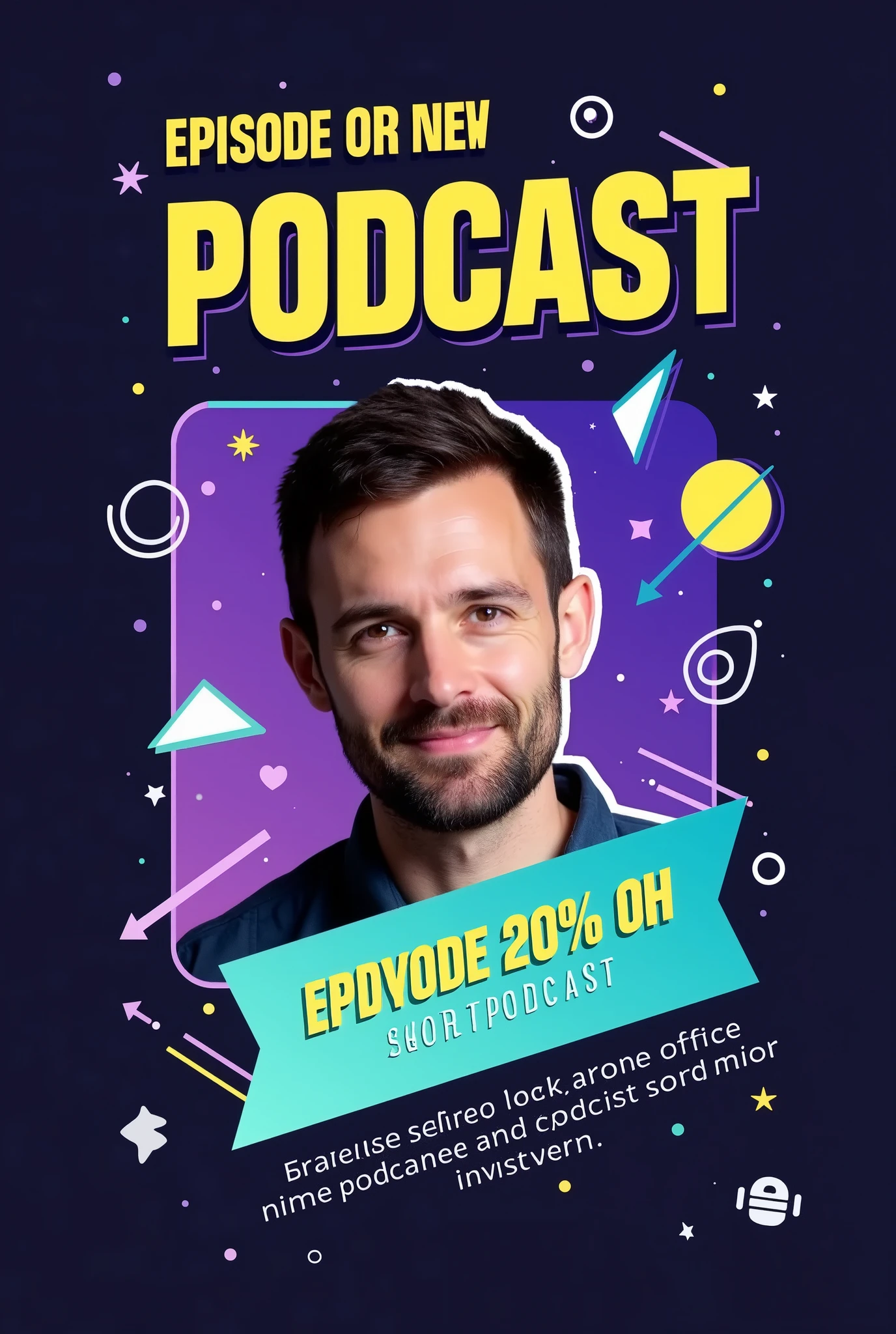

Prompt:

"Create an eye-catching Instagram post announcing the release of a new podcast episode with the following details:

Background: Use a gradient background with a dark-to-light transition, such as deep navy fading into a vibrant color like purple or teal. This adds depth and makes the design more dynamic.

Title Text: Place the episode title in a bold, modern sans-serif font like 'Montserrat' or 'Bebas Neue,' using a bright, contrasting color like neon yellow or white. The title should be large and centered at the top, reading something like 'New Episode Out Now!'

Subheadline or Short Description: Below the title, include a short description in a slightly smaller, sleek font like 'Open Sans.' Use a white or light gray color. The text could say something like 'Join us as we dive into the latest trends.'

Host or Guest Image: Feature a high-quality, cutout image of the host or guest in the center, slightly tilted or overlapped by graphic elements. Apply a subtle shadow or glow effect around the image to make it pop from the background.

Visual Elements:

Sound Waves or Audio Lines: Add subtle but dynamic sound wave graphics or audio line visuals emanating from the sides of the host image or near the title. Use a matching color scheme, like neon yellow or blue, to create motion and energy.
Geometric Shapes: Include overlapping circles, triangles, or rectangles in the background, with varying levels of transparency. These shapes can be in complementary colors (e.g., light blues, purples, or pinks) to add depth and interest without overwhelming the main content.
Icons: Place small, modern icons that represent the podcast theme (e.g., a microphone, headphones, or a podcast symbol) near the bottom corners or integrated within the background elements. These should be in a bright color to ensure they stand out.

Highlight Box: Use a semi-transparent highlight box or ribbon behind the subheadline text to make it stand out more. This box can be in a subtle gradient, ma
image
avatar
G
Gabriel Amorim
創作信息
同款
提示詞
Prompt: "Create an eye-catching Instagram post announcing the release of a new podcast episode with the following details: Background: Use a gradient background with a dark-to-light transition , such as deep navy fading into a vibrant color like purple or teal . This adds depth and makes the design more dynamic . Title Text: Place the episode title in a bold , modern sans-serif font like 'Montserrat' or 'Bebas Neue , ' using a bright , contrasting color like neon yellow or white . The title should be large and centered at the top , reading something like 'New Episode Out Now ! ' Subheadline or Short Description: Below the title , include a short description in a slightly smaller , sleek font like 'Open Sans . ' Use a white or light gray color . The text could say something like 'Join us as we dive into the latest trends . ' Host or Guest Image: Feature a high-quality , cutout image of the host or guest in the center , slightly tilted or overlapped by graphic elements . Apply a subtle shadow or glow effect around the image to make it pop from the background . Visual Elements: Sound Waves or Audio Lines: Add subtle but dynamic sound wave graphics or audio line visuals emanating from the sides of the host image or near the title . Use a matching color scheme , like neon yellow or blue , to create motion and energy . Geometric Shapes: Include overlapping circles , triangles , or rectangles in the background , with varying levels of transparency . These shapes can be in complementary colors (e . g ., light blues , purples , or pinks) to add depth and interest without overwhelming the main content . Icons: Place small , modern icons that represent the podcast theme (e . g ., a microphone , headphones , or a podcast symbol) near the bottom corners or integrated within the background elements . These should be in a bright color to ensure they stand out . Highlight Box: Use a semi-transparent highlight box or ribbon behind the subheadline text to make it stand out more . This box can be in a subtle gradient , ma
尺寸
1376X2048
日期
Aug 25, 2024
模式
實驗室
類型
upscale
模型 & 風格
SeaArt Infinity
模型
SeaArt Infinity
共 0 条评論
0
0
0
0/400
SeaArt快捷AI應用

ai_video_generationimg
AI視頻生成

释放您的想象力,AI為您成就視觉奇迹

face_swap_titleimg
免費線上換臉

快速製作有趣逼真的換臉影片和照片

gender_swapimg
性別轉換

使用 SeaArt 的 AI 性別轉換器在照片和影片中交換性別。輕鬆享受有趣且真實的轉換,免費在線使用!

changePersonimg
更換照片中的人物

輕鬆使用AI替換照片中的人物。

wanimg2vid_h1img
Wan 2.1 圖片轉視頻

用逼真的動態和電影效果為照片增添生動的動畫效果。

anime2realityimg
從動漫到現實

瞬間讓您喜愛的動漫角色活靈活現。

探索更多AI應用 

相關推薦

控製網
logo
中文-繁體
應用
創作圖像 數字人 快捷AI 模型训练 画板模式 AI應用 工作流
關於
實驗室 排行榜 AI聊天 AI博客 AI新闻
帮助
教程 客服
獲取應用
icon
Download on the
APP Store
icon
GET IT ON
Google Play
關注我們
iconiconiconiconiconiconiconicon
© 2025 SeaArt, Inc.
版权政策
《條款》
《隱私政策》 特定商取引法 資金決済法に基づく表示
更多