


Kling O1 vs Kling 2.5 Turbo: Which Video Model Fits Your Creative Workflow
Kling AI just launched Kling O1, and it's getting attention for all the right reasons. As the unified multimodal video model, it brings capabilities we haven't seen before in AI video generation. But here's the thing: Kling also offers the 2.5 Turbo model, which takes a completely different approach. So now the question becomes: Kling O1 vs Kling 2.5 Turbo—which one should you actually use?
I've spent time exploring both models, and here's what I've learned: they're not just different versions of the same thing. They're built for fundamentally different creative approaches. Let me break down what makes each one tick and help you figure out which belongs in your toolkit.
What Makes Kling O1 Special?
The release of Kling O1 video generator marked a significant philosophical shift in generative video, moving away from fragmented tools toward a unified, all-in-one engine. Built on the Multi-modal Visual Language (MVL) concept, O1 established a single, coherent model capable of handling diverse tasks.
The All-in-One Engine Breakthrough
Traditional AI video workflows force you to bounce between different models and tools. Need to generate a video from text? That's one tool. Want to edit that video afterwards? Switch to another. Trying to maintain character consistency? Good luck juggling reference systems across platforms.
Here's where O1 gets interesting. Instead of juggling multiple tools for different tasks, O1 handles everything in one place:
- Text-to-video generation
- Image-to-video generation
- First and last frame video creation
- Video content editing (adding or removing elements)
- Style transformation
- Shot extension
Think of it like having a Swiss Army knife versus a drawer full of single-purpose tools. The unified model understands context across all these tasks, which makes the transitions between different operations surprisingly smooth.
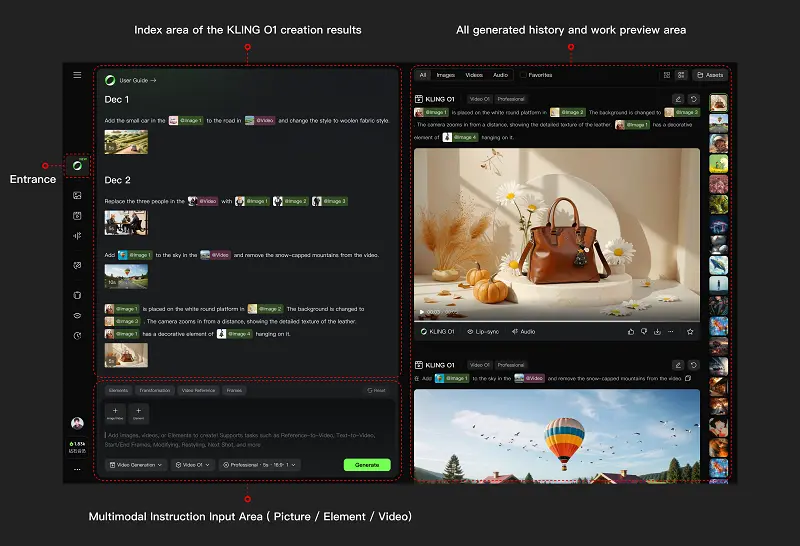
Multimodal Instructions: Beyond Text Prompts
Here's where O1 diverges sharply from conventional approaches. Most AI video tools treat images, videos, and text as separate input channels with rigid hierarchies. O1's MVL (Multi-modal Visual Language) framework treats everything as instructions.
"Upload a reference image." That's an instruction. "Provide a video clip." Another instruction. Add text description? It synthesizes with the visual inputs rather than overriding them.
The practical implications are significant. You can:
- Reference specific characters, props, or scenes from uploaded images
- Use video clips to demonstrate desired motion or camera movement
- Combine multiple-angle photos to create 3D-aware subject understanding
- Layer text descriptions that modify or extend visual references
The platform's creation interface at https://app.klingai.com/global/omni/new reflects this philosophy. Instead of separate tabs for different input types, everything converges in one workspace where you compose instructions naturally.
Solving the Consistency Problem
Anyone who's attempted to create story-driven AI video content knows the consistency nightmare. This is particularly challenging when generating consistent character video: your character's face changes between shots, clothing details shift, and lighting becomes inconsistent. It's a persistent challenge in AI video generation.
O1 addresses this through multi-angle subject creation. Provide several perspectives of your character—front, side, three-quarter view—and the model builds spatial understanding. The system appears designed to construct a coherent representation that persists across different camera angles, lighting conditions, and scenes.
This capability matters for narrative work: commercial advertising with brand characters, episodic content, or educational videos with consistent presenters. The ability to maintain visual identity across shots represents a meaningful step toward making AI video a genuine production tool rather than just a novelty generator.
The Semantic Editing Paradigm
Traditional video editing is parametric—you adjust masks, keyframes, timelines.
O1 introduces semantic editing where you describe changes conversationally.
"Remove the person in the background." "Change daylight to golden hour." "Replace the shirt with a red jacket."
The model interprets these instructions at a pixel level, performing what amounts to intelligent rotoscoping, color grading, and object replacement automatically. No manual masks. No tracking points. The unified architecture appears capable of understanding visual semantics well enough to execute instructions that would typically require significant time in traditional post-production.
Here's a fun example:
I edited a clip from Penguins of Madagascar, dressing the main penguin in a suit and shades to give it major boss energy.
The result? Pretty impressive!
Kling 2.5 Turbo: Democratizing Cinematic Quality
Kling 2.5 Turbo represents a different evolutionary path. Where O1 optimizes for flexibility and native control, Turbo optimizes for accessibility, throughput, and advanced production workflow without sacrificing visual quality.
The Quality Leap
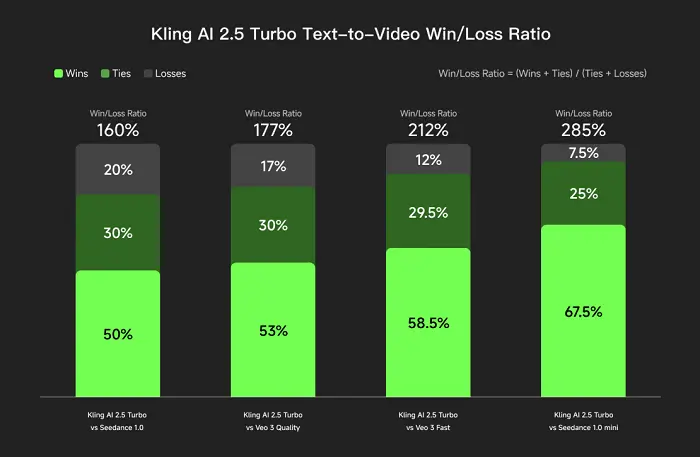
The official announcement materials emphasize "cinema-grade quality at an even lower price," and the sample outputs support this positioning.
The demonstrations showcase several notable improvements:
- Advanced Motion Dynamics: Movement appears weighted and intentional. Action sequences show what looks like proper momentum and natural motion curves, addressing the "floatiness" issue that can affect AI-generated video.
- Enhanced Prompt Fidelity: The gap between description and output appears narrower. Complex multi-element scenes render with better spatial relationships and compositional coherence based on the examples shown.
- Physical Accuracy: Object interactions in the samples follow believable physics. Water, fabric, and lighting all respond to surfaces in ways that feel natural, helping the output pass basic realism tests more consistently.
- Atmospheric Rendering: Environmental effects—fog, rain, lighting conditions, atmospheric perspective—demonstrate sophisticated handling of how ambiance affects visual storytelling.
The Economics Shift
The pricing comparison chart from the Kling official release reveal Turbo's strategic positioning: 30% lower cost than its previous iteration. It significantly undercuts competing models while maintaining output quality that appears genuinely competitive.
For professional creators, this changes project economics. Social media content that needs regular refreshing, A/B testing for advertising concepts, client presentations with multiple direction options, educational content production—all become more financially viable at scale. Volume creators particularly benefit. When you're producing dozens or hundreds of clips monthly, per-generation pricing differences accumulate quickly. Turbo makes professional AI video more accessible to individual creators and small studios without enterprise budgets.
Cinematic Foundations
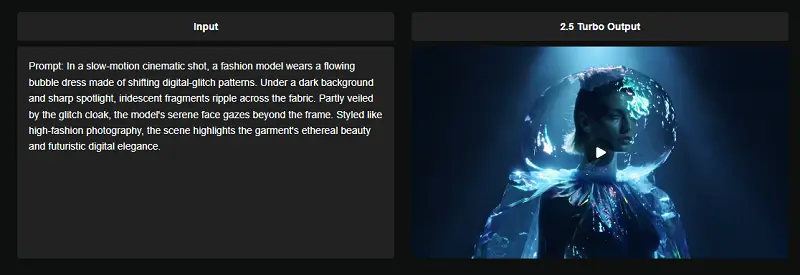
Kling 2.5 Turbo’s outputs inherently exhibit clear cinematic sensibilities. Composition follows filmmaking principles—rule of thirds, leading lines, depth layering. Color grading exhibits tonal consistency within scenes. The dynamic range and contrast ratios in the examples demonstrate strong visual quality.
This matters because it potentially reduces post-processing work. Output that already exhibits strong visual qualities may require less correction and enhancement, which could accelerate the production pipeline from concept to final delivery.
The Workflow Powerhouse: Introducing Kling Lab
This is the crucial distinction: 2.5 Turbo isn't just a faster model; it's the engine powering the new Kling Lab ecosystem, designed for professional teams.
● Node-Based Workflow: Kling Lab introduces a visual, node-based workspace, enabling complex, non-linear project structures. This allows you to manage intricate pipelines where the output of one step (e.g., generation) feeds directly into the input of another (e.g., style transfer or extension), which is essential for large-scale production.
● Real-Time Collaboration: The platform supports real-time team editing and management, transforming AI video creation into a collaborative studio environment.
● Streamlined Control: While O1’s focus is on in-model semantic editing, 2.5 Turbo integrates control features within the Lab environment, making the overall workflow more organized and efficient for high-volume tasks.
Head-to-Head: Feature and Capability Comparison
| Feature/Metric | Kling O1 (The Foundation) | Kling 2.5 Turbo (The Professional Standard) |
|---|---|---|
| Model Focus | Unified task consolidation (All-in-One Engine). Maximum native editing flexibility. | Performance, Cost-Efficiency, and Scalable Production Workflow. |
| Prompt Adherence | Strong, excellent for simple edits. | Superior: Excels at complex, multi-step narratives and temporal logic. |
| Dynamic Motion | Stable. | Highly Fluid and Stable: Excellent for high-range motion and action sequences. |
| Aesthetic Consistency | Very good (First to solve the consistency problem). | Exceptional: High-fidelity retention of light, texture, and style. |
| Cost | Premium positioning (35 Credits for 5s 1080p). | Aggressive Pricing (30% Lower): 25 Credits for 5s 1080p. |
| Workflow / Ecosystem | Standard O1 interface. | Kling Lab Ecosystem: Node-based, Copilot, Team Collaboration. |
| Key Advantage | Native semantic editing & multi-angle consistency. | Efficiency, speed, and collaborative project management. |
Let's get granular about how these models stack up across key dimensions.
Creative Control Spectrum
- Kling O1: Maximum flexibility. The unified multimodal approach means you can iteratively refine outputs through progressive semantic editing. The workflow supports deep, experimental creative development.
- Kling 2.5 Turbo: Streamlined generation and advanced post-generation workflow control via Kling Lab. Best suited for scenarios where first-pass quality is paramount and subsequent edits are managed structurally (e.g., node linking, batch processing).
Input Versatility
- Kling O1: Genuine multimodal synthesis. Text, images, videos, and multi-angle subjects all contribute to generation instructions. The model integrates different input types contextually.
- Kling 2.5 Turbo: Primarily text-driven with robust image reference support. The focus is on executing clear prompts with superior fidelity and speed.
Editing and Modification
- Kling O1: Native semantic editing capabilities. Add, remove, or modify elements through natural language instructions—all within the single unified model's logic.
- Kling 2.5 Turbo: Generation-focused but optimized for integration into the new Kling Lab platform, allowing for highly efficient structural and iterative refinement steps within the node-based workflow.
Character and Object Consistency
- Kling O1: Advanced multi-angle subject system specifically designed for consistency across shots. This appears critical for any multi-scene narrative work.
- Kling 2.5 Turbo: Reliable within single generations but its core emphasis is on dynamic stability and fidelity, while O1 explicitly highlights the cross-scene consistency solution.
Speed and Efficiency
- Kling O1: Processing time likely reflects the computational complexity of unified multimodal understanding. The tradeoff appears worthwhile for projects requiring maximum in-model control.
- Kling 2.5 Turbo: Speed-optimized architecture. The "Turbo" designation suggests genuinely faster generation times, enabling rapid iteration and high-volume production, crucial for utilizing its lower cost model.
Cost Considerations
- Kling O1: Premium positioning appropriate for its advanced native editing capabilities. Potentially cost-effective when flexibility and semantic editing features reduce overall production time.
- Kling 2.5 Turbo: Aggressive pricing makes professional quality accessible. Strong value proposition for straightforward generation tasks and volume production.
Practical Application Scenarios
Theory matters, but let's talk real-world usage based on the capabilities we've examined.
When Kling O1 Becomes Essential
- Branded Content with Consistent Characters: Creating a series featuring the same brand mascot? O1's multi-angle subject consistency could ensure your character looks identical across different scenarios, angles, and lighting conditions.
- Story-Driven Narrative Projects: Short films, episodic content, or narrative work requiring scene-to-scene coherence could benefit from O1's unified approach. Generate your establishing shot, then create follow-up shots that maintain visual continuity.
- Iterative Creative Development: When you're exploring creative directions and need to generate, review, refine—O1's semantic editing capabilities let you adjust specific elements without regenerating everything from scratch.
- Complex Multi-Element Compositions: Projects combining reference images, style guidelines, motion examples, and detailed text descriptions could leverage O1's multimodal synthesis capabilities effectively.
- Professional Client Work: When revision rounds are inevitable and clients want specific adjustments, O1's in-model editing features may save production time compared to full regeneration.
When Kling 2.5 Turbo Shines
- High-Volume Content Creation: Producing regular content where you need consistent quality across many pieces could benefit from Turbo's speed and pricing advantages.
- Professional Team Projects: Any project involving multiple contributors, complex asset management, and structured, repeatable workflows (using Kling Lab's node system).
- Marketing Testing and Rapid Prototyping: Testing multiple creative directions quickly? Turbo's speed and cost-effectiveness make it ideal for exploration phases and A/B testing at scale.
- Educational Content Production: Creating explainer videos, course materials, or instructional content could benefit from Turbo's combination of quality and accessible pricing.
- Budget-Conscious Professional Work: Small studios and independent creators delivering client work might maintain professional standards while preserving profit margins with Turbo's pricing model.
- Stock Content Generation: Producing video assets for libraries or content marketplaces becomes more economically viable at scale.
The Learning Curve Factor
There's an often-overlooked aspect of tool selection: onboarding complexity.
- Kling O1 likely requires understanding its multimodal instruction system. You'll need to experiment with how different input types interact, learn effective semantic editing commands, and develop workflows that leverage the unified architecture. The capability ceiling appears high, but reaching it probably takes practice.
- Kling 2.5 Turbo likely offers a gentler learning curve for initial generation, but its full potential relies on mastering the Kling Lab node-based environment. If you're familiar with production software interfaces (like Nuke or DaVinci Resolve’s node view), the transition will be rewarding. For pure generation, it's straightforward.
Final Thoughts on Kling O1 vs Kling 2.5 Turbo
I'll be honest: when I first encountered Kling O1 vs Kling 2.5 Turbo, I assumed one would clearly outperform the other. That's not what happened.
What I discovered instead was that they're solving different problems. The choice comes down to understanding your own workflow. Are you the type who generates once and moves on, or do you prefer to generate, refine, and perfect? Do you need character consistency across multiple shots, or are you creating standalone pieces? Is your bottleneck budget or capability?
Answer those questions honestly, and the choice becomes clear. Sometimes it'll be O1. Sometimes it'll be Turbo. Sometimes you'll want both. And that's perfectly fine—because the real win isn't picking the "best" tool. It's picking the right tool for right now.