

How to Create AI Snow Photos: Quick Guide and 5 Ready-to-Use Prompts
You don't need to wait for snow or rely on a professional photographer to create stunning winter portraits. In 2025, "AI snow photos" have become a trend on platforms like TikTok and Instagram. With an AI generator, anyone can transform an ordinary photo into a magical scene with falling snow and cinematic lighting effects.
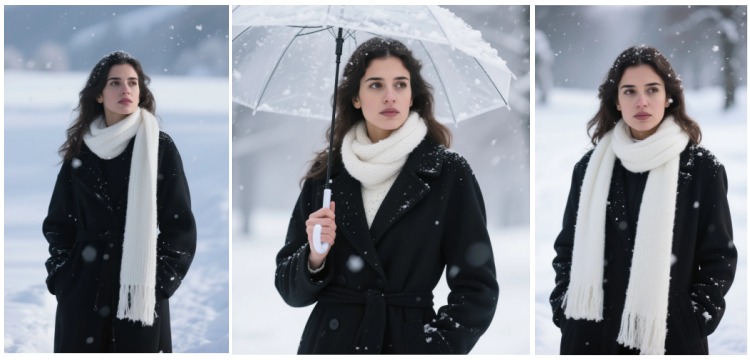
In this guide, you can learn step by step how to create your own AI snow photos and find 5 ready-to-copy-and-paste prompts that allow you to easily generate images with an authentic winter atmosphere. Fill your photos with winter spirit and enjoy the pleasure of creating dreamlike landscapes without leaving home.
What is the AI Snow Photo Trend?
The AI snow trend consists of transforming ordinary portraits into charming winter scenes. Thanks to artificial intelligence, it's possible to add realistic snowflakes, cold sunset lighting, and create a nostalgic or romantic atmosphere in just seconds. Since late 2025, this effect has gone viral on TikTok and Instagram under hashtags like #AISnowTrend, #WinterAesthetic, or #FotoDeNieveTrend, where thousands of users share their cinematic-style snowy portraits.
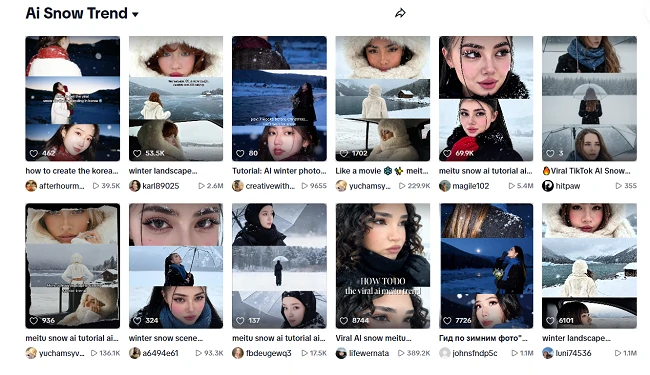
Within this trend, you can explore different types of compositions, such as:
- Individual portraits, with soft focus and blurred background.
- Triptychs or "3-frame triptych", showing three poses or emotions.
- Couple photos, under the snow with warm lights and romantic atmosphere.
- Urban or snowy forest scenes, ideal for conveying a sense of story or journey.
This style has gained popularity because it combines aesthetics, emotion, and ease of use. The cold tones and contrast with skin create a cinematic effect, while snow brings calm, nostalgia, or romance. Additionally, its vertical format and the ability to animate snowflakes make it perfect for Reels, Shorts, and TikTok. Furthermore, thanks to tools like SeaArt or Gemini Nano Banana, anyone can create professional winter portraits without editing, achieving an artistic and premium result that stands out from generic portraits.
How to Create Your AI Snow Photo Step by Step
SeaArt is a powerful online platform based on artificial intelligence that combines image generation and video creation. With it, you can apply automatic effects with a single click or freely edit your photos with prompts, adjusting lighting, background, visual elements, and artistic style.
Thanks to its intuitive interface and powerful AI models, transforming your portrait into a unique winter scene will take you just a few seconds.
Method 1 - Steps to Create Your AI Snow Photo
Step 1. Log in to SeaArt
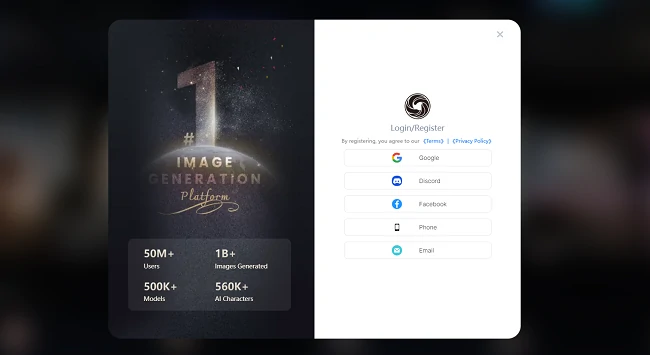
Open your browser and go to SeaArt.ai. Register or log in to start creating with AI. Registered users receive 130 free credits every day, which they can use to generate images at no cost.
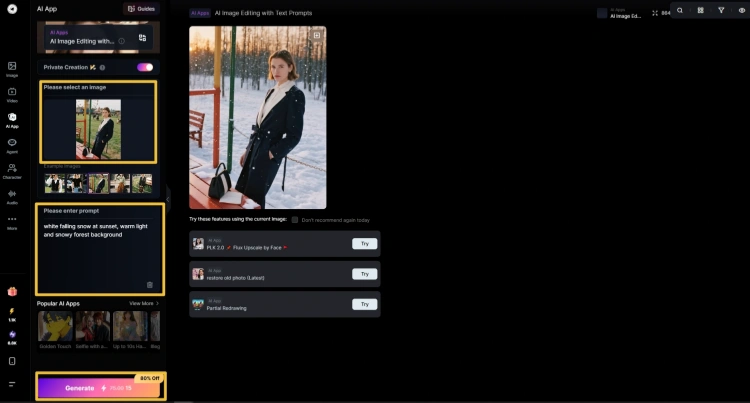
Step 2. Enter the "Edit image with prompt" function
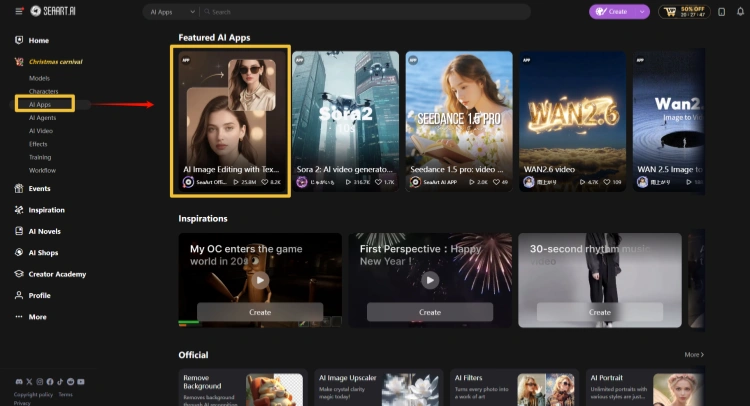
Click the "Create" button (top right) → select "AI App" → and choose "AI Image Editing with Text". Here you can control the light, background, and artistic style simply by writing a prompt.
Step 3. Upload your photo
Upload the image you want to edit (you can upload 1 or 2 photos). It's recommended to use clear, well-lit portraits with a simple background. Front-facing photos usually offer better results.
Step 4. Write your snow photo prompt
Describe the winter atmosphere you want to achieve, for example: "white falling snow at sunset, warm light and snowy forest background". You can also directly copy one of the 5 ready-made prompts below to easily generate a magical snow effect.
Step 5. Generate, download, and share
Click "Generate" and wait a few seconds to see your AI snowy portrait. When you're satisfied, download the high-resolution image and share it on your social media. 📸 Don't forget to add the hashtags: #AISnowTrend, #AISnow, or #SnowFilter so more people can discover your winter creation.
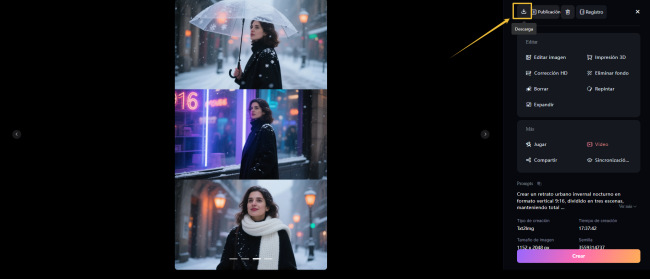
✨ Tip: If you plan to post it on Reels, TikTok, or Stories, use the 9:16 vertical format. Full-screen snowy photos create a much more immersive and cinematic effect
Method 2 - Apply the AI Snow Filter in One Click
SeaArt also offers an incredibly simple method – transform your photos into stunning winter scenes with just one click using the AI snow filter.
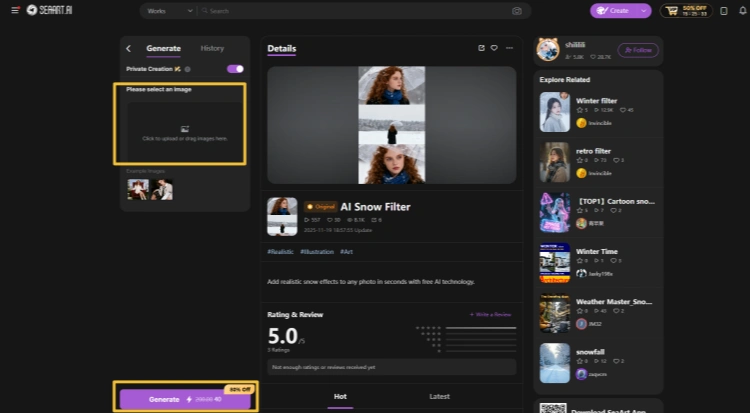
No prompts, no complicated steps, just instant magic.
Upload your photo or selfie, and within seconds, you'll have a gorgeous AI snow portrait ready to share. It's that easy!
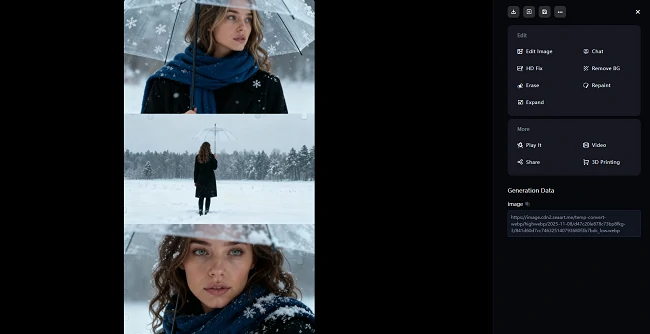
5 Ready-Made Prompts for Your AI Snow Photos
Now that you know how to create your own AI snow photos, it's time to take it to the next level! We're sharing 5 ready-to-use prompts that will allow you to generate stunning winter scenes with just a click. Copy, paste, and let the magic of snow transform your portraits.
🎬 Prompt 1: Solitary Walker · Silhouette in the Snow
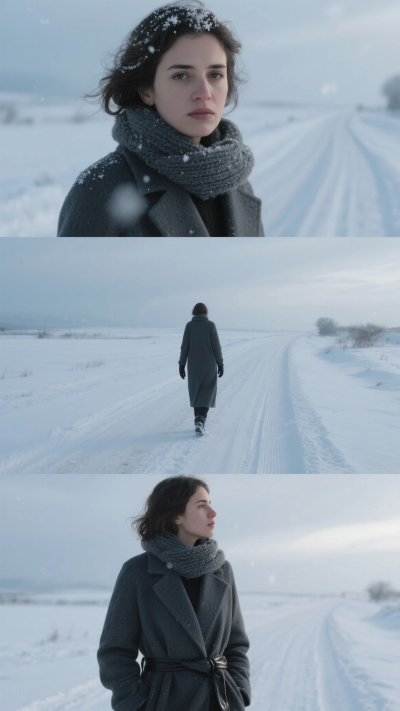
Create a winter portrait in 9:16 vertical format, divided into three scenes, with a quiet snowy path background that emphasizes solitude and inner serenity. Maintain consistency with my original face.
- Top scene: I look toward the camera while snowflakes gently fall on my eyebrows and shoulders. Breath rises slowly in the cold air, eyelashes with tiny ice crystals, and my gaze remains serene with a touch of reflection.
- Central scene: I walk alone along a winding path in the snow; footprints extend toward the horizon and the snowy background highlights my silhouette, while cold light defines my contours.
- Bottom scene: Side close-up illuminated by dim winter light, contemplating the distance with a calm and slightly melancholic expression.
- Clothing: Dark gray wool coat, thick knit scarf, leather gloves, hair slightly tousled naturally.
- Lighting: Cold tones of an overcast day, soft natural light, light film grain texture.
- Camera: Canon EOS R5, 50mm f/1.4.
- Atmosphere: Solitary, serene, winter artistic style.
💞 Prompt 2: Cinematic Style Couple
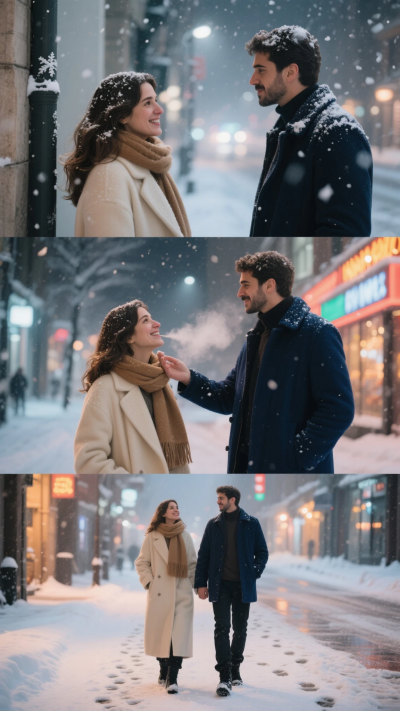
Create a winter urban portrait in 9:16 vertical format, divided into three scenes, showing a couple in a warm moment in the snow, maintaining facial consistency with the reference image.
- Top scene: The girl stops at the street corner, diffused light and floating snowflakes in the air create a magical effect, she and the boy look at each other across the street, hearts pounding in that instant.
- Central scene: The boy approaches gently, delicately brushing snow from the girl's hair, she smiles looking up, breath dispersing in the cold air.
- Bottom scene: They walk together down the snowy street, neon reflections shimmer on the snow, intertwined footprints leave a trail of warmth.
- Clothing: Girl in cream wool coat and camel scarf; boy in dark blue wool jacket and black boots.
- Lighting: Mix of warm and cold lights, urban nighttime reflections, soft and blurred effect.
- Camera: Sony α7R IV, 85mm f/1.4.
- Atmosphere: Romantic, cinematic, Korean drama-style winter atmosphere.
👉 You might also be interested in: 15 Gemini Couple Photo Prompts: Create Romantic Images with AI
🌇 Prompt 3: Sunset in the Snow · Gaze and Smile
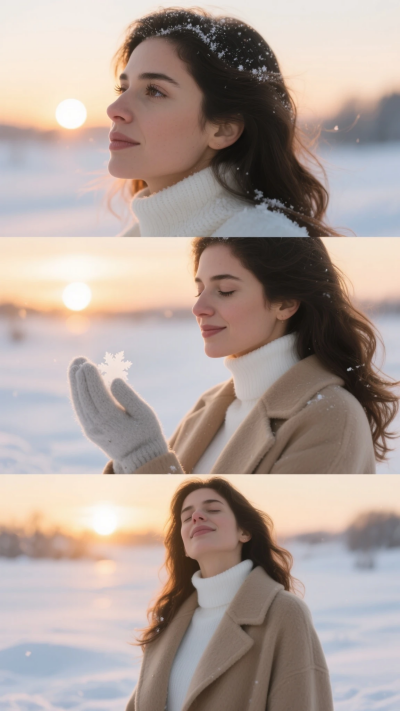
Create a portrait in 9:16 vertical format, divided into three scenes, in a snowy field at sunset, highlighting sweetness and beauty, maintaining total facial consistency with the reference image.
- Top scene: I contemplate the horizon while sunset light illuminates the tips of my hair; the breeze brushes the snow that reflects a warm golden glow, and my gaze conveys depth and reflection.
- Central scene: I gently raise my hand to catch snowflakes; my smile is light and natural, blending with the warm winter light.
- Bottom scene: I close my eyes and enjoy the mix of cold and sunlight; eyelashes sparkle with small ice crystals, and my breathing is calm and serene.
- Clothing: White turtleneck sweater, light camel long coat, light gray cashmere gloves, hair naturally loose.
- Lighting: Warm sunset light combined with snow reflections, HDR style.
- Camera: Canon EOS R5, RF 85mm f/1.2.
- Atmosphere: Tranquil, romantic, poetic.
🧣 Prompt 4: Snowy Urban Night · Neon Reflections
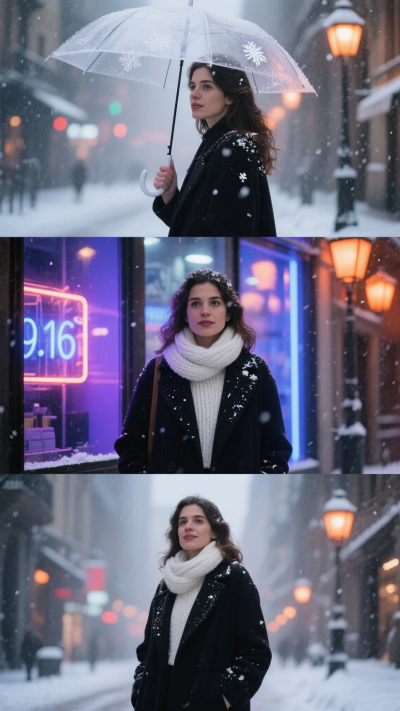
Create a nighttime winter urban portrait in 9:16 vertical format, divided into three scenes, maintaining total facial consistency with the reference image and highlighting the atmosphere of a snowy city with neon lights.
- Top scene: I walk under a transparent umbrella while neon lights reflect on it; the humid and cold air carries some snowflakes, and my gaze conveys depth and reflection.
- Central scene: I stop in front of a shop window; light reflects softly on my face, combining real and diffused reflections, with a subtle focus effect that enhances the atmosphere.
- Bottom scene: I look at the camera, calm gaze with a touch of nostalgia and a slight smile; small snowflakes rest on my shoulders.
- Clothing: Long black coat, white knit scarf, slightly damp hair, natural cold-toned lips, with subtle neon light reflections.
- Lighting: Mix of blue-purple neon lights with warm orange streetlights, shallow depth of field, film texture.
- Camera: Fujifilm X-T5, 35mm f/1.4.
- Atmosphere: Artistic, solitary, soft and romantic.
💍 Prompt 5: Snow Proposal · Tender Moment
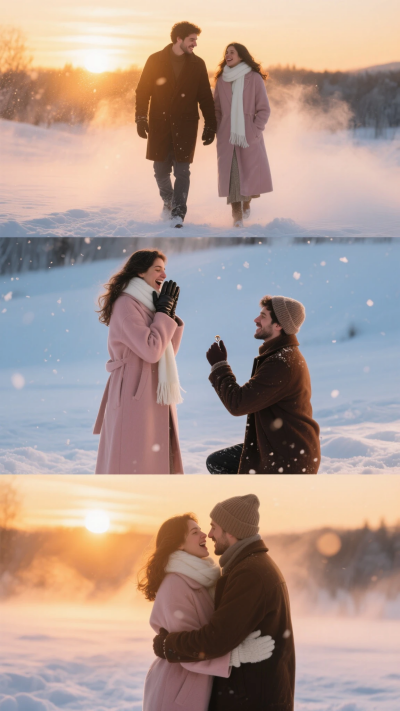
Create a couple portrait in 9:16 vertical format, three scenes, showing a romantic proposal at sunset in the snow, maintaining total facial consistency with the reference image.
- Top scene: We walk together through the snow, the sun sets and golden light envelops the surroundings, shimmering mist floats around us.
- Central scene: The boy kneels and shows the ring, the girl is surprised covering her mouth, snowflakes swirl in the sunset light, moment frozen in romance.
- Bottom scene: We embrace, backlight defines our silhouettes, warmth and emotion fill the air.
- Clothing: Girl in light pink long coat, white scarf and leather gloves; boy in dark brown jacket and wool beanie.
- Lighting: Contrast between golden and cold blue tones, HDR style.
- Camera: Sony α7 IV, 70–200mm f/2.8.
- Atmosphere: Warm, emotional, dreamlike winter cinematic style.
Tips for Realistic and Aesthetic Snow Photos
To achieve a convincing winter effect, it's worth paying attention to lighting, proportion, and facial consistency. Small adjustments can make the difference between a flat image and a cinematic portrait. Some key points you need to know:
- Use keywords like soft lighting, depth of field, HDR, and cinematic mood.
- Add negative prompts like "no cartoon style" or "no overexposure" to avoid distortions.
- Choose proportion according to use: 9:16 for Reels/Stories, 1:1 for profile.
- Maintain facial consistency with "same face identity" or by uploading a clear photo as reference.
- Try animations with SeaArt Video Generator to add moving snow.
Creative Uses of AI Snow Photos
Snow photos are not only visually appealing but also offer multiple creative possibilities. From standing out on social media to telling complete visual stories, these are the most common applications:
- Social media: winter portraits that make your feed stand out and capture attention.
- Christmas cards: personalized images to send to friends and family with a magical touch.
- Campaigns or branding: use snowy aesthetics for fashion products, lifestyle, or special promotions.
- Personal projects: combine multiple images to narrate a visual story like a "winter mini-movie", creating sequences with emotion and cinematic style.
Frequently Asked Questions
Is SeaArt free to generate snow photos?
Yes, you can try it for free with basic features and get high-quality results.
What type of photos work best?
Portraits with good lighting, simple background, and sharp faces offer the best results.
Can I keep my face unchanged?
Yes, SeaArt maintains the original facial identity when applying the snow effect.
Can I use these prompts in other generators?
Yes, but SeaArt offers better compatibility and precision with photographic prompts.
Conclusion
The magic of winter no longer depends on the weather: you can create it yourself with artificial intelligence. AI snow photos are the most aesthetic and emotional trend of 2025, and SeaArt allows you to capture that essence in seconds. ✨ Try SeaArt for free today, transform your portrait into a winter scene, and share your creation with the world.
Related Articles
15 Gemini Couple Photo Prompts: Create Romantic Images with AI
30+ Christmas Photo Prompts: Create Christmas Portraits with AI