


Kling 2.6 vs Kling 2.5 Turbo Review: Performance & Value Compared
AI video tools used to give us stunning but silent clips, requiring extra apps and editing to add voice and sound effects. With all the advanced audio-video features popping up in other platforms, Kling now gives you two solid choices:
- Kling 2.5 Turbo - The high-value visual workhorse.
- Kling 2.6 (2025.12.3 release) - The new all-in-one storyteller.
You probably want to know: What's new in the latest King video generation update? And do I really need it? This guide breaks down Kling 2.6 vs Kling 2.5 Turbo - the real differences, the costs, and who should use which one.
What is Kling 2.5 Turbo?
Think of it as: A Pro Cinema Camera + A Mini Sound Studio.
- 🎬 Coherent Storytelling: Transforms static photos or outputs from Kling AI text to image into smooth animations, with smarter logic that preserves the flow of complex, multi-step actions.
- 🖼️ Physics-Based Motion: Simulates real-world physics to keep movement fluid. Fast actions and camera moves stay stable, eliminating the "glitchy distortion" of older models.
- 🔊 Add Sound Effortlessly: Built-in tools for background music, AI sound effects, and post-production lip-sync.
- ⚡ Save Time and Effort: Everything you need in one place for stunning videos with both visuals and audio.
Kling AI video generator 2.5 Turbo makes creating professional-quality content easier, faster, and more fun.
What is Kling 2.6?
Think of it as: A Full Film Crew (Director + Actors + Sound Guy).
Kling 2.6 video generator will launch on December 3, 2025, at 23:00 CST. This time, it doesn't just "see" your prompt - it "hears" it, generating visuals, dialogue, and environmental sounds all at once.
It natively supports 5 specific audio capabilities:
- Dialogue: Multi-character conversations, monologues and narration.
- Singing & Rap: Characters can perform lyrics with rhythm.
- Physics SFX: Sounds match actions instantly (e.g., glass breaking, footsteps).
- Environment: Ambient world-building like wind, traffic, or waves.
- Mixed Mode: A cinematic blend of voice, SFX, and background music.
Kling 2.6 vs Kling 2.5 Turbo: Feature Comparison
Kling 2.6 keeps the great visuals of 2.5 Turbo but adds the "Sound Layer." Here is the breakdown:
| Feature | Kling 2.5 Turbo | Kling 2.6 (New Flagship) |
|---|---|---|
| Core Philosophy | Visual First, add sound later | Audio-Visual Sync, all-in-one |
| Cost (5s Video) | 25 Credits | 35 Credits |
| Visual Quality | Sharp, well-lit, accurate to prompts | Same high-fidelity foundation as 2.5 |
| Dialogue | Manual Lip-Sync after video generation | Native lip-sync with matching expressions |
| Sound Effects | Add-on via "AI Sound" tool | Native, synced with actions |
| Motion Stability | Generally smooth; occasional face consistency issues | Optimized to sync movement with audio |
| Video Duration | 5s / 10s | 5s / 10s (10s recommended for dialogue) |
| Aspect Ratios | 16:9, 9:16, 1:1 | 16:9, 9:16, 1:1 |
Deep Dive: Four Key Battlegrounds
Since Kling 2.6 isn't officially released yet, this Kling 2.6 vs Kling 2.5 Turbo Reddit comparison uses real Reddit discussions about Kling 2.5 Turbo and the confirmed features of Kling 2.6 to give you a clear, side-by-side look.

1. Visual Quality & Motion
Kling 2.5 Turbo is widely considered the "value king" for a reason.
- The Good: In community tests, it often matches competitors like Veo 3 in clarity and texture. It also handles camera movements (pans, zooms) and physical actions (running, pouring) with impressive stability - all while offering one of the best price-to-performance ratios in its category.
- The "Catch": Some users have noted that in Image-to-Video mode, the face might shift slightly or the color grading might change from the original photo.
Kling 2.6 inherits this strong visual foundation but adds a layer of "Semantic Synergy" - meaning the character’s body language now tries to match the tone of their voice, not just the movement. However, it doesn’t make any direct improvements to the AI generated video quality itself.
2. Audio & Dialogue
This is the biggest difference in how you work.
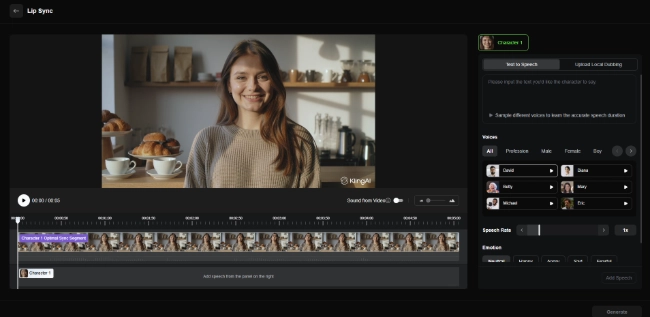
With 2.5 Turbo (The "Editor" Approach):
You generate a silent video first. Then, you use the Lip-Sync tool to type a script and choose a voice (like "David" or "Diana").
- Pros: You can change the script or voice 10 times without re-generating the video.
- Cons: The face is just "mouthing" the words; the eyes and body might not look angry even if the voice is shouting.
With 2.6 (The "Director" Approach):
You describe the scene: "A news anchor excitedly reporting breaking news."
The model generates the video AND the voice together. The anchor’s eyebrows raise, they lean in, and their cadence matches the excitement.
It also supports: Singing, Rap, and Multi-turn Dialogue (two people talking).
3. Sound Effects & Environment
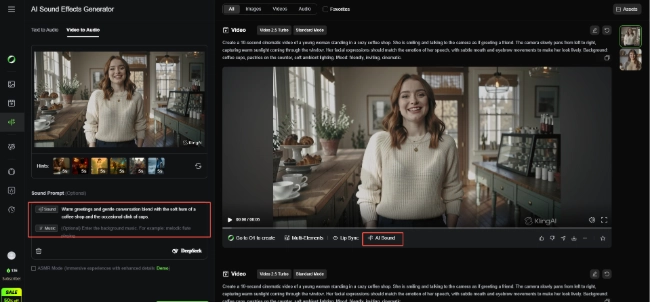
Kling 2.5 Turbo:
- Includes an "AI Sound" button to add background tracks like "lo-fi beats" or "forest ambience."
- Also features an "ASMR Mode" which users love for creating satisfying, texture-rich audio loops (like cutting sand or rain on a window).
Kling 2.6:
Goes beyond background noise. It syncs Physics Sounds to the action.
Example: If a character drops a phone, you hear the clatter exactly when it hits the floor. You don't need to time it manually.
4. Usability & Workflow
Kling 2.5 Turbo (Flexible Control):
- Step-by-Step: Generate video -> Check it -> Add Sound -> Check it -> Add Lip Sync.
- Best for: Perfectionists who want to tweak every layer separately. If you don't like the voice, you just change the voice, not the video.
Kling 2.6 (One-Click Magic):
- All-in-One: You write one prompt, and you get a finished movie file with proper sound.
- Best for: Speed. It’s ideal when you need a "good enough" result instantly. However, if the video is perfect but the voice is wrong, you have to re-generate everything (costing more credits).
The Real Cost: Dollar-for-Dollar Comparison
Let's break down the numbers using the official credit system, with all calculations based on the paid plan.
Kling 2.5 Turbo: The Budget-Friendly Choice
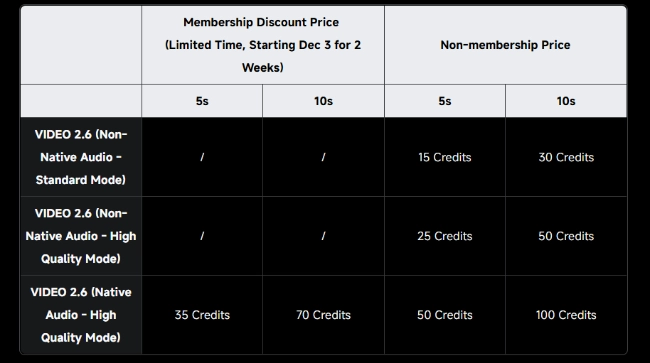
- Cost: 25 Credits (premier plan for ~$0.2; ultra plan for ~$0.12) for a 5s High-Quality clip.
- Why it's a deal: It is significantly cheaper than the 2.6 model.
- Hidden Benefit: Because it's cheap, you can afford to generate 10 variations of a shot to pick the perfect one. It is perfect for building a large library of B-roll.
Kling 2.6: The Premium Choice
- Cost: 35 Credits (premier plan for ~$0.3; ultra plan for ~$0.2) for a 5s Audio+Video clip.
- Why pay more? You are paying for Time Saved.
- The Calculation: To recreate a 2.6 video using 2.5, you would need to: Generate Video ($0.2) + Use Lip-Sync Tool + Use Sound Effect Tool - Spend 15 mins editing.
Verdict: If you need the character to talk, $0.2-0.3 is actually a bargain for a finished result.
If you want to see a comparison of other Kling products, also read: Kling O1 vs Kling 2.5 Turbo: Which Video Model Fits Your Creative Workflow
Kling 2.6 vs Kling 2.5 Turbo Decision Guide: Which One is For You?
🎬 Choose Kling 2.6 if…
- You are a Storyteller: You need characters to speak dialogue, argue, or narrate a scene naturally.
- You make Music/Performance Videos: You want characters to sing or rap in sync with the beat.
- You want "Ready-to-Post" clips: You hate juggling multiple tools and just want a finished video file with sound.
🎨 Choose Kling 2.5 Turbo if...
- You need Stock Footage: You want beautiful shots of cities, nature, or products where dialogue isn't needed.
- You are an Editor: You prefer to add your own specific music or voiceover later.
- You love ASMR: The dedicated ASMR mode + great visual detail is a killer combo for this niche.
- You are experimenting: You want to test many different prompts and angles without burning through your budget.
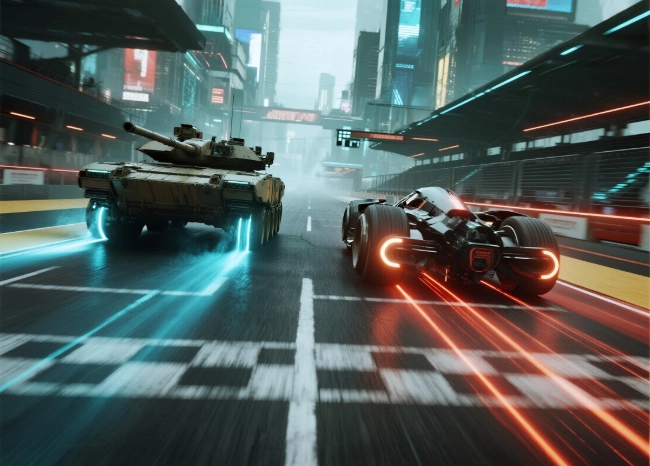
Pro Tip: The Hybrid Workflow
You don't have to pick just one. The smartest creators use both:
1. Use Kling 2.5 Turbo to test your prompt structure and visual style. It’s cheap enough to fail a few times.
2. Switch to Kling 2.6 only when you have the perfect prompt and need the character to deliver a specific line of dialogue or performance.
How to Use Kling 2.6?
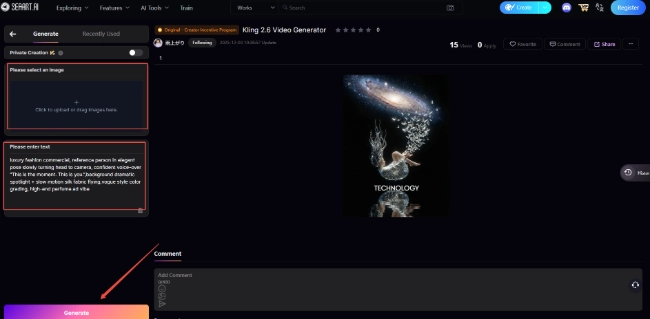
If you want to try out Kling 2.6 without spending too much, you can experience its native audio features for free on SeaArt AI.
Step 1: Go to SeaArt AI and enter the Kling 2.6 video generator.
Step 2: Enter your text prompt or upload an image, then wait a few seconds.
Step 3: Watch your Kling AI video length for 5-10s with perfect audio effects and export the result.
Kling 2.6 vs Kling 2.5 Turbo - FAQ
Which languages can the Kling 2.6 model generate voice in?
Currently, only Chinese and English. Other languages are automatically translated into English before voice generation.
Does Kling 2.5 Turbo have a free trial?
Kling AI typically offers daily free credits (around 66 credits), which is enough to generate two 5-second videos on 2.5 Turbo every day for free.
How do I get the best results for talking videos in 2.6?
The official suggests uploading high-definition images and clear but simple prompts, and using the 10s duration setting to ensure the dialogue isn't cut off.
Conclusion
Kling 2.5 Turbo is perfect for stunning visuals, flexible editing, and budget-friendly experimentation. Kling 2.6 adds native audio, multi-character dialogue, and synced sound effects for fully finished scenes. You can choose the version that best fits your needs.
Related Articles
Kling O1 vs Veo 3.1: Complete AI Video Generator Comparison (2025)
Kling AI vs Runway: Ultimate AI Video Generator Showdown

How to Use Kling AI: A Complete Guide to AI Creation
Kling O1 vs Kling 2.5 Turbo: Which AI Video Model to Choose