
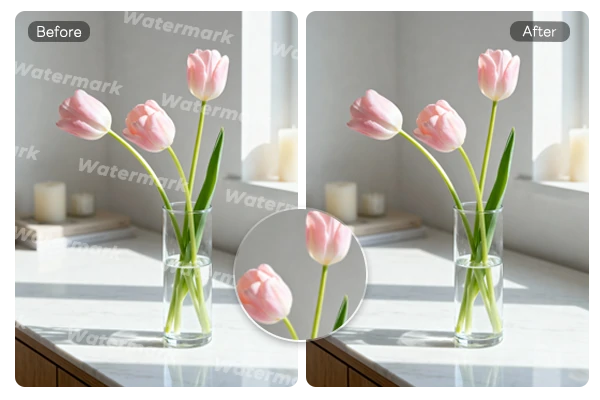
Remove Watermark from Images Online Free
Get rid of watermarks from your images online for free with SeaArt AI. Achieve seamless, high-quality results in just a few clicks - no downloads or technical skills required!
Best Free AI Watermark Remover


Seamless and Natural - Preserve Image Quality
Our watermark remover intelligently analyzes the image structure and preserves the photo's original details, leaving no trace of the watermark. Whether it's a small logo or a full-screen stamp, every image looks pristine after removal.


Control the Image Watermark Removal Process
Choose between two removal modes: Manual Mode lets you precisely control the process with tools like Redo, Undo, and Reset to fine-tune your edits. Language Mode allows you to simply describe the watermark in text, and AI removes it automatically. Need quick results? Try the One Click Watermark Remover for instant removal.

More Than Just Watermark Removal
Our AI watermark remover doesn't just eliminate watermarks; it is part of the AI Eraser suite. With its customizable control process, you can remove unwanted objects, blemishes, or even background elements. Eliminate anything that is distracting or unnecessary, and keep only the most beautiful parts of your photo.
How to Remove Watermark from Image Free
Getting a watermark-free image is quick and easy with SeaArt AI. Here's how you can do it:
Step 1: Upload Your Image
Drop or click to upload your image. Support popular formats like JPG, PNG, and JPEG for easy editing.
Step 2: Select the Watermark Area
Use the brush tool to highlight the watermark area you want to remove. Adjust for precise selection.
Step 3: Erase and Save
Click Start Erasing to remove the watermark. Preview the result, then save your clean image with no traces of the watermark.
Tips for Perfect Removal


Adjust for Full-Screen Watermarks
For full-screen watermarks, use Language Mode to describe the watermark, or try the Image Watermark Removal tool for the most effective results.

Choose the Right Selection Tool
Use the Smear Tool for smooth erasing, the Rectangle Tool for quick selections, and the Lasso Tool for detailed, irregular areas.



Select Only the Watermark Area
Focus on the watermark area to maintain the original image quality and achieve the best results.

FAQs About Remove Watermark

Is watermark removal really free?

How do I remove logos from images?
Upload your image, select the logo area, and click Start Erasing - it's gone in seconds! SeaArt AI gives you daily free stamina to explore more AI features, and you can even use AI Logo Creator to design your own logo!
Is removing watermarks illegal?
For commercial use, it usually violates copyright unless you have authorization. For personal or educational purposes, it may be allowed, but make sure you have the legal right to edit the image.



